
How to Build a Customer Health Score in HubSpot (Step by Step)

If you run customer success in HubSpot, it's reasonable to want your health score there too. Your accounts, deals, and tickets already live in HubSpot, so scoring health in the same place keeps your team in one system. The good news is you can build a genuinely useful score with out-of-the-box HubSpot features. This guide walks through how, step by step, then shows how to bring in product usage, the pitfalls to watch, and where a dedicated scoring engine does more.
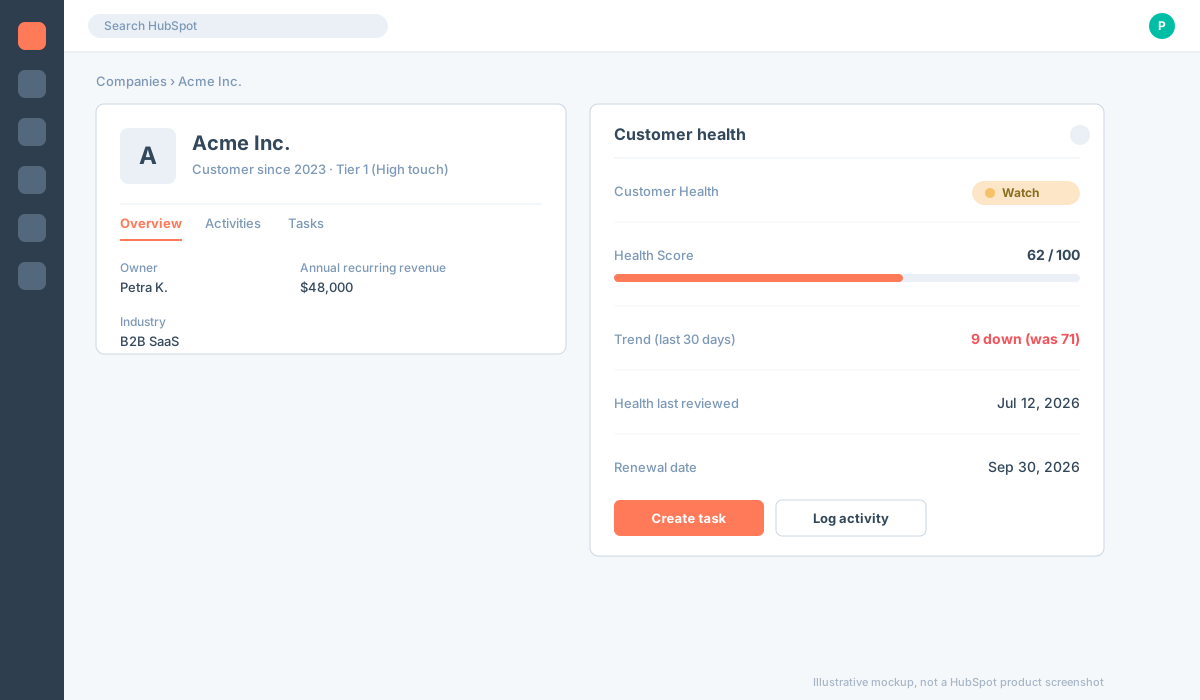
How to build a customer health score in HubSpot (step by step)
You don't need a separate tool to start. Here is the practical way to build a score in HubSpot, from the simplest version to the most robust. Pick the level that matches your HubSpot tier and how much data you actually have.
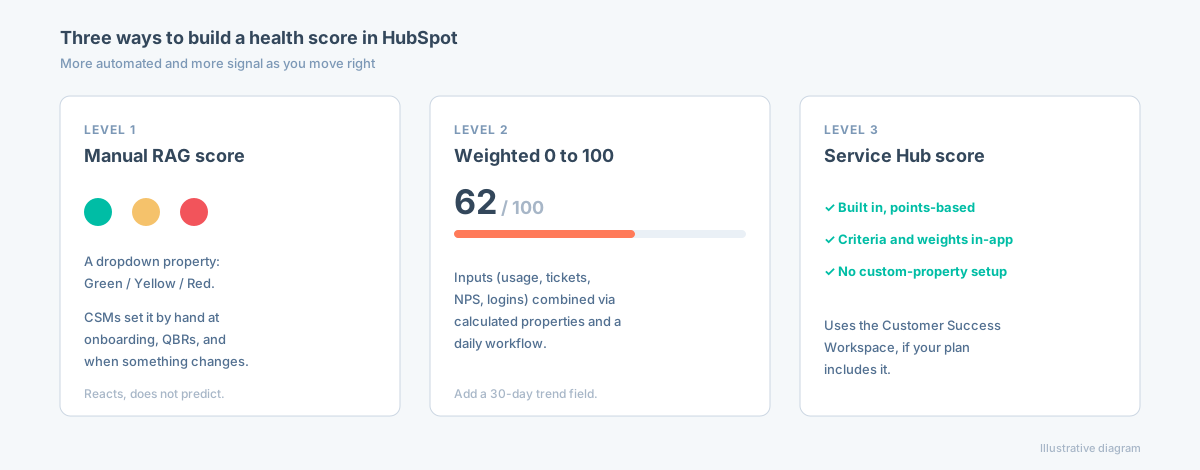
Level 1: a manual RAG score (fastest to ship)
The quickest start is a color-coded score your CSMs set by hand.
- Create the property. Go to Settings, Properties, Company properties, Create property. Label it "Customer Health", field type Dropdown select, options Green (healthy), Yellow (watch), Red (at risk).
- Set the review rhythm. Have CSMs update it at fixed moments: after onboarding, at each QBR, and whenever something notable changes (a usage drop, a bad support experience, a champion leaving).
- Keep it honest with a date. Add a "Health last reviewed" date property and a simple workflow that stamps it whenever the score changes. A score no one has touched in three months is worse than no score.
This beats nothing, but it only reflects what a human already noticed. It reacts, it does not predict.
Level 2: a weighted rule-based score (more signal)
To move from opinion toward data, combine a few inputs into one number.
- Choose inputs you actually have in HubSpot: email and meeting engagement, renewal or deal stage, open support tickets, NPS or CSAT, login recency, and a product-usage tier if you have piped usage in (see the next section).
- Turn each input into a sub-score. On Operations Hub you can use calculated properties to compute sub-scores (for example a usage score and a support score); otherwise set them with workflow branches.
- Aggregate into one number. Create a "Health Score (0 to 100)" number property and combine the sub-scores with weights you choose. A common banding is 80 to 100 healthy, 60 to 79 watch, below 60 at risk.
- Recalculate automatically. Run the scoring on a scheduled daily workflow so it updates without anyone remembering to.
- Add a trend. Every 30 days, copy the score into a "Health Score (previous)" field and compute the difference. Now you see the direction of travel, not just today's value, which is what tells you when to act.
Level 3: use Service Hub's Customer Success Workspace (if you have it)
If you are on Service Hub with the Customer Success Workspace, HubSpot ships a built-in health score: the sum of points from the criteria you configure on the company. You set the positive and negative criteria and their weights, and it renders in the workspace with no custom-property plumbing. It saves most of the setup above, though it still works from the data in HubSpot.
Make it visible and act on it
A score only matters if it drives action.
- Surface it on the company record and in saved views like "Health = Red, renewal in 90 days".
- Report on it with a dashboard: health distribution, the trend over time, and renewals by health band.
- Automate the response. Trigger a workflow that creates a CSM task or a Slack alert when the score flips to Red or drops past a threshold (say 20 points in a month).
How to get product usage data into HubSpot
This is the step that separates a score that works from one that just looks busy, and it's also the step HubSpot is least built for. HubSpot knows about emails, meetings, deals, and tickets, but not whether the account logs in and uses the features that create value. That product usage is the strongest churn and expansion signal, so you have to get at least some of it in. Here are the routes, from lightest to most robust.
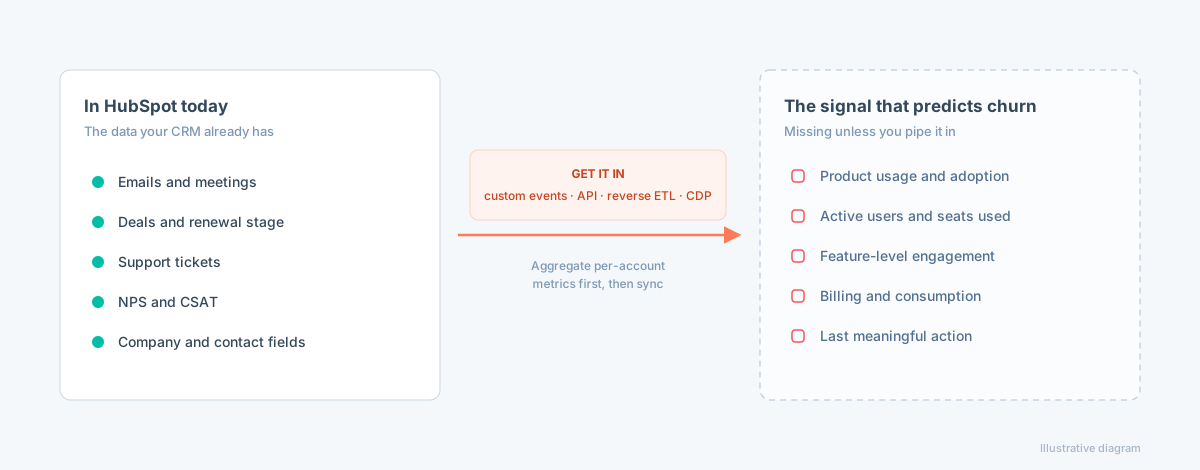
- Custom behavioral events (HubSpot native). Define custom events and send them in via HubSpot's Events API or tracking code. Good for a handful of key actions (for example "project created" or "report exported"). Keep it to the events that signal value, not every click.
- The HubSpot API plus a scheduled job. If your product already computes per-account metrics (weekly active users, seats active, feature adoption), push them into custom Company properties on a schedule with a small script against HubSpot's CRM API. Simple and durable if you have engineering time.
- Reverse ETL (Hightouch, Census). If your usage data lives in a warehouse (BigQuery, Snowflake, Postgres), a reverse-ETL tool syncs modeled metrics into HubSpot properties on a schedule, with no custom code to maintain. This is the common default for teams that have a warehouse.
- A CDP or event pipe (Segment, RudderStack). If you already route product events through a CDP, add HubSpot as a destination and map the events or traits you need.
- Product-analytics integrations. Some analytics tools (Mixpanel, Amplitude, PostHog, June) offer HubSpot syncs that push cohort or usage attributes across.
Whichever route you pick, aggregate first: don't dump raw event streams into HubSpot. Compute a few per-account metrics that predict retention (active users, feature adoption, last meaningful action) and sync those as clean properties.
Here is the honest catch, though. This is not something HubSpot solves well natively, and the effort rarely pays off. Even after you have piped usage in, HubSpot holds those metrics as flat numbers. It has no sense of what is normal for each account, so it can't tell a healthy plateau from a real slide. It doesn't turn them into a trend, and it can't explain what a drop means. You have spent real engineering effort to land a number in a field, and converting that number into an early warning is still entirely on you. This is the wall most teams hit: getting usage in is hard, and once it's there, native HubSpot still can't do much with it.
Where a HubSpot health score falls short
Everything above is worth doing, and for plenty of teams a HubSpot score is enough. But even a well-built one shares a ceiling worth knowing before you rely on it as your early-warning system, especially for usage-based SaaS:
- It is rule-based. You hand-pick the weights and thresholds. There is no model finding the patterns you didn't think to code, so the score reflects the rules you already guessed at, and it drifts as your product changes.
- It is maintenance you own. The weights, the workflows, and the usage pipeline are all yours to build and keep current. When the product or the customer base shifts, the score quietly goes stale until someone recalibrates it.
- It compares to a fixed threshold, not each account's own baseline. "Logins dropped below 5" misses the enterprise account that quietly halved from 40. A flat rule can't tell normal-for-this-account from a real slide.
- It doesn't explain itself. Even with a number and a trend, there are no ranked drivers behind the score, so your team still has to guess at the cause and the fix.
None of this makes HubSpot the wrong CRM. It means HubSpot is a system of record, and a hand-built composite is a useful starting point, not a predictive early-warning system.
What a real customer health score needs
A health score worth acting on does four things a hand-built HubSpot score can't, no matter how carefully you weight it:
- Predicts, not just reports: it surfaces risk early using a model trained on your own churned customers, not a formula you maintain by hand.
- Reads product usage measured against each account's own baseline, so it catches the drop a flat threshold misses.
- Shows a trend and a "why": the direction of travel plus the specific drivers behind the score.
- Scores expansion too: the same signals that predict churn often predict upsell, so a real score covers both sides of customer health.
The fix: Customerscore.io does what HubSpot can't
You don't have to choose between HubSpot and a real health score. Customerscore.io is a native app for HubSpot, so nearly every customer runs both: HubSpot stays where your team works, and Customerscore.io does the parts HubSpot can't.
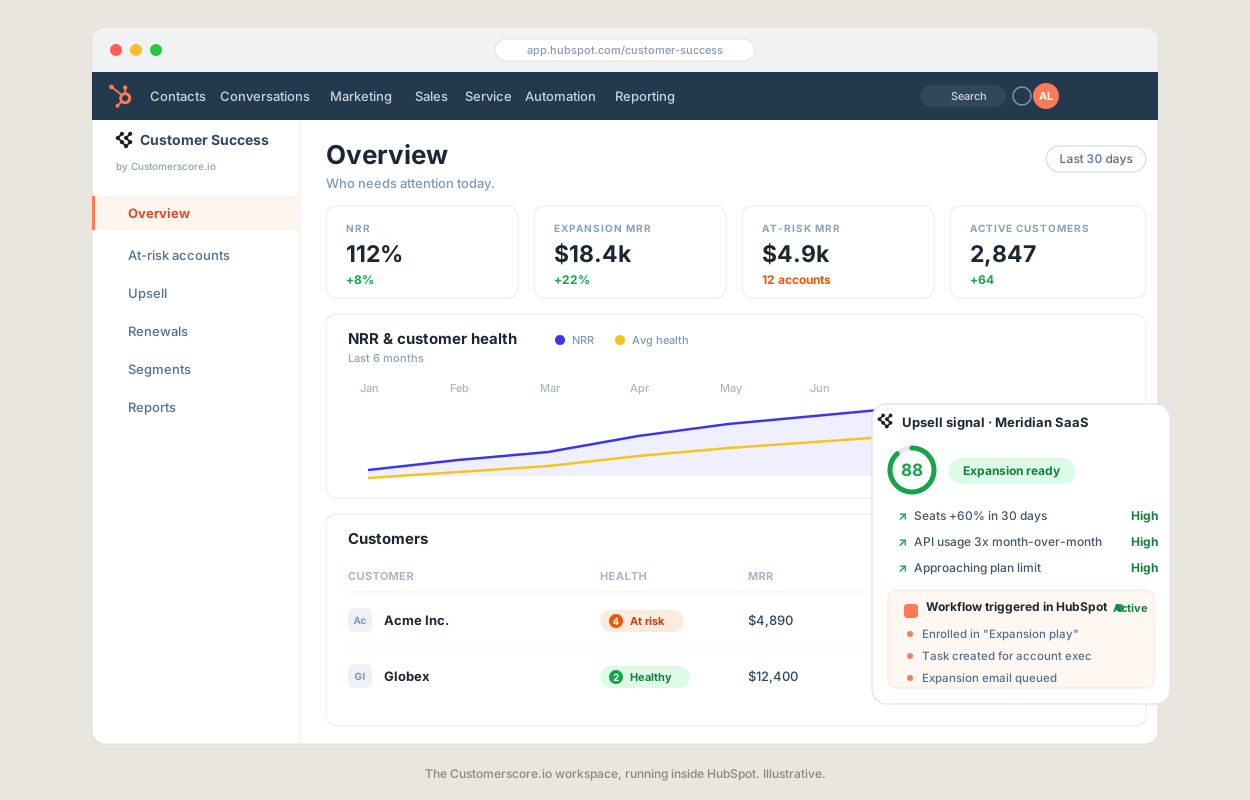
We actually work with your product usage data. Instead of leaving a lonely number in a HubSpot property, we blend product usage with billing, support, and the records already in HubSpot, and measure each account against its own baseline. Out of that comes one explainable score for both churn risk and expansion, with the drivers and brakes and the trend behind it, so you get the why, not just a value.
And you get an enhanced Customer Success workspace, inside HubSpot. The Customerscore.io app adds dashboards (at-risk MRR, NRR, expansion), automations that trigger on the score, and Customer Rooms for onboarding and renewals. So every week your team opens HubSpot already knowing exactly who to focus on and why, instead of maintaining a formula.
That is exactly how awork uses it. We helped them turn HubSpot into a workspace where churn risk, upsell opportunities, the trend, and the reason behind each score are all visible in one place.
"The team sits down with you and builds an extremely valid health scoring step by step. They are incredibly talented at finding nuggets in your own data you might not have been aware of."
Fabian R., Head of Growth, awork
See the full awork case study.
Setup is live in days. Book a demo to see how it works, or see how Customerscore.io works with HubSpot.
FAQ
Can HubSpot do customer health scoring?
Yes. You can build a rule-based health score from CRM and support fields, from a manual Green/Yellow/Red property to a weighted 0 to 100 score via workflows, or use Service Hub's built-in score. It won't read product usage unless you pipe it in, which is why usage-based SaaS teams often add a dedicated scoring engine on top.
How do you build a health score in HubSpot?
Three ways, by effort. Start with a manual RAG property (Green/Yellow/Red) that CSMs update. Next, combine inputs like login recency, open tickets, and NPS into a weighted 0 to 100 number property, recalculated on a scheduled workflow, with a 30-day trend field. If you have Service Hub's Customer Success Workspace, use its built-in points-based score. See the step-by-step above.
How do I get product usage data into HubSpot?
Send it in with HubSpot custom behavioral events or the CRM API, sync it from your warehouse with reverse ETL (Hightouch, Census), route it through a CDP like Segment, or use a product-analytics integration (Mixpanel, Amplitude, PostHog). Aggregate per-account metrics first, then sync those as clean properties rather than raw events.
Is there a better alternative to HubSpot's health score?
For usage-based SaaS, yes. A dedicated scoring engine like Customerscore.io adds explainable AI scoring, product usage, churn and expansion, and the drivers behind each score, then feeds the result back into HubSpot. See our best customer health score software comparison.
Do I have to replace HubSpot?
No. The point is to complement it. You keep HubSpot as your system of record and workflow hub, and feed it an accurate, explainable score from a tool built for it. See how Customerscore.io works with HubSpot.
Key Takeaways
- You can build a workable customer health score in HubSpot today: a manual RAG property, a weighted 0 to 100 score via workflows, or Service Hub's built-in score.
- The hardest and most valuable step is getting product usage data in (custom events, the API, reverse ETL, or a CDP). Aggregate per-account metrics first, then sync.
- Even well built, a HubSpot score is rule-based, maintenance you own, threshold-based, and has no "why", so it leaves silent churn invisible for usage-based SaaS.
- A real score is predictive, usage-aware, baseline-relative, explainable, and covers expansion too.
- You don't have to leave HubSpot. Generate the score in a dedicated engine and push it back into HubSpot, the way Customerscore.io customers already do.
Related articles
Account Health Dashboard: A B2B SaaS Guide for 2026
What an account health dashboard is, the metrics it should track, how to implement one your team actually trusts, and how it fits into your B2B SaaS workflows.
BlogBest Churn Prediction Software (2026)
The best churn prediction software in 2026, compared on what matters: how each tool predicts churn, whether it explains the why, reads product usage, and acts on the risk.
Blog5 Best Planhat Alternatives for SaaS (2026)
Planhat is powerful and endlessly customizable, but it is quote-priced, takes months to implement, and needs a dedicated admin. Five Planhat alternatives for SaaS teams that want results without the build.
Blog5 Best Gainsight Alternatives for SaaS (2026)
Gainsight is powerful, but it's expensive, slow to deploy, and needs a dedicated admin. Five Gainsight alternatives for SaaS teams that want results without the enterprise overhead.