
Churn Prediction in SaaS: How to Spot Risk Before You Lose the Customer

Churn prediction means identifying which customers are likely to cancel before they do, by comparing each account's current behavior with the patterns that came before churn in the past. Done well, it gives your customer success team a short list of accounts that need attention now, with the reason for each, while there is still time to change the outcome.
The time is there. Across B2B SaaS, 70 to 80% of customers who churn show measurable warning signs 30 or more days before they cancel, and most of them never contact support first. They do not complain or ask for a discount. They use the product less, stop replying, let the renewal date come closer, and leave.
This guide covers the signals that show churn early, the three ways to predict it, how to check whether your prediction works, when in the customer lifecycle churn happens, and the most practical part: what to do when an account is flagged.
Churn prediction, churn rate and health scores
These three terms are often mixed up:
- Churn rate measures what already happened: the share of customers or revenue you lost in a period. It is a lagging indicator. Our guide to churn rate covers the formula, and the churn calculator does the math for you.
- A customer health score summarizes how an account is doing right now, from usage, billing, support and relationship signals. Our guide on how to build a customer health score walks through the options.
- Churn prediction looks forward: which accounts are likely to leave, and how soon. A predictive health score, such as a churn risk score from 1 to 5, is one way to express it.
Churn rate tells you how big the problem was. Churn prediction tells you which accounts to call this week.
The signals that predict churn
Before you predict anything, you need the signals. Some appear two months before a cancellation, others only confirm what you already know. In our study of 44,000 SaaS users, these stood out:
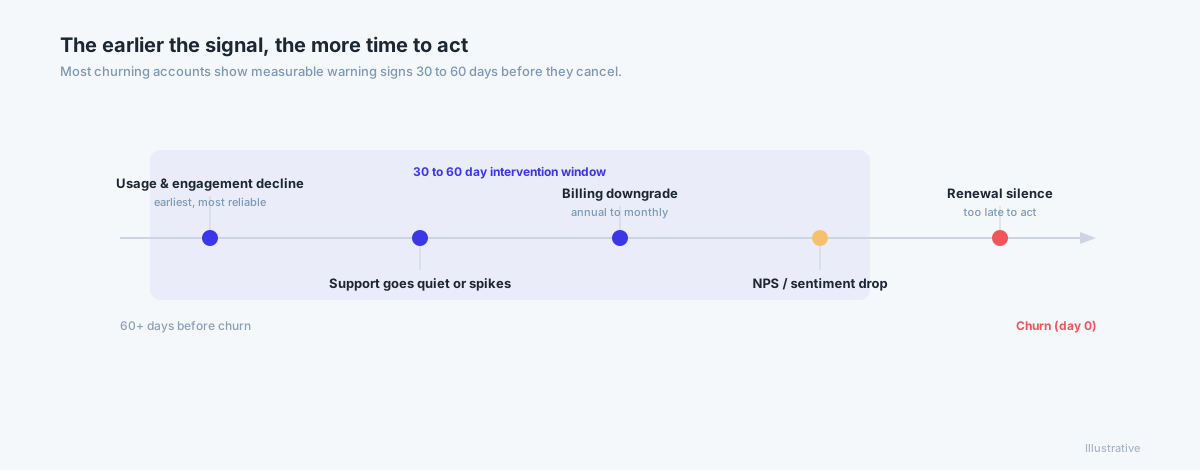
Usage falling against the account's own baseline
The earliest and most reliable signal. What matters is the trend compared with the account's own 30 and 90 day average, not the absolute number. A customer who went from daily to weekly use is at risk; a customer who has always used the product weekly may be perfectly healthy. A sustained drop over three to four weeks says more than one quiet week.
The core action never happens
In our data, customers who never performed the product's core action churned 3 to 6 times more than those who did, and the biggest gap was between zero uses and one, not between light and heavy use. Every product has its core action: a report sent, a survey collected, a task created. Track whether new accounts reach it.
Billing changes
Billing behavior changes early and is easy to miss because it lives in Stripe or Chargebee, not in product analytics. Monthly plans churned 4.7 times faster than annual plans in our study, so a switch from annual to monthly, a seat reduction or a downgrade is a strong signal. Failed payments are a separate kind of risk, covered below.
Renewal and contract signals
For annual contracts, churn concentrates around the renewal date. Once a customer signals that they may not renew, churn averaged 40% in our data, the strongest signal in the dataset and one of the least acted on. Start renewal work 90 days before the date, not 30.
Relationships and team size
When the champion leaves or changes roles, the account loses the person who bought into the product. Team size matters too: single-user accounts churned 14 to 33 times faster than accounts with a team, with the biggest drop between one user and two or three. Getting a second person into the account is one of the most durable retention moves.
Support patterns
A spike in unresolved tickets is a warning. So is silence: a customer who stops contacting support is often disengaged, not happy. On its own, support data is weak; combined with usage and billing it resolves ambiguous cases.
Three ways to predict churn
| Rules | Statistical and cohort analysis | Machine learning | |
|---|---|---|---|
| How it works | You choose signals, weights and thresholds | Each account is compared with similar accounts at the same stage | A model learns which patterns preceded churn |
| What you need | Domain knowledge and a spreadsheet or CRM | Clean history and an analyst | In-house: a data scientist, lots of history and hundreds of churned accounts. Pre-trained: about 2 months of history, ideally 100+ active and 40+ churned customers |
| Strength | Transparent, quick to start | Accounts for lifecycle stage and plan | Finds patterns no one wrote as a rule, treats each account individually |
| Weakness | One rule set for everyone, guessed metrics, blind to seasonality | Still needs you to pick the variables | Expensive to build and maintain yourself |
Rules
Most teams start here: a weighted score in a spreadsheet or the CRM. It is a sensible first step, and our guide on how to build a customer health score shows how to do it well. Its limits are the same everywhere: the rules apply equally to every customer, you have to guess which metrics drive churn, and expected seasonal dips turn red every year.
Statistical and cohort analysis
The next step compares each account with similar accounts: same plan, same lifecycle stage. Instead of "is usage falling?", you ask "is usage falling compared with customers at the same point in their lifecycle?" Survival analysis estimates how likely an account is to churn by a given time. Cohort analysis is the practical starting point.
Machine learning
A machine learning model does not need you to say which signals matter. It looks at your customers' history across usage, billing, CRM and support data and learns which combinations came before churn, by comparing customers who stayed with customers who left. It scores every account against its own rhythm, so seasonal dips are not flagged.
There are two very different ways to get there:
- Build it in-house. You need a data scientist, clean joined data, a long history and enough churned customers for the model to learn from, usually hundreds. Plus ongoing monitoring and retraining as your product changes.
- Use a pre-trained model. A model already trained across many SaaS companies needs much less of your own history to work: in our experience about 2 months, ideally with 100+ active and 40+ churned customers to tune it to your base.
Whichever way you go, the output should be more than a number. A churn risk score is only useful if it shows why: the signals pushing the risk up and the ones holding it back.
How accurate is churn prediction, and how to test it
There is no universal accuracy figure; it depends on your data and how you measure. As one reference point, in our churn prediction accuracy study of 13,259 B2B SaaS customers, customers with the highest Churn Risk Score churned 31 times more often within 60 days than customers with the lowest. Test your own prediction too:
- Back-test. Take the last 6 to 12 months, calculate what the score would have said at different points in time, and compare it with who actually churned.
- Measure lead time. How many churned accounts did the prediction flag at least 30 days before they left? A flag a week before the renewal is too late to help.
- Check both directions. Of the accounts flagged, how many really churned (precision)? Of the accounts that churned, how many were flagged (recall)? A score that flags everyone has perfect recall and no value.
- Compare with a simple baseline. Does the prediction beat sorting accounts by size or tenure?
- Repeat monthly. Take the accounts flagged last month and a sample that was not, and compare both with what happened.
When churn happens: two risk windows
Churn does not happen evenly over the customer lifecycle. There are two windows to watch:
- The first 90 days. Customers who never reach value leave early. Across SaaS, 40 to 60% of cancellations are commonly reported in the first 90 days. The signals here are activation signals: onboarding milestones completed, the core action performed, integrations connected, a second user active.
- Months 6 to 12. In our 44,000-user study, median churn peaked at 6 to 12 months (25%), higher than in the earliest cohort (15.7%). By then customers have been around long enough to cancel without guilt, but have not yet built the habit that makes leaving hard. The signals here are trend signals: usage falling against the account's own baseline, no expansion, a renewal coming closer.
Both windows need different playbooks: help to get started in the first, proof of value and a renewal plan in the second.
First 30 days, activation:
- Did the customer complete onboarding milestones?
- Have they performed the core action at least once?
- Have they connected their integrations?
- Is more than one user active on the account?
Days 30 to 90, engagement and commitment:
- Is usage rising, flat or falling compared with the first 30 days?
- Are they using the features your best-retained customers use?
- Are they adding team members or building the product into their workflows?
What to do when an account is flagged: playbooks
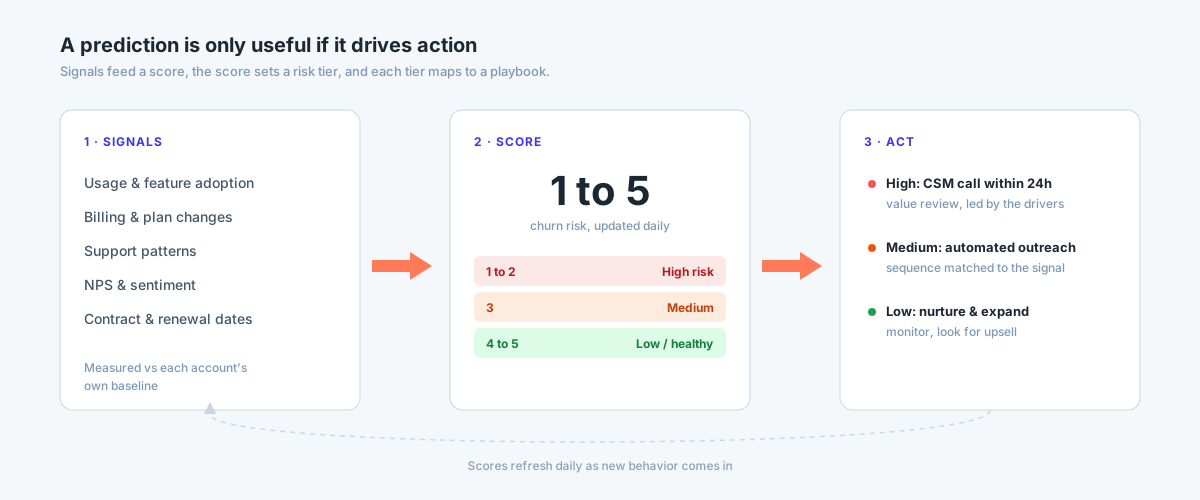
A prediction nobody acts on changes nothing. The most common failure is not a bad model; it is a good flag that lands in a dashboard no one opens.
The fix is a playbook: a sequence of tasks and steps that starts when an account is flagged and is assigned to the account's CS manager, with an owner and a due date for every step. The playbook organizes the work; the CSM has the conversation. Automated email sequences are fine for accounts that need no personal touch, but a flagged account with real revenue needs a person.
Start with what kind of risk it is
A red flag is not enough; the team needs to know what kind of red it is. A practical taxonomy:
- Activation risk: the account never reached first value.
- Value decay: usage was strong, then declined, often after a workflow or team change.
- Champion turnover: the internal advocate left or changed roles.
- ROI doubt: the account cannot tie the product to a business outcome before renewal.
- Support friction: repeated unresolved tickets.
- Fit risk: the account was sold outside your ideal customer profile.
- Payment failure: involuntary risk, driven by billing, not sentiment.
Give each flagged account one primary tag. It decides which playbook runs, and it makes your quarterly churn-by-cause report useful.
Example playbooks you can copy
Risk tiers below follow a 1 to 5 churn risk scale, where 5 is the highest risk.
Usage falling against the account's own baseline (risk 3 to 4)
- Day 0: the CSM reviews the drop and the signals behind it.
- Within 3 days: call the champion, lead with specifics ("your team hasn't used the reporting module in three weeks").
- Within 7 days: offer a working session on the features they stopped using.
- Day 14: check whether usage recovered; if not, escalate to the CS lead.
Champion or key user left
- Within 2 days: find the new owner in the CRM and confirm their role.
- Within 7 days: introduce yourself and agree on what they need from the product.
- Within 14 days: run a short onboarding for the new person and their team.
- For large accounts: involve an executive sponsor on both sides.
Billing signal (annual to monthly, seat reduction, downgrade)
- Within 2 days: the CSM and the account owner align on what they know.
- Within 7 days: a value review with numbers from the account, not a sales pitch.
- Only after the conversation: a commercial proposal if it makes sense.
Renewal within 90 days and risk 4 to 5
- Day 0: open a save plan and name the executive sponsor.
- Within 7 days: prepare the renewal from the full account history: goals, usage, outcomes, open issues.
- Within 14 days: a renewal conversation with a decision date agreed with the customer.
- Weekly until the decision: review progress in the team meeting.
Low risk (1 to 2)
No CSM task. Keep the account in nurture and watch for upsell signals: seat limits reached, power features adopted, new teams joining.
Voluntary vs. involuntary churn
Not every lost customer decided to leave. Involuntary churn happens when a payment fails and the subscription lapses: an expired card, a declined charge, a balance that ran dry. It needs a different playbook from voluntary churn, and it is usually the most recoverable kind.
| Signal | Action |
|---|---|
| Card expiring within 30 days | Ask the customer to update the payment method before it fails |
| First payment failure (soft decline) | Automatic retry plus a notification |
| Second payment failure | A personal email from the account owner |
| Hard decline | Immediate outreach for a new payment method |
Our guide on dunning and churn covers retry schedules and recovery in detail. Track involuntary churn separately, or billing failures will look like product dissatisfaction in your reports.
Why churn prediction projects fail
No clear definition of churn. Is churn the cancellation date, the non-renewal date or the last day of activity? If billing, product analytics and CS define it differently, the prediction learns from conflicting data. Agree on one definition first.
The flag does not reach anyone. Scores that live in a BI tool someone opens once a week are a reporting project. Every flag needs an owner and a next step, which is what playbooks are for.
Acting too late. A flag a week before the renewal is useless. You need at least 30 days of lead time, which means fast-moving signals (usage, billing, renewal) rather than slow ones like quarterly surveys.
Treating all churn the same. A customer leaving in month 3 because they never got started and a customer leaving in month 18 because they stopped seeing value need different playbooks. Tag the kind of risk and route it.
How Customerscore.io predicts churn and what happens next
You can build all of this yourself: rules in a spreadsheet, a cohort model, or an in-house machine learning model with a data scientist to run it. The catch is the cost, the history you need and the work to keep it accurate.
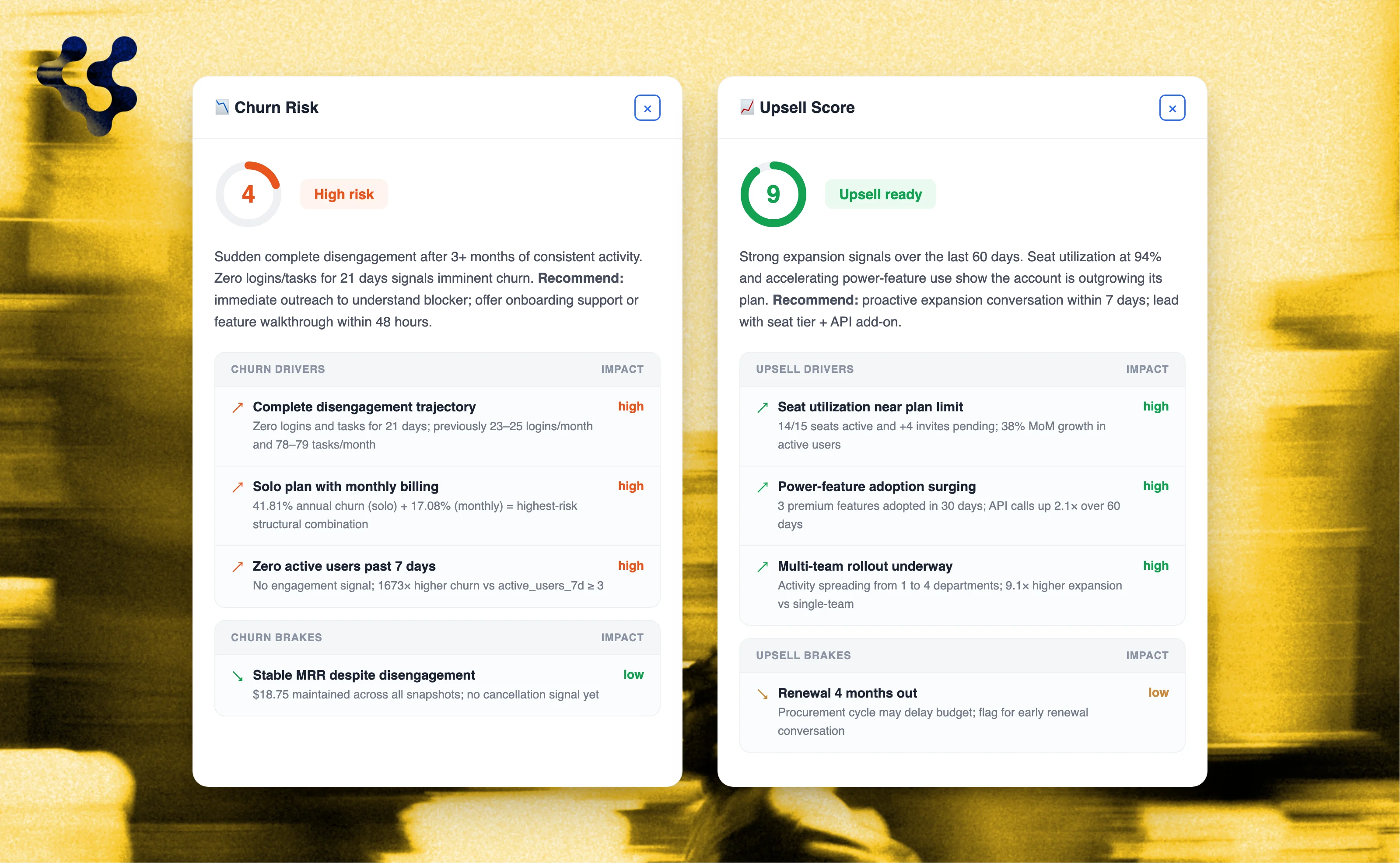
Customerscore.io gives every account a Churn Risk Score from 1 to 5 and an Upsell Score from 1 to 3, refreshed daily. The model is pre-trained on tens of thousands of SaaS users and tuned to your data, and every account is scored against its own history, so seasonal dips are not flagged. Each score shows the drivers and brakes behind it in plain language.
When an account is flagged, a playbook creates the sequence of tasks and assigns it to the account's CS manager, and the account shows up in that CSM's My Day with the reason. The AI does the watching; your team does the conversations. The team behind the scoring engine sets it up with you, and most teams are live in 1 to 3 weeks.
To see how it works, book a demo.
Frequently asked questions
What is a churn prediction model?
A system that estimates which customers are likely to cancel, based on how their behavior compares with the patterns that came before churn in the past. Models range from simple rules to statistical analysis to machine learning. Unlike churn rate, it looks forward.
How accurate is churn prediction?
It depends on your data and your definition of accuracy. In our accuracy study, customers with the highest Churn Risk Score churned 31 times more often within 60 days than customers with the lowest. Test your own too: back-test against the last 6 to 12 months, measure how many churned accounts were flagged at least 30 days ahead, and check how many flagged accounts actually churned.
What data do I need for churn prediction?
Billing data (payment status, plan and seat changes, renewal dates) and product usage (trend against each account's baseline, core actions, feature adoption). Support, CRM and meeting data make it sharper. Most important: one dataset where every source maps to the same account.
When should I start predicting churn?
As soon as you can see who churned and why. Start with rules or cohort analysis on the data you have. A pre-trained model can work with about 2 months of history; building your own machine learning model needs much more history and a data scientist.
What is a churn score?
A number that expresses how likely an account is to churn, usually on a short scale. A churn risk score from 1 to 5, where 5 is the highest risk, is easy to act on: it maps directly to risk tiers and playbooks. The score is only useful if it also shows the reasons behind it.
What is the difference between churn prediction and a customer health score?
A health score summarizes how an account is doing now; churn prediction estimates whether and when it will leave. A predictive health score combines both: it is calculated from the patterns that came before churn and tells you who is at risk and why. See our guide on how to build a customer health score.
Key takeaways
- 70 to 80% of churning customers show warning signs 30 or more days before they cancel, and most never contact support first.
- The strongest signals are trends against the account's own baseline, the core action, billing changes, renewal signals and team size.
- Rules are the start, cohort analysis the next step, machine learning the most accurate. Building ML in-house is expensive; a pre-trained model needs far less of your own history.
- Watch two risk windows: the first 90 days and months 6 to 12.
- A flag is only worth something if it starts a playbook: tasks with an owner and a due date, assigned to the account's CS manager.
Related: How to build a customer health score · SaaS retention statistics from 44,000 users · What is logo churn · Churn prevention strategies · Dunning and churn
Related articles
How Accurate Is Churn Prediction? What Data on 48,000 B2B SaaS Customers Shows
How accurate is churn prediction? We checked the risk scores of 48,000 B2B SaaS customers against what happened next, for AI and rule-based scoring.
BlogBest Churn Prediction Software (2026)
The best churn prediction software in 2026, compared on what matters: how each tool predicts churn, whether it explains the why, reads product usage, and turns the risk into work for your team.
Blog8 Best Customer Health Score Software Tools (2026)
The 8 best customer health score tools in 2026, compared on how they actually score health: configured vs predicted, churn and expansion, setup time, and admin effort.
BlogSaaS Retention Statistics: 8 Findings From 44,000 Users
1 in 4 paying customers is doing nothing. Monthly plans churn 4.7× faster than annual. Eight findings from analyzing 44,000 SaaS users.