
Customer Health Score: How to Build One (Rule-Based vs. Predictive)

A customer health score is a single number that tells your team how likely each customer is to renew, grow or churn. It turns the signals a customer sends through your product, billing, CRM and support tools into one value you can sort, filter and act on. The goal is simple: spot the accounts that are quietly drifting away while there is still time to change the outcome.
There is no standard formula. Every SaaS company builds its own, and there are two fundamentally different ways to do it: a rule-based score, where you choose the metrics and weights yourself, and a predictive score, where a machine learning model learns which patterns actually come before churn and upsell. This guide covers both: the data you need, how to build a rule-based score step by step, where each approach breaks, and how to decide which one fits your team.
What a customer health score is (and what it is not)
A health score summarizes customer behavior. It is not a survey result like NPS or CSAT, and it is not a single metric like logins. A useful score combines several signals into a view of the whole account:
- Is the customer using the product, and is that usage rising or falling?
- Are invoices paid on time, and has the plan or seat count changed?
- When is the renewal, and how much revenue is at stake?
- Are support tickets piling up or getting resolved?
- When did someone on your team last speak to them, and how did it go?
Most teams show the score as a number from 0 to 100 and group it into three colors: green (healthy), yellow (needs attention) and red (at risk). The color tells a CSM at a glance which accounts to look at first; the number and the signals behind it tell them why.
The score earns its place only if it changes what your team does. It should tell a CSM which accounts need attention this week, and ideally why. A number nobody acts on is just another dashboard.
The timing matters too. Across B2B SaaS, 70 to 80% of customers who churn show warning signs 30 or more days before they cancel, and most of them never contact support first. A good health score catches those signs inside that window.
The two types: rule-based and predictive
| Rule-based health score | Predictive (ML/LLM) health score | |
|---|---|---|
| How it works | You pick the metrics, set weights and define thresholds | A model learns from your data which patterns precede churn or upsell |
| Who builds it | CS ops, a CSM or RevOps, in a spreadsheet, BI tool or CRM | A data scientist, or a platform with a trained model |
| Data needed | Whatever you choose to include | Clean history across all touchpoints, plus enough churned customers to learn from |
| Cost to start | Low | High if you build it yourself |
| Adapts to each customer | No, one set of rules for everyone | Yes, each account is compared with its own history |
| Seasonality and trends | Only if you code exceptions by hand | Learned from the data |
| Explains itself | Shows which rules fired | Shows the drivers behind each score, in plain language with an LLM layer |
| Maintenance | Manual recalibration as your product and customers change | Retraining and monitoring |
Neither type is "right" in the abstract. Rule-based scoring is the natural starting point for most teams. Predictive scoring is where teams end up once the rule-based score stops matching reality. The rest of this guide explains why.
The data you need for either approach
Both types of score are only as good as the data underneath them. Ideally you connect every place where the customer leaves a trace:
- CRM: renewal date, ARR or MRR, plan, owner, contacts and their roles, open deals
- Billing: payment status, failed payments, plan changes, seat changes, switches from annual to monthly
- Product usage: active users, usage trend against the account's own baseline, adoption of the features that matter, completed onboarding milestones
- Conversations and support: meetings, emails, tickets, resolution times, escalations, sentiment
Billing is the most underused of these sources. Changes in billing behavior are among the earliest and clearest signals you have, and they sit in Stripe or Chargebee rather than in your product analytics.
The hard part is not collecting the data. It is joining it into one reliable dataset. The same customer appears as a company ID in your CRM, a customer ID in Stripe, a workspace ID in your product and an email domain in your helpdesk. Until those IDs are mapped to one account, no score can be trusted. If you are starting from scratch, our guide on the customer 360 data model covers how to structure it.
A short data checklist before you score anything:
- Every source maps to the same account ID.
- Usage data covers at least the last few months, so you can see trends.
- You know exactly which customers churned and when (cancellation date or non-renewal date, not last login).
- Missing data shows as missing, not as zero. A broken integration that reports zero usage will paint healthy accounts red overnight.
How to build a rule-based health score, step by step
Rule-based scoring is where most teams start, and for good reason: you do not need a data scientist, anyone on the team can build a basic version, and everyone can see how the number is calculated. Done carefully, it is a useful first version.
Step 1: Decide what the score is for
Pick one primary question. For most B2B SaaS teams it is "which accounts are at risk of churning?" A score that tries to predict churn and upsell at the same time usually does both poorly. If you want both, build two scores.
Step 2: Pick three to five signals
Fewer signals make a score you can explain and debug. Good starting candidates:
- usage trend against the account's own 30 and 90 day average
- adoption of the two or three features your best-retained customers actually use
- onboarding milestones completed
- payment health and billing changes
- time until renewal
Our own data points to where to look first. In our study of 44,000 SaaS users:
- Customers who never performed the product's core action churned 3 to 6 times more than those who did. The biggest gap was between zero uses and one, not between light and heavy use.
- Monthly plans churned 4.7 times faster than annual plans, so billing frequency belongs in the score.
- Once a customer signaled non-renewal, churn averaged 40%, the strongest signal in the dataset and one of the least acted on.
- Single-user accounts churned 14 to 33 times faster than accounts with a team, with the biggest drop between one user and two or three.
- In the median company, 23% of paying customers showed no product activity at all.
Avoid signals that only describe what already happened, and be careful with vanity metrics. Daily logins feel rigorous, but in many products they say little about churn. A customer who went from daily to weekly use is a risk; a customer who has always been weekly may be perfectly healthy.
Step 3: Normalize every metric to the same scale
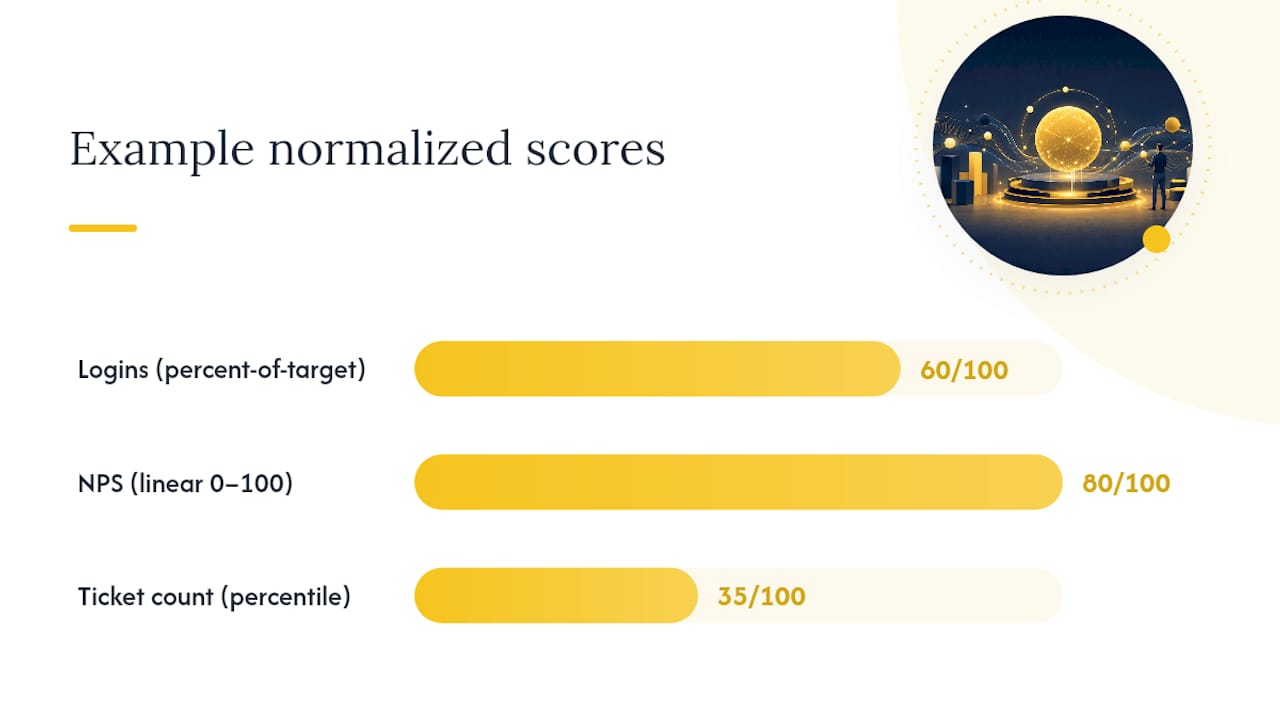
Before you weight anything, convert each metric to the same range, for example 0 to 100. Otherwise a metric with a wide range, such as ticket count, silently outweighs a metric with a narrow one. Common methods:
- Percent of target: actual usage divided by a target (licensed seats, expected logins), capped at 100%.
- Min-max scaling: subtract the minimum, divide by the range, multiply by 100.
- Percentile: rank each account against the rest of your base. Useful for skewed data like ticket counts.
- Log transform first, when values span several orders of magnitude.
Skipping this step is the most common technical mistake in home-built scores.
Step 4: Assign weights and calculate
Give each signal a weight so the weights add up to 100%, then calculate the weighted sum. A common starting point for a seat-based B2B product looks like this: usage 35%, outcomes 25%, engagement 15%, sentiment 15%, support 10%. Treat any such split as a hypothesis to test, not a rule. Two guardrails help:
- No single signal above roughly 40%, or the "blended" score is really a one-metric score.
- Log every input, normalized value and weight, so you can explain any score change months later.
Step 5: Back-test against customers who churned
This is the step most teams skip, and the one that tells you whether the score works. Take the last 6 to 12 months of data, calculate what each account's score would have been at different points in time, and compare it with what actually happened. Ask:
- Of the accounts the score flagged, how many really churned?
- Of the accounts that churned, how many did the score flag at least 30 days before?
- Does the score do better than simply sorting accounts by size or tenure?
If the answers disappoint, change one signal or one weight at a time and test again.
Step 6: Turn the score into red, yellow and green tiers
A number on its own does not tell anyone what to do. Group the score into tiers and give each tier an owner and an action. A common starting point on a 0 to 100 scale:
| Tier | Score | What it means | What the team does |
|---|---|---|---|
| Green | 80 to 100 | Healthy: steady or growing usage, paid on time, good relationship | Keep the rhythm, look for upsell and advocacy, ask for a case study or review |
| Yellow | 60 to 79 | Needs attention: usage flat or slipping, open issues, quiet contacts | Proactive check-in, training for teams that are behind, fix open issues |
| Red | 0 to 59 | At risk: falling usage, failed payments, unresolved escalations, champion gone | CSM call within days, a recovery plan, an executive sponsor for large accounts |
Treat these bands as a first guess, not a standard. Set your own cut-offs from the back-test in step 5: red should hold most of the accounts that later churned, and green should renew at a clearly higher rate than red. Two rules keep the colors honest:
- Watch the trend, not only the color. An account that drops from 90 to 70 in a month needs a call sooner than one that has sat at 65 for a year.
- Don't trust green blindly. "Green churn" happens when a customer looks healthy on usage but has already decided to leave, for example after a champion changes jobs or a budget is cut. Relationship signals catch what usage misses.
Then decide who is notified when an account changes tier, what the CSM does and how fast, and review the score every month. Take the accounts it flagged and a sample it did not, and compare both with reality. Recalibrate at least every quarter, and after every major product or pricing change.
If your team runs on HubSpot, our guide to building a customer health score in HubSpot walks through the same steps with HubSpot's own tools. And once the score exists, an account health dashboard is how CSMs actually work with it day to day.
Where rule-based scores break
Rule-based scores are a good start, but almost every team hits the same limits.
One set of rules fits everyone, so it fits no one. The weights that work for a small customer on a monthly plan mislead you on an enterprise account with a two-year contract. And the stakes are uneven: in our 44,000-user study, the top 10% of customers held 58% of MRR on average, so a score that treats every account the same hides where the revenue risk really is. Splitting rules by segment helps, but customers inside one segment still behave differently.
You have to guess which metrics drive churn. The score reflects what you believe matters, not necessarily what does. You never fully know whether the five signals you picked are the ones that drive churn and retention in your base, and back-testing only tells you how good the guess was.
It ignores seasonality and trends. A school goes quiet in summer, a retailer slows after the holidays, an accounting tool peaks at year-end. A fixed threshold turns each of those dips red every year. After a few false alarms, the team learns to ignore the score.
It does not look at each customer individually. A drop to ten logins a week is alarming for an account that used to log in fifty times, and normal for one that has always logged in ten. Shared thresholds cannot tell them apart.
It drifts. Someone set the weights once. The product changed, new features shifted how customers work, and the score now measures what used to matter.
Predictive health scores: how ML and LLM scoring works
A predictive health score turns the question around. Instead of you telling the model what matters, the model learns it from your data.
The model learns the patterns itself. It looks at your customers' history across usage, billing, CRM and support data and finds the events and combinations of signals that come before churn, and the ones that come before an upsell opportunity. Often these are patterns no one would have written as a rule: a slow decline in one feature combined with a billing change, for example.
It learns by comparing active and churned customers. In our experience, a model needs a sample of both groups to learn from: customers who stayed and customers who left. It compares the patterns of the two and learns what separates them. The more churned customers in the history, the sharper the predictions.
It treats every customer individually. Each account is scored against its own rhythm and trend. An expected seasonal dip is not flagged as risk, while the same drop in an account that never slows down is.
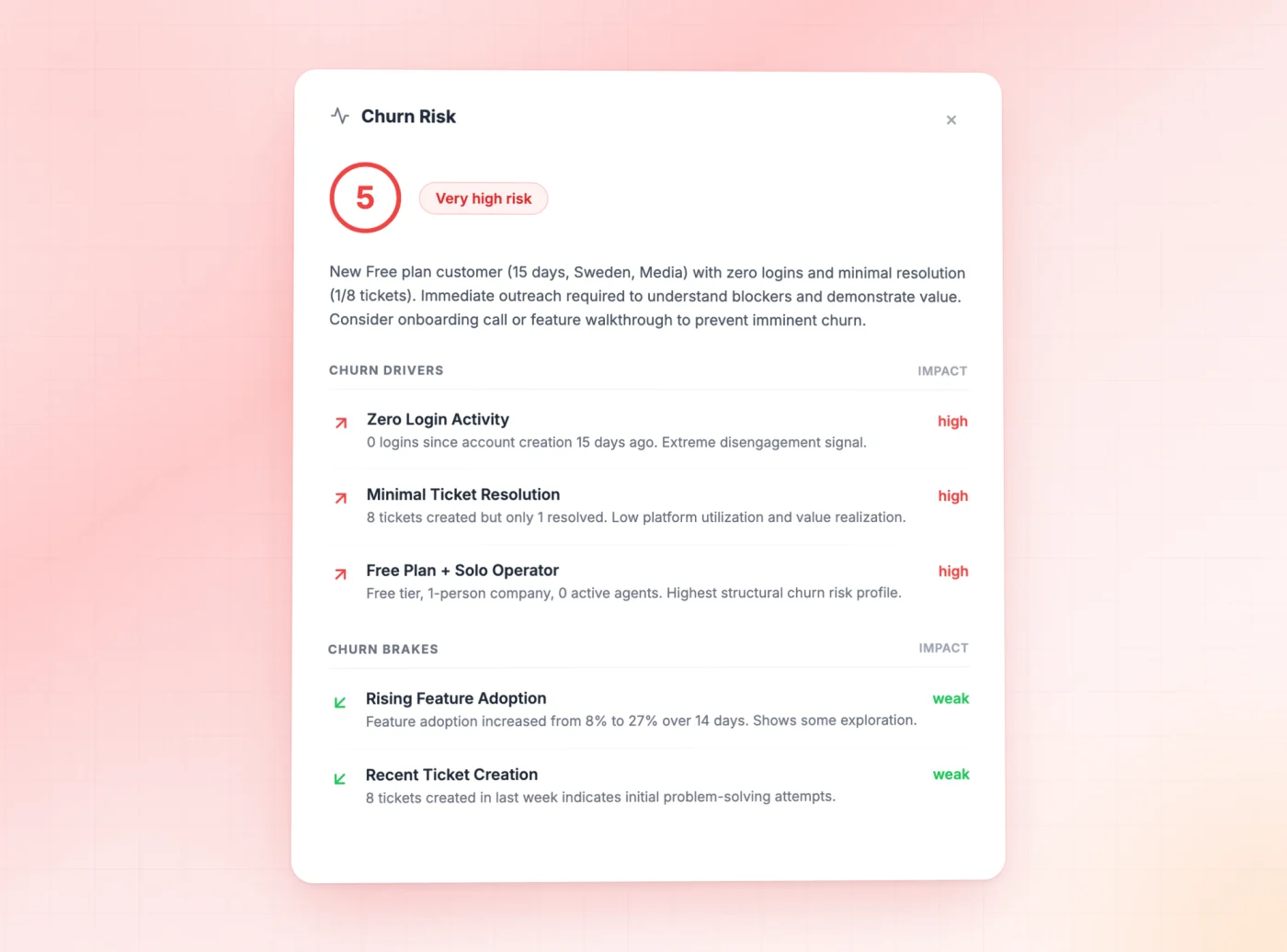
With an LLM layer, it explains itself. A score of 4 out of 5 on its own still leaves the CSM guessing. A model enriched with a language model adds the why: what is happening with this customer, which signals push the risk up, which ones hold it back, and why the account deserves attention now. That explanation is what turns a number into a conversation the CSM can prepare for.
What it takes to build a predictive score yourself
Predictive scoring is more accurate, but building it in-house is a real project:
- It is expensive. You need data engineering to build and maintain the pipelines, and a data scientist to build, validate and monitor the model.
- You need history. The model learns from the past, so it needs months of clean, joined data and enough churned customers to learn from. Young companies or companies with very low churn may not have that sample yet.
- It needs ongoing care. Models drift as your product and customer base change, so someone has to monitor accuracy and retrain.
- The explanations are extra work. A raw model gives you a probability. Turning it into a plain-language reason a CSM trusts is a separate layer to build.
For most customer success teams, that is a bigger investment than the scoring problem justifies, which is why predictive scoring has mostly lived in large companies with their own data teams.
Build or buy: your options
You have three realistic paths:
- Build a rule-based score yourself in a spreadsheet, BI tool or your CRM. Cheap and transparent, but you carry the guessing, the recalibration and the false positives.
- Build a predictive model in-house. The most tailored option, if you have a data team, the history and the patience to maintain it.
- Use a platform that brings a scoring model with it, so you get predictive scores without building the data science yourself. Our comparison of the best customer health score software covers the main options and what each one does well.
Whichever path you choose, the data work from the section above still applies. No tool can score what it cannot see.
How Customerscore.io approaches health scoring
You can build a health score yourself, and if you have the time, a clear view of what drives churn and someone to maintain it, a rule-based score is a reasonable start. The catch is that it is demanding to build, unreliable to keep accurate, and you still have to guess which metrics to choose.
The customer health score software in Customerscore.io gives you both options in one place:
- A predictive model that is already trained on tens of thousands of SaaS users and then tuned to your data. It tells you which events and metrics drive retention in your base, instead of asking you to guess. Every account gets a Churn Risk Score and an Upsell Score from 1 to 5, refreshed daily, each with the drivers and brakes behind it in plain language.
- Your own rule-based score with your own metrics and weights, if you want to keep logic your team already trusts and run it alongside the predictive one.
Instead of colors, both scores use a 1 to 5 scale: a Churn Risk Score of 4 or 5 means the account needs attention now. Every account is scored against its own history, so seasonal dips are not flagged as risk. The team behind the scoring engine sets it up with you on your data, and most teams are live in 1 to 3 weeks.
If you want to see how predictive health scoring works in practice, book a demo.
Frequently asked questions
What is a good customer health score?
One that predicts churn early enough to act, ideally 30 or more days ahead. The exact scale matters less than the gap between groups: customers at the healthy end should renew at a clearly higher rate than customers at the at-risk end. If that gap is not there, the score is not working, whatever it outputs.
What do red, yellow and green mean in a customer health score?
They are tiers of the score. Green means healthy, yellow means the account needs attention, and red means it is at risk of churning. A common starting point on a 0 to 100 scale is green from 80, yellow from 60 to 79 and red below 60, but set your own cut-offs from how accounts actually renewed or churned.
Which metrics should go into a customer health score?
Start with usage trend against the account's own baseline, adoption of your stickiest features, onboarding milestones, payment health and billing changes, and time to renewal. Then back-test against churned customers and keep only the signals that actually separate them from customers who stayed.
How often should a health score update?
At least daily. Engagement can fall sharply within a week, so a weekly or monthly score misses much of the time you have to react. The weights of a rule-based score, or the training of a predictive model, can be reviewed less often.
Rule-based or AI health scoring: which is better?
Rule-based scoring is cheaper to start and easy to understand, but it applies one set of rules to everyone and depends on you guessing the right metrics. Predictive scoring learns from your data, treats each customer individually and explains its reasons, but it needs history and is expensive to build yourself. Many teams start with rules and move to predictive scoring once the rules stop matching reality.
Can I keep my own rule-based score if I use a predictive one?
Yes. Many teams run both: the rule-based score captures knowledge the team already trusts, and the predictive score catches patterns no one has written as a rule. In Customerscore.io you can run your own rule-based score alongside the predictive Churn Risk Score and Upsell Score. When the two disagree, the explanation is often the most useful part.
How do I know if my health score actually works?
Back-test it. Calculate past scores for the last 6 to 12 months and check how many churned accounts it flagged at least 30 days before they left, and how many flagged accounts actually churned. Repeat the check every month with fresh data.
Can I build a customer health score in HubSpot?
Yes, as a rule-based score using properties, calculated fields and workflows. Our guide to the HubSpot customer health score shows how, and where its limits are.
Related articles
Best Customer Success Software for SaaS Teams in 2026
The 8 best customer success software platforms for SaaS in 2026, compared by company size and use case: health scoring, churn prediction, automation, pricing.
BlogMulti-Year Renewals in B2B SaaS: When to Offer Them and How
When a multi-year renewal pays off, what discount to expect, which clauses protect both sides, and how to time the offer.
BlogCustomer Success Org Design: Structure, Roles and CSM Capacity
How to structure a customer success team, size books by hours rather than ratios, and evolve the org as the company grows.
BlogSales to Customer Success Handoff: Template, Checklist and Other Handoffs
A one-page handoff brief, the fields it needs, timing targets, and how support to CS and product to CS handoffs work.