
Introducing Customer Rooms: one shared space to onboard every account

Onboarding is where churn starts. 40 to 60% of SaaS cancellations happen in the first 90 days, and most of them trace back to the same thing: the customer never reached value, and nobody noticed until the cancellation email arrived.
Part of the problem is how onboarding usually runs. The plan lives in a slide deck the customer opened once. Tasks live in email threads. Files live in five different places. By week three, nobody on either side can answer the simplest question: where are we, and what's next?
Meet Customer Rooms, a shared workspace you build for each account and hand over with a single link. No login for your customer, no back-and-forth email threads, no "which version of the plan are we on?". Just one place where you and your customer see the same plan, tick off the same tasks, and keep every resource within reach. And it lives inside Customerscore.io, right next to the health data you already track.
What you can do today
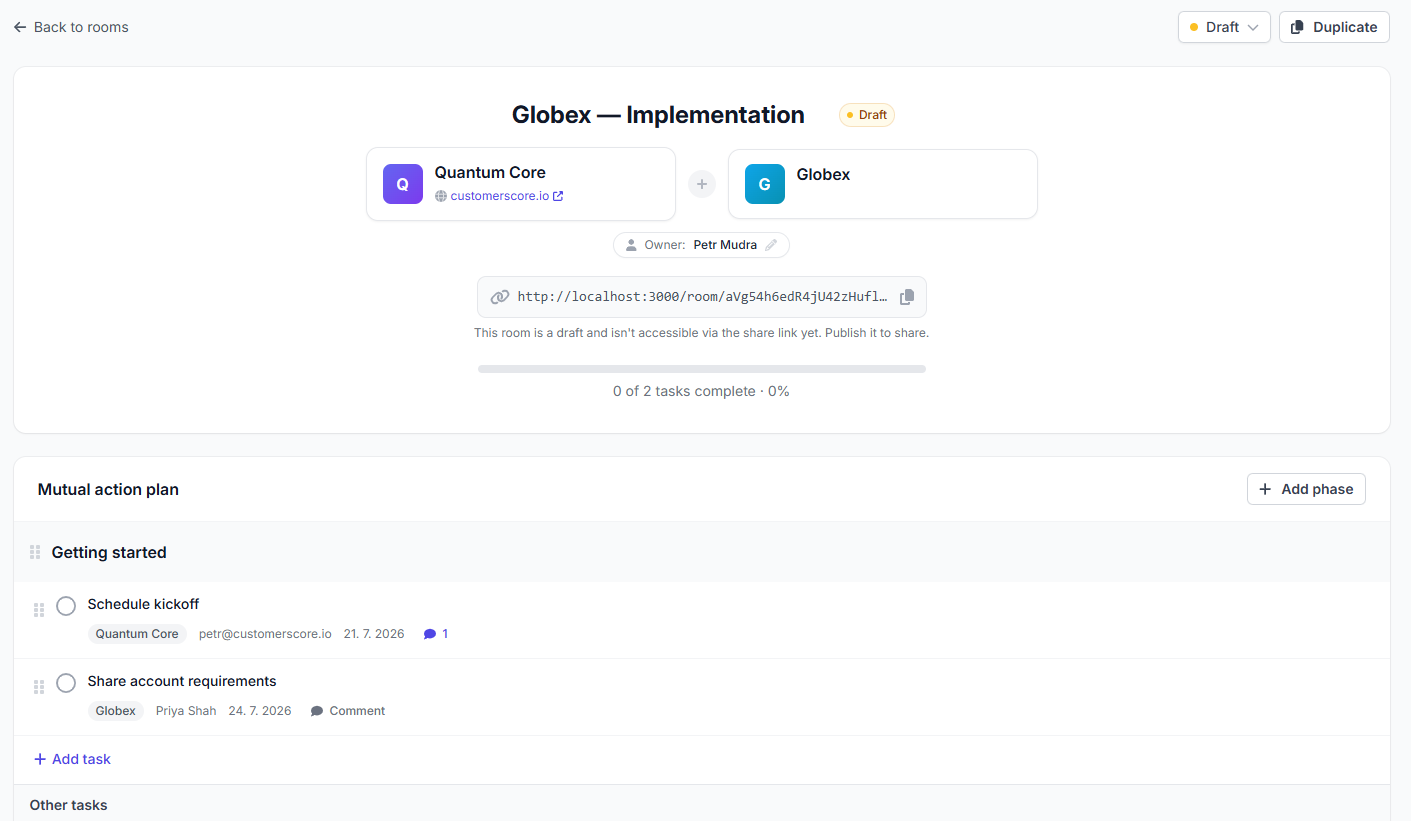
- Build a mutual action plan. Organize the work into phases, break each phase into tasks, set due dates, and assign every task to someone on your team or on the customer's.
- Share resources. Attach files, links, and documents so everything the customer needs sits in one tidy list.
- Add the people. List both your team and the customer's contacts so everyone knows who's who. Customer-side participants need just a name and an email.
- Track progress live. A progress bar shows exactly how far along the plan is, updating the moment anyone completes a task.
- Comment in context. Discuss any task or resource right where it lives, and @mention anyone in the room. Mentioned people get an email, so the right nudge reaches the right person without another meeting.
- Share with one public link. Send the room link and your customer opens it instantly. No account, no password, no IT ticket.
- Put your own live chat on the room. Connect Crisp, Smartsupp or Intercom once and every published room carries your chat bubble, so a stuck customer reaches you without leaving the plan.
- Meet customers in their language. The public room page comes in English, Czech and Brazilian Portuguese, picked from the visitor's browser with a switcher in the footer.
- Duplicate your best plan. Built a room that works? Copy it and spin up the next one in seconds.
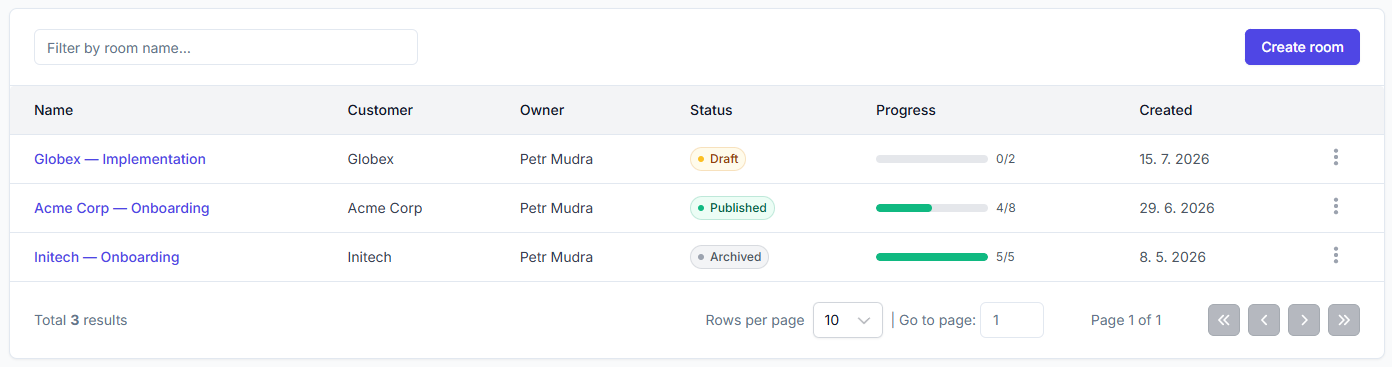
Built around a mutual action plan
A mutual action plan (MAP) is a shared checklist of everything that has to happen for the customer to reach their first value, with a named owner and a due date on every step. The "mutual" part is the point: when the customer owns tasks too, onboarding stops being something you do to them and becomes something you do with them.
In a Customer Room, the plan is the room. You shape it in the editor: add and reorder phases and tasks by dragging, drop in resources, and line up the people on both sides. Everything you change is instantly reflected in what the customer sees.
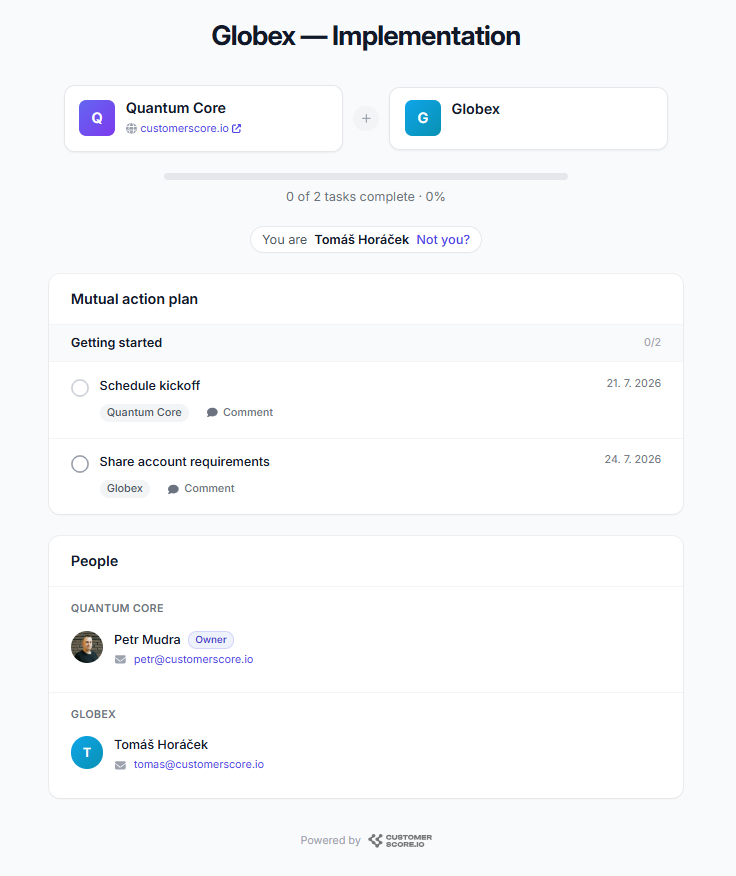
Your customer lands on a clean, focused page: the plan, the resources, and the people, with a progress bar up top. They can check off their own tasks, and the update flows straight back to you. No more "just checking in" emails to find out whether they invited their team yet.
In their language, on their terms
That page also speaks your customer's language. The public room comes in English, Czech and Brazilian Portuguese, picked up from the visitor's browser, with a switcher in the footer if they want a different one.
What it does not do is translate your work. Room names, phases, tasks, descriptions and comments stay exactly as you wrote them, because a machine-translated onboarding plan is worse than an English one. The interface adapts around your content, so a stakeholder in São Paulo can tell which task is theirs and when it is due without decoding the labels first.
When a comment is the wrong tool
Rooms are built for asynchronous work: your customer opens the link, ticks off tasks, and leaves a comment when something needs discussing. But when they are stuck right now, waiting on a comment thread is exactly the friction onboarding cannot afford.
So you can put your own live chat on the room. Connect Crisp, Smartsupp or Intercom once from the Customer Rooms settings, and every published room carries your chat bubble. The customer's name and email travel with the conversation, so you know who you are talking to and which plan they are looking at. You paste a key from your provider, never a code snippet, so there is no way to break a room page. And any room that should stay quiet can have chat switched off on its own.
The point is where the conversation lands: in the same inbox, with the same history and the same notifications your team already works in. Rooms do not become another place to check.
Not just onboarding
Onboarding is where rooms earn their keep, but the mechanism is general: a plan, tasks for both sides, files, and one link. Teams use the same setup for:
- Implementation projects. Longer technical rollouts with IT on the customer's side, where phases and owners matter even more than in a standard onboarding.
- Renewals and QBR follow-ups. Every QBR ends with commitments on both sides, and most of them evaporate by the next call. Put them in a room and the renewal conversation starts from a shared record of what actually got done.
- Joint projects. A migration, a new team rollout, an expansion into a second department. Anything with steps and two sets of owners fits.
- Proposals. Share the offer, the scope, and the next steps in one link instead of a PDF attachment that gets forwarded around.
Duplication makes this practical: build one good renewal room or one good implementation plan, then copy it for every account that follows.
Why it belongs in your CS platform
Standalone digital sales room and onboarding tools do rooms well, and charge hundreds of dollars a month for a product that can't see your usage data, your billing, or your churn risk.
Customer Rooms are part of Customerscore.io, so the room lives next to everything else you know about the account: the health score, the usage trend, the tasks your team is already tracking. The same platform that predicts churn runs the onboarding that prevents it. That matters because onboarding isn't a project with an end date, it's the first 90 days of a retention story, and the point is to know whether it worked. Which brings us to what's next.
What's coming next
This is just the beginning for Customer Rooms. On our roadmap:
- Tie rooms to health. Surface onboarding progress right alongside each account's health score, so a stalled plan shows up as the risk signal it is.
- In-app notifications. Get notified inside Customerscore.io when a customer completes a task or leaves a comment, not just by email.
- Personal links per contact. Give each participant their own link, so you always know exactly who did what.
Create your first room and tell us what you'd like to see next. And if you're not using Customerscore.io yet, see how Customer Rooms fit into the rest of the platform, or book a quick demo.
Related articles
Introducing AI-generated QBRs: a ready-to-present business review for every customer
Open a customer, pick a period, and get a full quarterly business review drafted from their real data. Edit what the AI wrote, then export it to PDF or PowerPoint.
Product updateIntroducing Tasks: never lose a follow-up again
A simple way to capture the follow-ups every account needs and make sure they actually get done.
Product updateMay 2025 product updates
We are staying lean and shipping features our customers ask for, as well as working towards our long-term roadmap.
Product updateIntroducing My Day: the priorities your CS team starts with
One page that tells every CSM who to handle today and why: renewals with bad signals, stalled onboardings, upsell openings, accounts that went quiet.