
Introducing My Day: the priorities your CS team starts with

Ask a CS manager what the first hour of their day looks like and you get the same answer in different words. A look at the dashboard. A saved filter in the CRM. Yesterday's Slack alerts, half of them already stale. A personal note from last week that says "call them Tuesday". Thirty minutes later there is a rough plan, and nobody is quite sure it is the right one, or that nothing fell through the gaps between the tools.
Meet My Day: one page in Customerscore.io that shows every account your team should handle today, the signal that flagged it, who owns it, and what to say when you pick up the phone.
The situations My Day catches for you
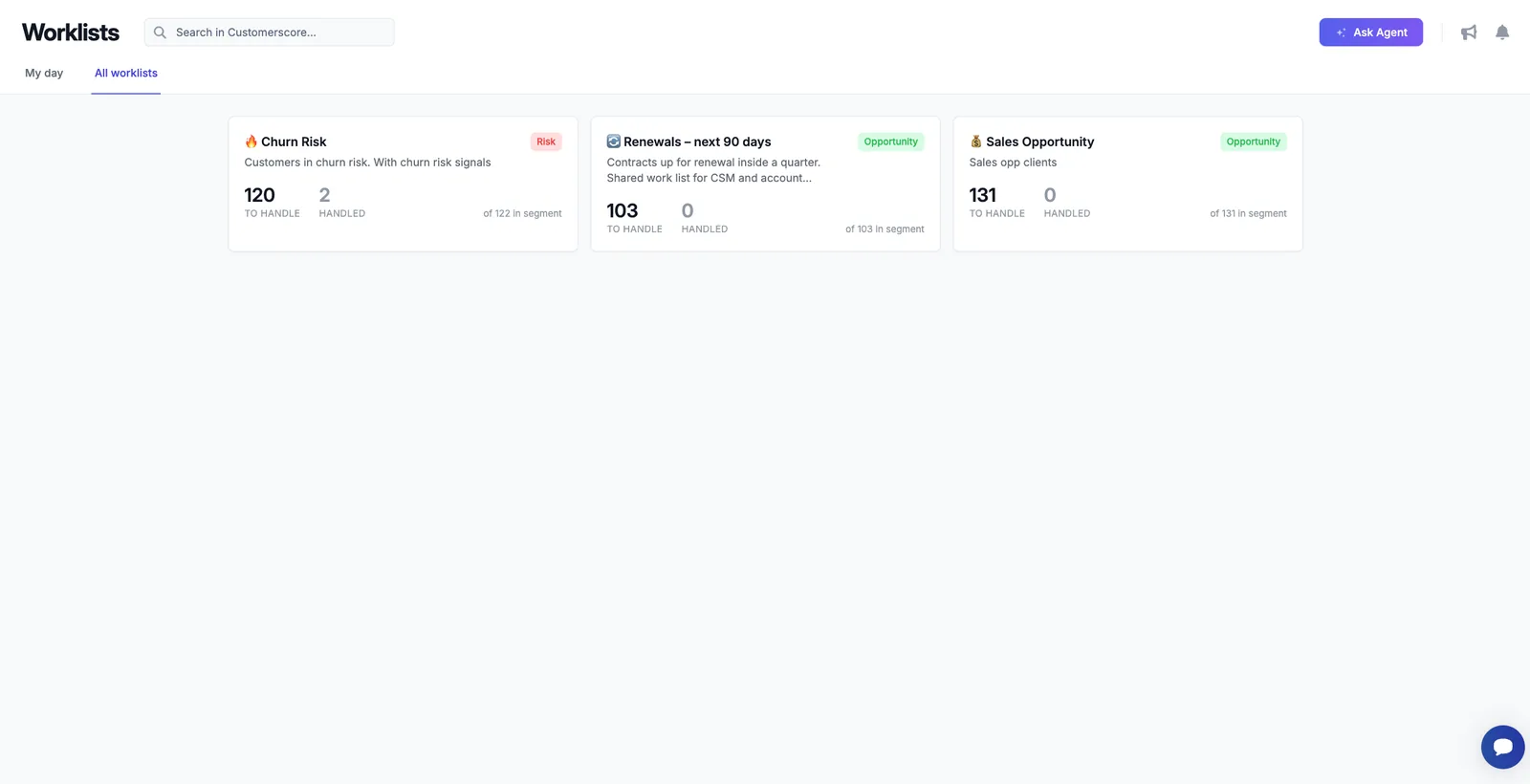
My Day is not a dump of everyone with a low score. It is built from the situations that actually cost you revenue, each one a signal with a name your team recognizes. A few we see teams start with:
- A renewal is coming and the signals are turning bad. The contract ends in 60 days, usage has been sliding for a month, and the last recorded call carried a negative tone. Without a system, this account shows up the day the cancellation notice arrives. On My Day it shows up while there is still time to change the outcome.
- Onboarding has stalled. A customer signed three weeks ago and has never touched the feature they bought the product for. Nobody notices, because new customers are assumed to be fine. This is where most churn starts, and it is quiet.
- An upsell opening appeared overnight. The company added seats, a second team started using the product, or consumption is running ahead of the plan. Left alone, sales hears about it at the next renewal, if at all. On My Day it is a row with a green badge and a number next to it.
- An account went silent. Decent health, meaningful MRR, and no email, meeting or support ticket in 90 days. On a large account, silence is a signal, not a sign of peace.
- A score dropped on an account nobody owns. The long tail below the line where a CSM is assigned. These accounts churn in the dark unless something puts them in front of a person.
Each situation is its own signal, with a live count of how many customers are waiting on it and how many have already been dealt with. Customers are flagged when they match the conditions and drop off when they no longer do, so the count on the card is always today's, not last quarter's.
One morning, one page
My Day pulls the open items from every signal into a single queue. Every row shows the customer, the signal that flagged them (Churn Risk, Renewal, Sales Opportunity), the owner, MRR, the current health score and how long they have been waiting.
Two controls do most of the work. Only customers I own turns the shared queue into a personal one, which is what a CSM wants at nine in the morning. The signal filter does the opposite for the CS lead who wants to see, say, every renewal across the team before the pipeline call. Sort by MRR and the biggest money is at the top.
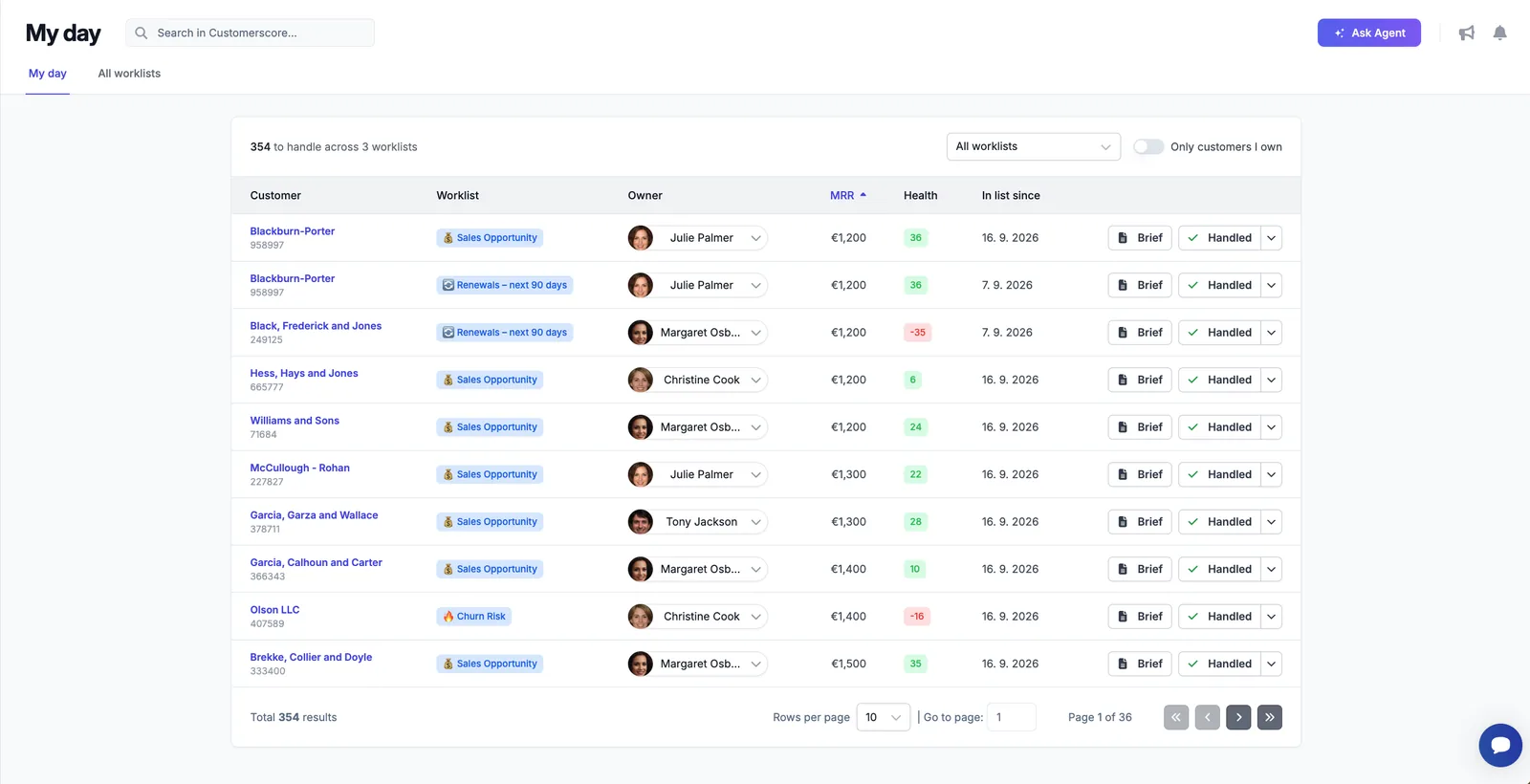
The point is not the table. The point is that the team stops assembling priorities by hand and starts the day already knowing where to look.
Why today, and what to say: the Brief
Knowing who to call is half of it. The other half is walking into the call knowing what happened, which is the part that used to take twenty minutes of clicking through the CRM, the inbox and the analytics tool.
Click any row and a Brief opens next to the queue. At the top, the hard numbers: where the health score was and where it is now, MRR then and now, how many conversations and meetings are on record. Below it, five short sections written for that customer and that signal:
- Why now. What flagged the account, in one paragraph.
- What changed. The movements since it entered: usage, seats, credits, revenue.
- Last conversation. What the most recent email or call was about, or a plain note that there has not been one.
- What to say. A suggested angle for the conversation, matched to the purpose of the signal. A renewal signal gets a save angle, an opportunity signal gets an expansion one.
- Risks. What not to do. The account may look like an upsell, but if active users dropped last quarter, the Brief says so before you push for more seats.
That last section is the one new team members thank you for. It is the context a senior CSM carries in their head, written down for whoever happens to own the account today.
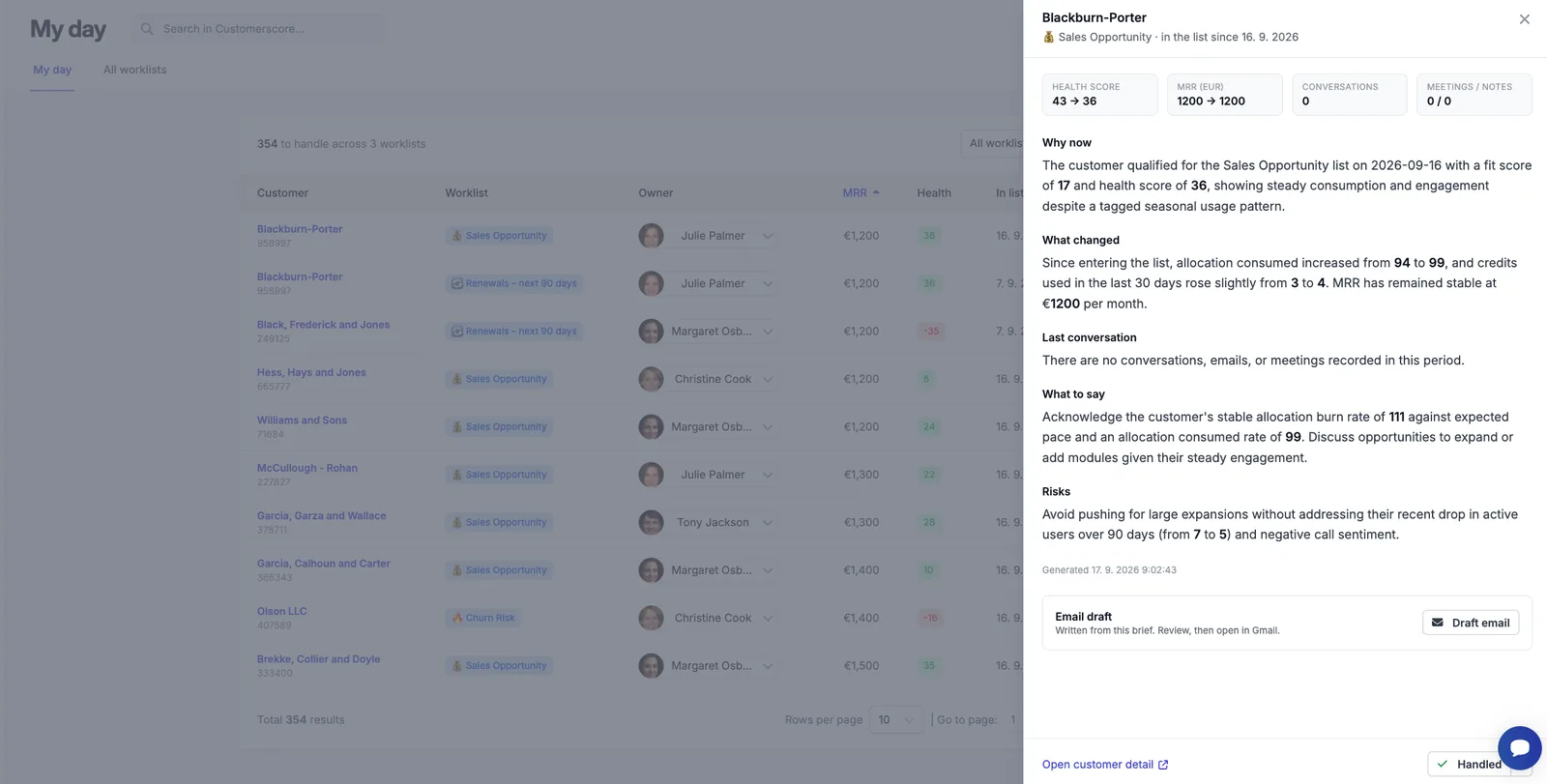
Under the Brief sits an email draft, written from the same context and sized for a real inbox, not a newsletter. You read it, change what you would say differently, and open it in your mail client. Nothing is sent without a person deciding to send it.
Handled, snoozed, and back again
A queue is only useful if it empties. When you have dealt with a customer, mark them Handled and they drop off the queue. If the right moment is next month, Snooze them until a date and they come back on their own. Either way you can leave a note on why, so the next person to open the account does not have to guess.
The Handled tab keeps the record: who closed each item, when, and what they wrote. If someone closes a row by mistake, Put back reopens it.
One behaviour matters more than it looks. When a handled customer's situation repeats, say their usage drops again three months after you saved them, they return to the queue by themselves. Nobody has to remember to check. My Day is not a to-do you clear once, it is a standing watch.
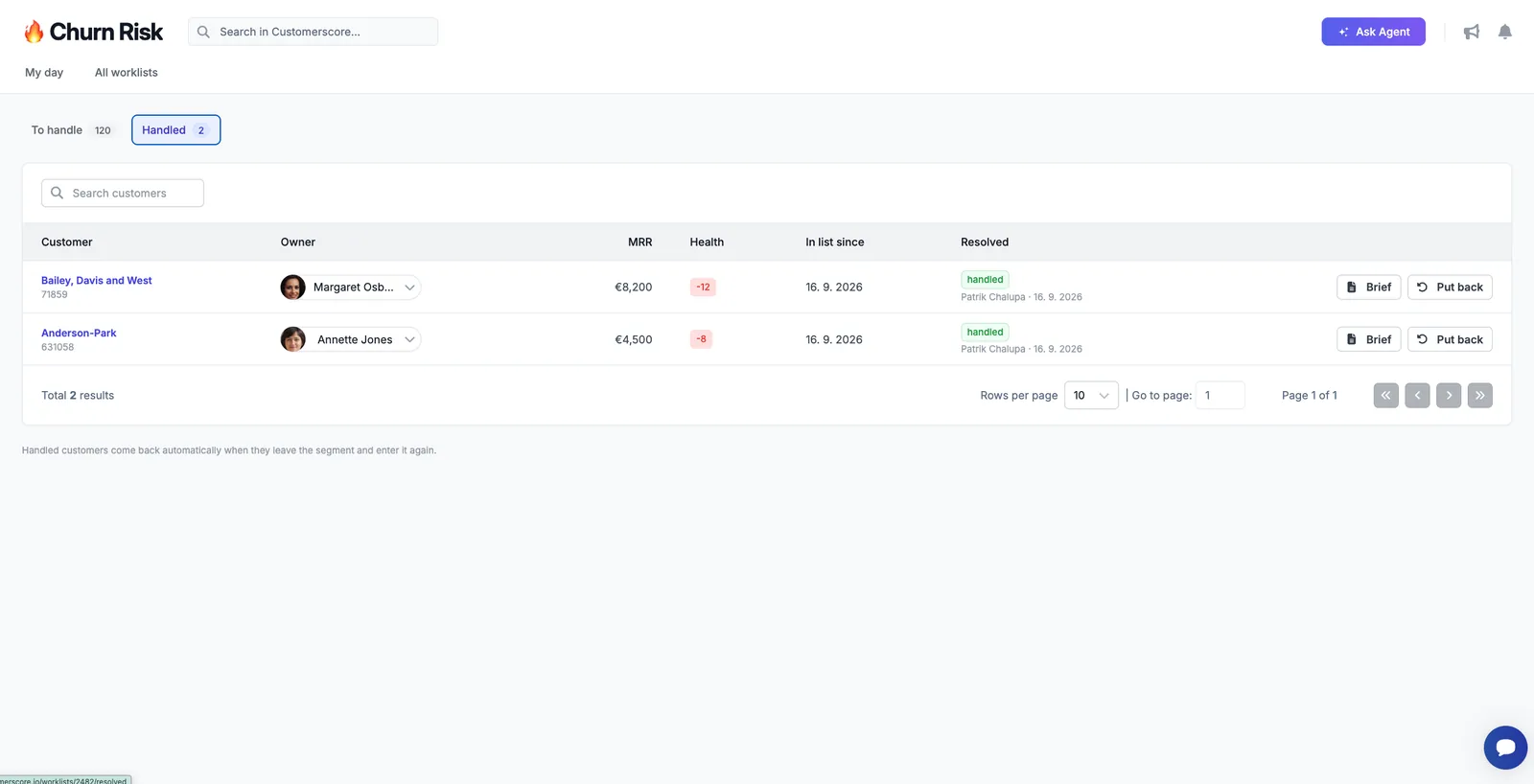
For a CS lead, this tab answers a question that used to have no answer: did anyone actually act on the risks we flagged last month?
Which signals to set up first
Start with two or three, not ten. In practice, the first signals are almost always:
- Renewals in the next 90 days, shared between CS and account management, so the two teams stop working from different spreadsheets.
- Churn risk, driven by the health score and its drivers rather than a single usage threshold.
- Expansion, for the accounts whose behaviour says they have outgrown the plan.
Once those are running smoothly, add the quieter ones: stalled onboarding, silent accounts, failed payments, survey detractors. Every signal has a short description of its purpose, and the Brief and the email draft take their tone from it, so it is worth writing that sentence with the outcome in mind.
How it fits with the rest of Customerscore.io
The health score and its drivers tell you who is at risk and why. Smart Alerts tell you the moment something changes, in Slack or by email. My Day is the queue you work from every morning, and the follow-ups you promise on those calls become Tasks with an owner and a due date. The routine outreach that does not need a person runs through playbooks. If you want to see how the whole loop looks for a CS team, the Customer Success page walks through it.
How to turn it on
My Day is available to every Customerscore.io account. Any group of customers you already track can become a signal: open it, switch it on for My Day, write one sentence about what it is for, and its customers appear at the next data refresh. Turning it on for a group you already have does not fire alerts for the customers already in it, so there is no notification storm on day one.
The My Day guide in our documentation has the full walkthrough, from setting up your first signal to how snoozing and re-entry work in detail.
Related articles
Summer product update: AI-generated QBRs, Customer Rooms, Tasks and the integrations behind them
A summer of shipping in one place: the layer where your team does the work, the conversations behind the numbers, and the review that now writes itself.
Product updateIntroducing AI-generated QBRs: a ready-to-present business review for every customer
Open a customer, pick a period, and get a full quarterly business review drafted from their real data. Edit what the AI wrote, then export it to PDF or PowerPoint.
Product updateIntroducing Customer Rooms: one shared space to onboard every account
A shared workspace you build for each account and hand over with a single link. No login, no email threads, just one plan both sides actually follow.
Product updateIntroducing Tasks: never lose a follow-up again
A simple way to capture the follow-ups every account needs and make sure they actually get done.