
Summer product update: AI-generated QBRs, Customer Rooms, Tasks and the integrations behind them

For most of its life, Customerscore.io answered one question well: which accounts are in trouble? This summer we went after the next one. Knowing an account is slipping only pays off if something happens afterwards, and until now that something lived in a spreadsheet, a Slack thread, or somebody's head. Over the summer we shipped the working layer: a shared space you run onboarding in together with the customer, follow-ups that outlive the call they were promised in, expansion signals sitting next to churn risk, and alerts anyone on the team can read out loud and understand.
Then we went one step further. The account's own words, its emails and its recorded calls, now sit next to its numbers, and on top of all of it the quarterly business review drafts itself.
What shipped
AI-generated QBRs
What it is. Open a customer, pick a period, and Customerscore.io drafts the whole quarterly business review from that account's own data. Seven sections, from the executive summary through health, usage and financials to risks and recommended action items, sit above a snapshot of the hard numbers frozen at generation time. Generate for the last month, two months, three months or the last completed quarter, in any of seven languages. Generation runs in the background and we email you when the draft is ready. Every section is editable markdown, and the finished review exports to a PDF or a PowerPoint deck with one slide per section.
Why it matters. The meeting was never the expensive part of a QBR. The day of preparation was, and that cost is the reason most teams run reviews for their top ten accounts and send everyone else a check-in email. When the draft arrives in minutes, the mid-tier accounts that never got a structured conversation become the easiest ones to give one to. There is a second effect worth naming: reviews assembled from the same data every time are comparable, both between two accounts and between two quarters of the same one, which a folder of hand-built decks never was.
Who it is for. Every CS manager carrying more accounts than they can build decks for, and the lead who wants the reviews to be consistent rather than eleven personal slide templates.
Introducing AI-generated QBRs is the full walkthrough: what lands in each section, which sources feed the draft, and how the export works.
Conversations and meetings on the customer detail
What it is. Four integrations put the account's own words next to its numbers. Gmail connects one shared mailbox, support@ or sales@, and full email threads appear on the customer with quoted reply history cleaned away and a deep link back to the original. Intercom brings complete conversations rather than just the last reply. Fireflies.ai and tl;dv bring every recorded customer meeting with its AI summary, action items and topics, while the transcript and the recording stay with your provider, one click away. Threads and meetings are matched to customers by contact email and fall back to company domain, and anything belonging to none of your customers is never stored. Access is read-only, you pick the initial sync window, Gmail can be narrowed with a standard search filter such as label:support, and everything refreshes daily or on demand.
Why it matters. A health score tells you an account is slipping. The support thread from July tells you why. Those two have always lived in different tools owned by different people, which is how a renewal call arrives with nobody knowing about the incident in the summer. It is also what makes the QBR above worth generating: a review written from usage data alone can report what changed, while one that can read the conversation can explain it.
Who it is for. The CS manager who would otherwise walk into a call cold, and anyone inheriting an account who needs its history before the first meeting.
Customer Rooms
What it is. A shared workspace you build for each account and hand over with a single link. Inside it: a mutual action plan split into phases and tasks, due dates, an owner on your side or the customer's, the resources they need, and the people involved on both sides. Your customer opens the link and sees exactly the plan you see, with no account and no password. They tick off their own tasks and the progress bar updates for everyone. Comments live on the individual task or resource they are about, and mentioning someone sends them an email, so the nudge reaches the right person without anybody leaving the room.
Two additions landed on top of it during the summer. Live chat puts your existing widget on every room, so a customer who is stuck right now can reach you while still looking at the plan. Crisp, Smartsupp and Intercom are supported, and conversations stay in the tool your team already watches. And the customer-facing room now speaks English, Czech and Brazilian Portuguese, picked automatically, which matters the moment onboarding crosses a language border.
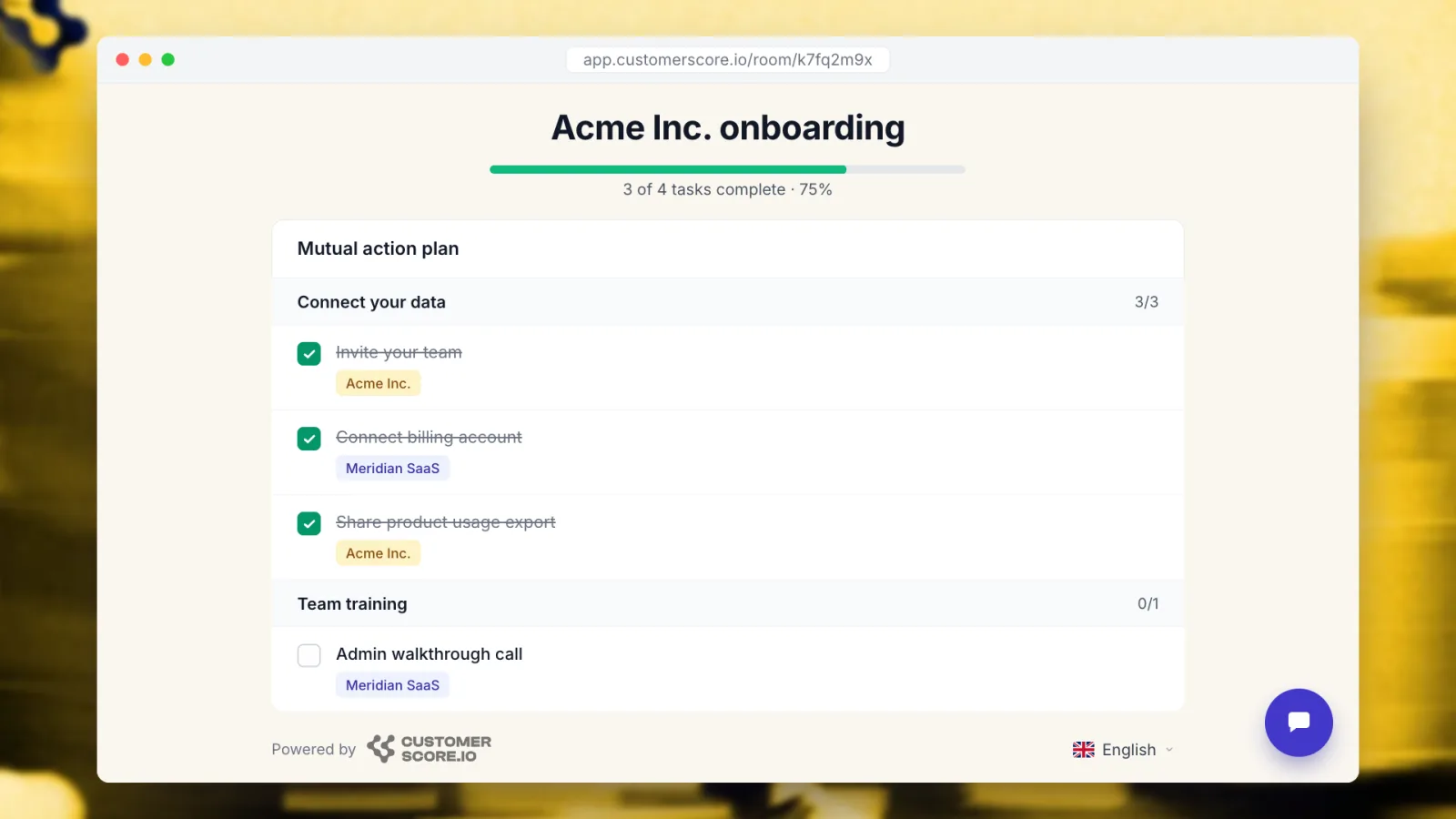
Why it matters. Slow onboarding is where the churn clock starts, and most of the delay is not work, it is coordination: chasing a document, re-explaining the plan, discovering in week six that both sides were reading a different version. One shared link removes the version question entirely and makes stalled steps visible while they are still cheap to fix.
Who it is for. Onboarding and implementation managers first, CS leads second, because for the first time the state of every onboarding is in one list instead of eleven email threads.
Introducing Customer Rooms is the full walkthrough: the mutual action plan, what your customer actually sees when they open the link, and the cases beyond onboarding that rooms turn out to fit.
Tasks
What it is. A follow-up with a title, description, due date, assignee and priority, linked to a customer or standing on its own. Every task is Open, Done or Cancelled, and overdue ones are flagged. Your open tasks show up on the dashboard the moment you log in. The dedicated Tasks page gives you My tasks, All tasks and Overdue, with filters by assignee, due date, priority and status. Each customer also has a Tasks tab that carries the open count on its label, so a follow-up can be created and closed without leaving the account.
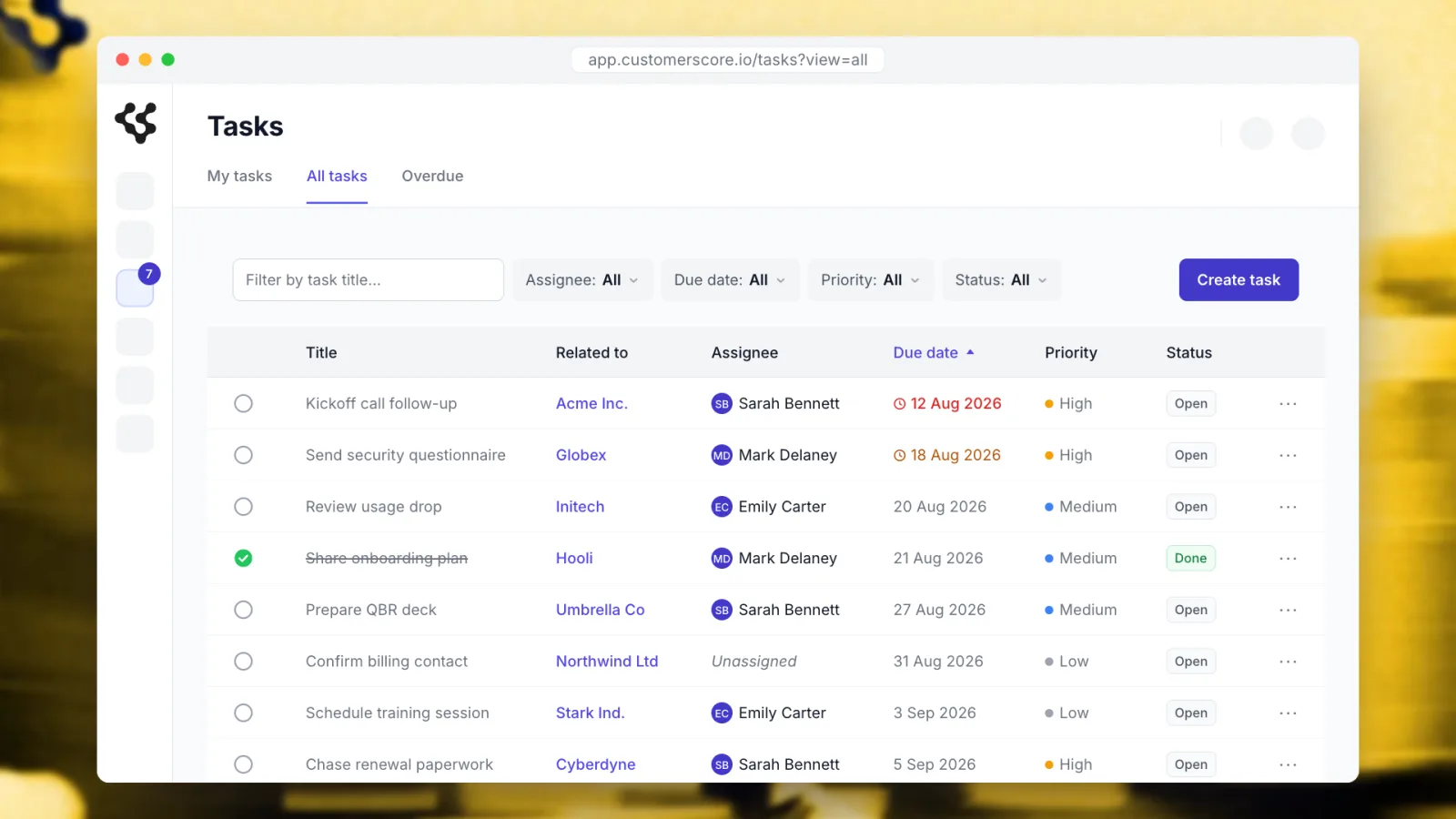
Why it matters. "Schedule the QBR", "chase the renewal", "reach out, health is dropping": these are the cheapest retention actions you have and the ones most likely to evaporate between a call and Monday morning. Putting them next to the health data means the account that triggered the task and the task itself are one click apart.
Who it is for. Anyone who owns accounts, plus the CS lead who until now had no way to see whether the agreed follow-ups actually happened.
Introducing Tasks covers it in full: where tasks show up across the product, how they attach to an account, and why the follow-up belongs next to the health score that prompted it.
Upsell scoring
What it is. Every account now carries an upsell score on a low, medium or high scale, with the factors behind it, right alongside its churn risk. It shows up everywhere churn risk already does: the customer table, the account detail, filters, sorting, segments, alerts, exports, outbound sync to your other tools, and the API.
Why it matters. Most retention tooling is built to point at danger, which leaves expansion to instinct and timing. Because the upsell score sits in the same places as risk, a "ready to grow" list can be worked exactly like an "at risk" list: filter it, save it as a segment, alert on it, hand it to whoever owns the conversation. Net revenue retention moves on both halves of that number, not just the one you defend.
Who it is for. Account managers and RevOps, and the small teams where sales and customer success are the same person.
Alerts you can read out loud
What it is. The alerting side got rebuilt around three changes. Slack, connected once in a single click, delivers any alert straight to a channel, and Slack and email recipients can be combined on the same alert. Comparison windows let a numeric alert fire on the change against the previous day, week or month instead of an absolute threshold, and a new alert type fires when a specific customer attribute changes at all. The editor is now a sentence you assemble: choose the subject, the operator, the value and the comparison window, and read the result back in plain language before saving. On top of that, every alert remembers its most recent run, so the "last results" table shows which accounts matched and exports them to CSV in one click.
Why it matters. An absolute threshold misses the account that is falling fast but has not crossed the line yet, which is the account you most want to catch. And an alert nobody can read is an alert nobody maintains: the sentence builder means the person receiving the notification can also tell what triggers it, without asking whoever set it up nine months ago.
Who it is for. The CS lead who owns the alert set, and the whole team on the receiving end of it.
Also shipped this summer
Your customer data inside Claude, ChatGPT and Gemini
The MCP server lets an AI assistant work with your Customerscore.io account directly, in plain language. Claude connects over OAuth 2.1 with PKCE, which means one click and short-lived scoped tokens you can revoke; ChatGPT, Gemini, Cursor and other MCP clients authenticate with a scoped API token. The tools cover customers (list, detail, notes, stats, AI summaries), scoring and churn (score history, churn analytics, lost MRR), analytics (insights, MRR trend by health, statistics overview), segments, properties and tags, and alerts. list_customers is the workhorse: free-text search plus filters on cohort, churn risk, health score and renewal date.
Almost everything is read-only. The only write actions are creating a segment and creating an alert, so an assistant can build you a list or set up a warning, but cannot edit or delete what is already there. Nothing leaves Customerscore.io on the way.
Read your customers over the API
Data used to go into Customerscore.io through the API and only come back out through the interface. Two new endpoints close that loop. You can search customers by any property or core field, combine conditions, choose exactly which properties come back and page through the results, or fetch a single customer by the same external ID you already use to create and update them. Scores and custom properties arrive side by side, authenticated with the API key you already have. Enough to feed a warehouse or drive a workflow that lives somewhere else entirely.
Annotations on every chart
A number nobody can explain is a number nobody trusts. You can now pin a note to a specific date on any chart with a time axis, on the dashboard, across statistics, and on an individual account: the pricing change, the champion who left, the tracking fix that reset a metric. Six months later the explanation for that dip is on the chart itself rather than in whoever happened to be in the room.
What's next
The direction for autumn is automation. Tasks are the obvious next thing to stop creating by hand, so we are working on letting alerts and playbooks open them for you, and on having the product propose the next best action for an account rather than waiting to be asked. Customer Rooms get closer to the health data they sit beside, with onboarding progress readable from the account itself and notifications that reach you inside the product, not only by email.
Related articles
Introducing My Day: the list your CS team works from every morning
One page that tells every CSM who to handle today and why: renewals with bad signals, stalled onboardings, upsell openings, accounts that went quiet.
Product updateIntroducing AI-generated QBRs: a ready-to-present business review for every customer
Open a customer, pick a period, and get a full quarterly business review drafted from their real data. Edit what the AI wrote, then export it to PDF or PowerPoint.
Product updateIntroducing Customer Rooms: one shared space to onboard every account
A shared workspace you build for each account and hand over with a single link. No login, no email threads, just one plan both sides actually follow.
Product updateIntroducing Tasks: never lose a follow-up again
A simple way to capture the follow-ups every account needs and make sure they actually get done.