
Introducing AI-generated QBRs: a ready-to-present business review for every customer

Ask a CS manager how long a QBR takes and you will rarely hear about the meeting. The meeting is an hour. The preparation is a day: pulling usage numbers out of one dashboard, revenue out of another, scrolling back through email threads to remember what was promised in June, opening the recorder to find what was said on the last call, then arranging all of it into slides nobody will read twice.
That cost has a consequence most teams have quietly accepted. QBRs happen for the top ten accounts and nobody else. The rest of the book gets a check-in email, which is not the same thing, and the accounts that would benefit most from a structured conversation are exactly the ones that never get one.
AI-generated QBRs change the arithmetic. Open a customer, pick a period, and Customerscore.io drafts the whole review from that account's actual data, ready to edit and present.
What is in a generated QBR
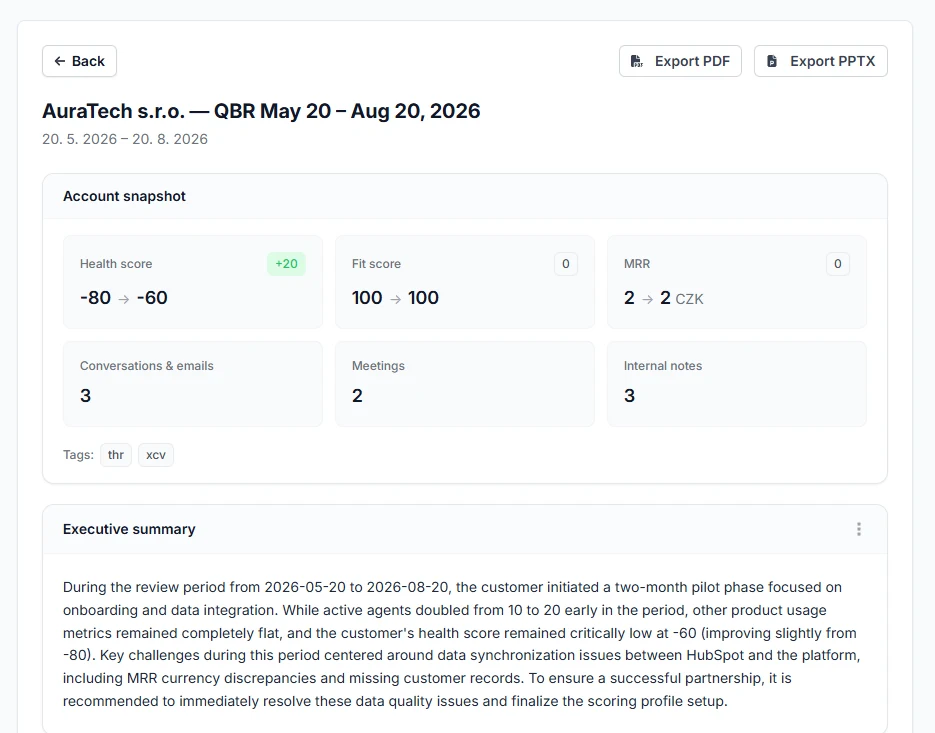
Every report covers seven sections:
- Executive summary. What happened in the period, in the language you would use to open the call.
- Health and engagement trend. Where the score moved and what moved it.
- Product usage review. Which metrics grew, which went flat.
- Financial overview. The revenue trajectory across the period.
- Communication and relationship summary. What was actually discussed, drawn from emails and meetings.
- Risks and opportunities. The things worth raising before the customer raises them.
- Recommended action items. What to commit to on the call.
Above them sits a snapshot table of the hard numbers: health score and fit score, MRR, and the count of meetings, conversations and notes in the period. The snapshot is frozen at generation time, so a report you send in October still shows the numbers you presented in October, even after the account has moved on.
Built from the data you already connected
The draft is not a template with your customer's name pasted in. It is written from what Customerscore.io already holds about the account:
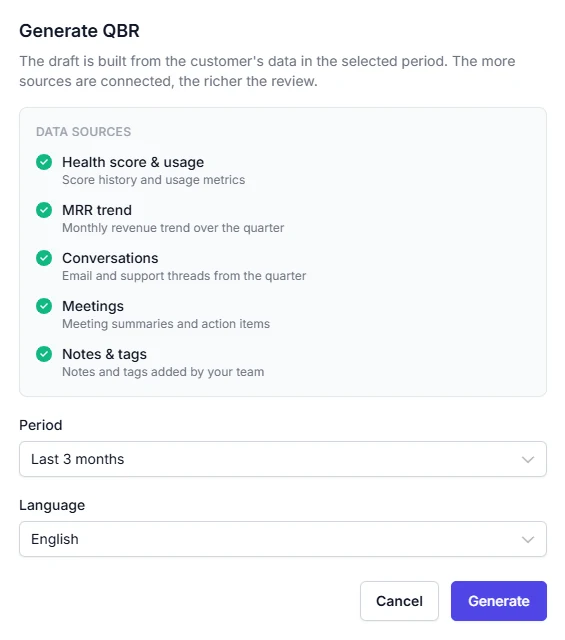
- Health score and usage. Score history and usage metrics across the period.
- MRR trend. The revenue trajectory, when an MRR property is set.
- Conversations. Email threads from the Gmail integration and Intercom conversations.
- Meetings. Summaries and action items from Fireflies.ai or tl;dv.
- Notes and tags. The context your team added along the way.
This is why the integrations matter more than they look. A QBR built on usage data alone can tell you the customer logged in less. A QBR that can also read the support thread from July and the notes from the last call can tell you why, and that difference is the whole value of the document.
The generate dialog shows exactly which sources are connected before you start, so there is no guessing about what will feed the review.
Your period, your language
Generate for the last month, the last two months, the last three months, or the last completed quarter. A quarterly cadence is the default assumption, but a monthly review for an account in trouble is often the more useful document.
The review is written in any of seven languages: English, Czech, German, French, Spanish, Italian and Brazilian Portuguese. If your customer runs their business in German, the review that lands in their inbox should be in German, not translated by them on the way into a board meeting.
Generation runs in the background, so you can close the tab and keep working. We email you the moment the report is ready.
Edit it, then export
An AI draft that you cannot change is a demo, not a tool. Every section of the report is editable markdown, so you can cut the paragraph that misreads the situation, sharpen the recommendation, and add the one thing the data does not know.
When it is ready, export it as a PDF or as a PowerPoint deck, one slide per section with the snapshot included. What leaves the platform is a document you wrote, with the assembly work done for you.
What changes when a review takes minutes
- Before. A day of preparation per QBR, which caps you at the accounts important enough to justify a day.
- After. A draft in minutes, edited in half an hour, for any account you choose.
- Who feels it first. The CS manager carrying a large book. The mid-tier accounts that never got a structured review are now the easiest ones to give one to.
There is a second, quieter effect. When the review is assembled from the same data every time, two QBRs for two accounts become comparable, and a QBR from March and one from June for the same account tell you something as a pair. A folder of hand-built slide decks never did that.
Where to find it
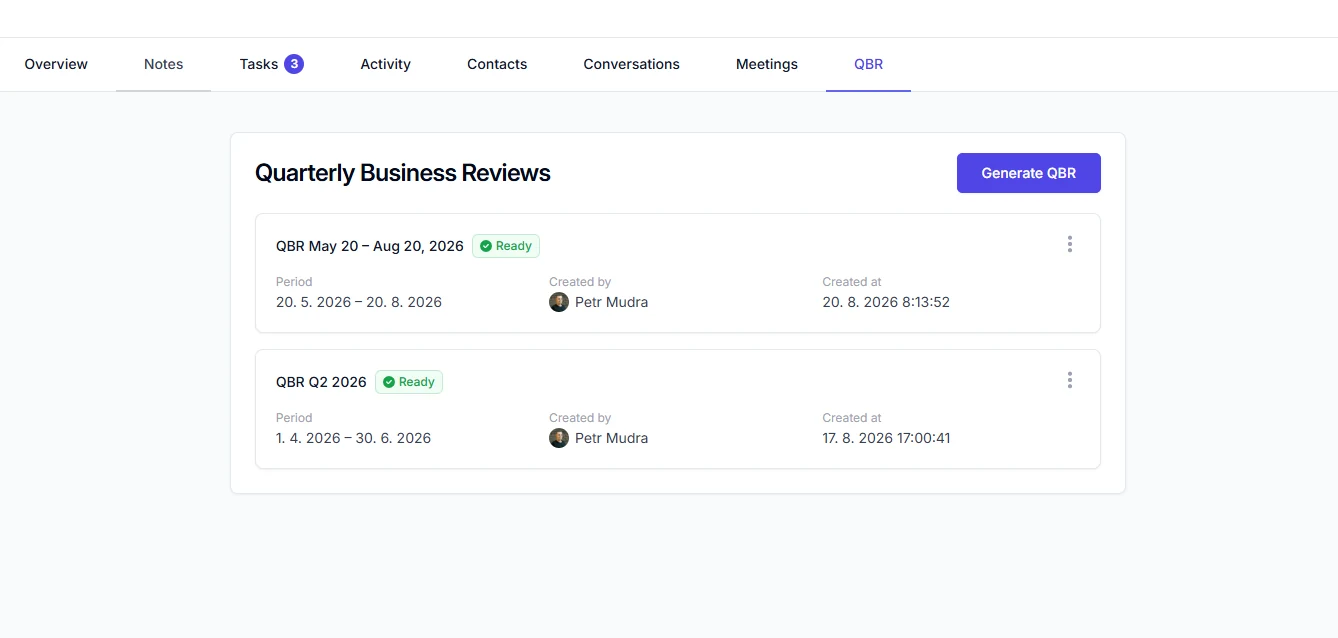
Open any customer and go to the new QBR tab. Generated reviews are listed there with their period and status, and the button to create the next one sits at the top.
The report gets better as more of the account's story reaches the platform, so if your inbox and your meeting recorder are not connected yet, that is the highest-value thing you can do before your next review cycle. Full setup details are in the QBR guide.
If you are already running onboarding in Customer Rooms, the two fit together: the room is the record of what both sides committed to, and the QBR is the moment you check whether it happened. And if you would rather ask for the numbers than read them, the same account data is reachable from Claude, ChatGPT and Gemini through our MCP server.
Related articles
Introducing Customer Rooms: one shared space to onboard every account
A shared workspace you build for each account and hand over with a single link. No login, no email threads, just one plan both sides actually follow.
Product updateIntroducing Tasks: never lose a follow-up again
A simple way to capture the follow-ups every account needs and make sure they actually get done.
Product updateMay 2025 product updates
We are staying lean and shipping features our customers ask for, as well as working towards our long-term roadmap.
Product updateIntroducing My Day: the priorities your CS team starts with
One page that tells every CSM who to handle today and why: renewals with bad signals, stalled onboardings, upsell openings, accounts that went quiet.