
Introducing Tasks: never lose a follow-up again

Meet Tasks, a simple way to capture the follow-ups every account needs and make sure they actually get done. Whether it's "schedule a QBR", "chase the renewal", or "reach out, health score is dropping", you can now turn it into a task and keep it in one place.
What you can do today
- Create a task with a title, description, due date, assignee, and priority (Low, Medium, High).
- Link a task to a customer so the context is always one click away, or create standalone tasks not tied to anyone.
- Track status. Every task is Open, Done, or Cancelled. Tick it off the moment it's handled.
- See what's due. Overdue tasks are flagged so nothing slips through the cracks.
See your tasks right on the dashboard
Your open tasks show up on the dashboard the moment you log in, so the day starts with a clear picture of what needs your attention.

One place for every task
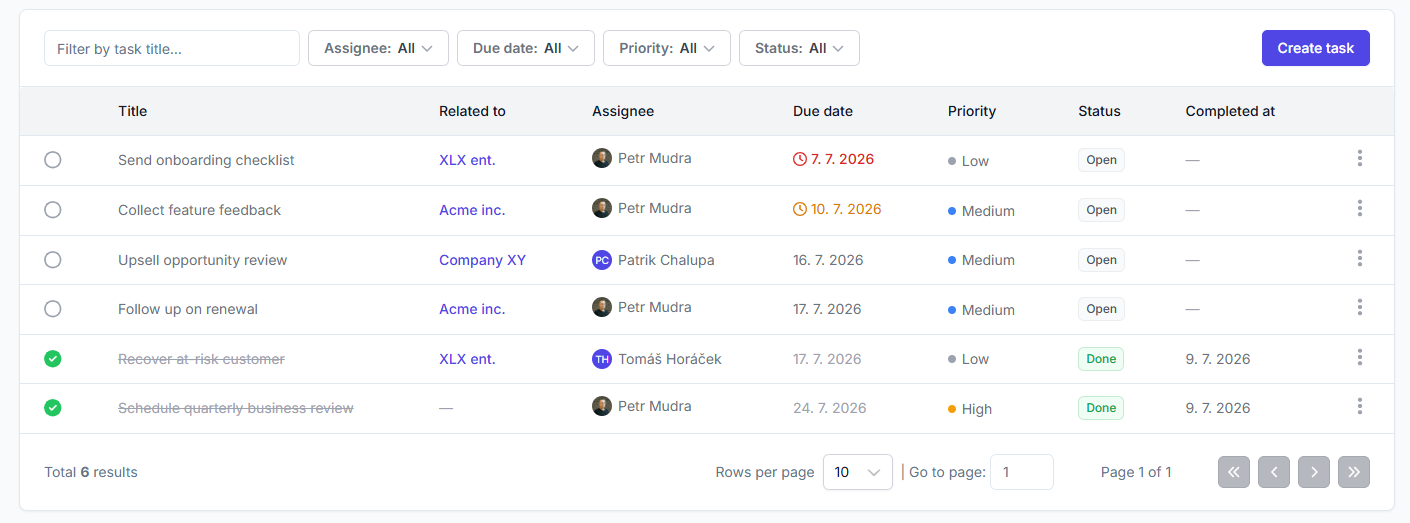
The dedicated Tasks page gives you three views (My tasks, All tasks, and Overdue) plus filters by assignee, due date, priority, and status, so you can zero in on exactly what matters.
Tasks in customer context
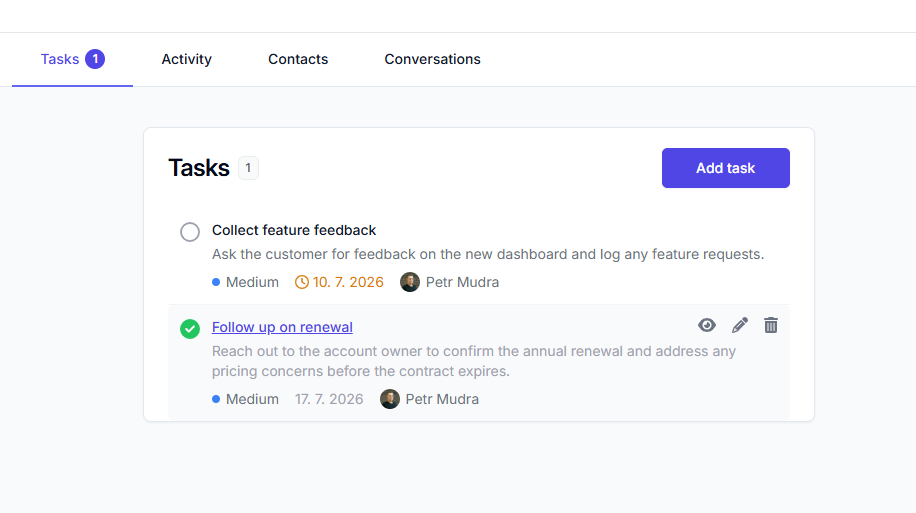
Every customer now has a Tasks tab showing the open task count right on the label. Create and complete follow-ups without ever leaving the customer's profile.
What's coming next
This is just the start. In upcoming releases we plan to:
- Wire tasks into automations. Let your alerts and playbooks create tasks automatically, so the right follow-up appears without anyone lifting a finger.
- Let AI generate tasks for you. Surface the next best action for each account and turn it into a ready-to-go task.
Give Tasks a try and let us know what you'd like to see next.
Related articles
Introducing AI-generated QBRs: a ready-to-present business review for every customer
Open a customer, pick a period, and get a full quarterly business review drafted from their real data. Edit what the AI wrote, then export it to PDF or PowerPoint.
Product updateIntroducing Customer Rooms: one shared space to onboard every account
A shared workspace you build for each account and hand over with a single link. No login, no email threads, just one plan both sides actually follow.
Product updateMay 2025 product updates
We are staying lean and shipping features our customers ask for, as well as working towards our long-term roadmap.
Product updateIntroducing My Day: the priorities your CS team starts with
One page that tells every CSM who to handle today and why: renewals with bad signals, stalled onboardings, upsell openings, accounts that went quiet.