
Salesforce Renewal Automation: A Practical Playbook


Automate four things in Salesforce: renewal opportunity creation, quote and order generation, notice scheduling, and uplift rules. Pair that with a usage audit and a 9 to 12 month runway before the term ends, and renewals stop being a fire drill. This is what salesforce renewal automation actually means in practice, not a vague promise of "efficiency."
The payoff shows up fast:
- Renewal pipeline becomes visible well in advance instead of appearing as a surprise on someone's calendar
- Missed contractual notices drop because dates trigger the workflow instead of a person remembering
- Uplift clauses get applied consistently instead of getting negotiated away out of habit
- Shelfware surfaces early enough to rightsize before the invoice goes out
Key Takeaways
Automating renewal opportunity creation, quote generation, notices, and uplift rules in Salesforce, backed by a 9 to 12 month runway and a clean usage audit, converts renewals from a reactive scramble into predictable, forecastable pipeline.
| Point | Details |
|---|---|
| Start early | Begin the renewal program 9 to 12 months before the term ends, not at the notice window. |
| Audit usage first | Typical audits find 20 to 40 percent of licenses show low or no activity, per Reveal Compliance's research. |
| Automate the core four | Renewal opportunity creation, quote/order generation, notices, and uplift rules should all run without manual triggering. |
| Fix data before automating | Missing term dates and unsynced billing records are the leading causes of automation failure. |
| Layer in health signals | Customerscore's churn prediction and health scoring help time and personalize renewal outreach based on account behavior, not just the calendar. |
Table of Contents
- Why Automate Salesforce Renewals: The Business Case
- What to Automate in Salesforce: The Core Renewal Workflows
- Data and Systems Prerequisites Before You Automate
- Implementation Roadmap: From Quick Win to Full Program
- Metrics and Dashboards to Watch After Automation
- Common Pitfalls and Practical Guardrails
- Handling Exceptions and Manual Intervention in Automated Renewal Processes
- Ensuring Compliance and Legal Considerations in Contract Renewals
- Customer Communication Strategies and Personalization During Automated Renewals
- Error Handling and Troubleshooting Common Issues in Renewal Automation
- What the Data Actually Tells You About Salesforce Renewals
- How Customerscore.io Helps You Operationalize Renewal Signals
- Sources
Why Automate Salesforce Renewals: The Business Case
Spreadsheets fail at renewal management for one simple reason: nobody updates them until the deal is already late. A self-driving renewal process built on asset records instead of a tracker fixes that by making the term end date the thing that drives action, not a reminder someone has to set.
Two costs disappear once you automate the salesforce renewal process. First, revenue leakage from uplifts that never get applied because the rep forgot or didn't want an awkward conversation. Second, shelfware: licenses nobody uses that renew anyway because no one flagged them. A usage audit alone tends to surface serious waste. Reveal Compliance's negotiation research finds that 20 to 40 percent of licensed seats in a typical Salesforce org show low or no activity by renewal time.
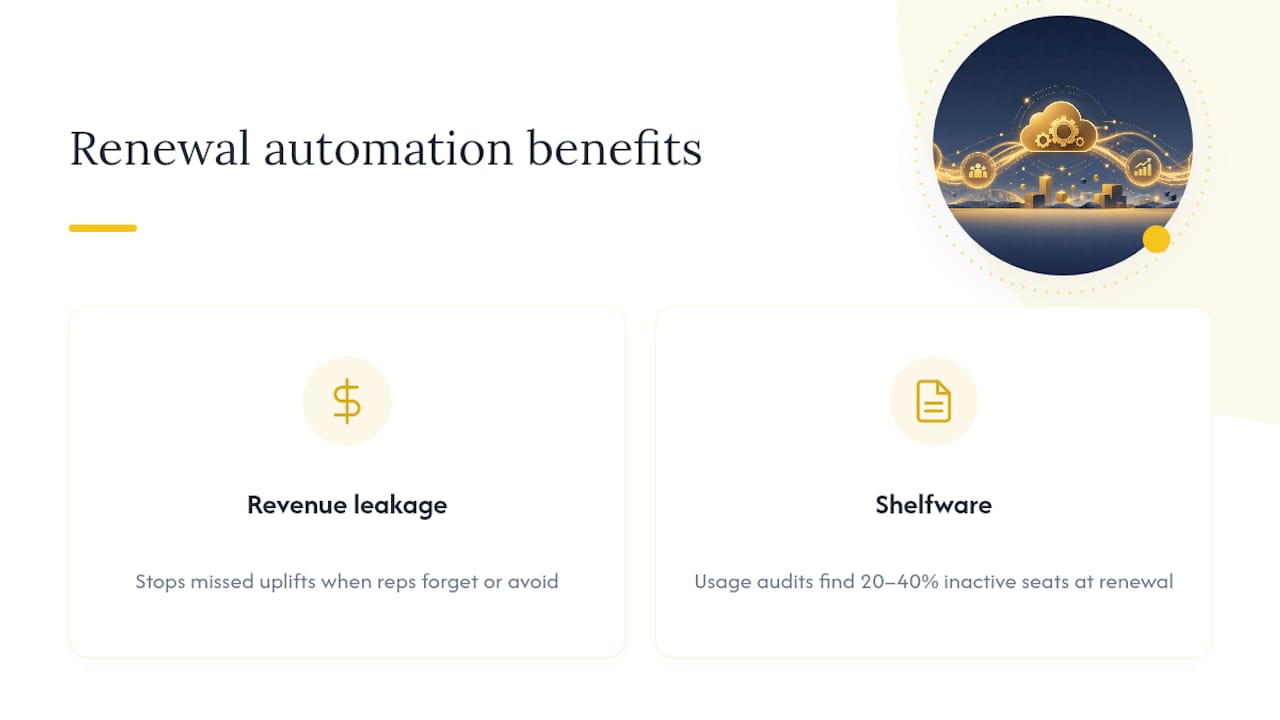
Timing matters as much as the automation itself. Programs that start the renewal clock 9 to 12 months before the term ends give teams enough runway to rightsize, benchmark pricing, and negotiate from a position of preparation rather than panic, according to guidance from Atonement Licensing. Automation without that runway just automates the same last-minute scramble.
What to Automate in Salesforce: The Core Renewal Workflows
Renewal automation isn't one button. It's a sequence of workflows that each remove a specific point of failure. Here's the order that works:
- Create the renewal opportunity at subscription creation. The renewal lives in pipeline the entire contract term, not just the final quarter, which is how Revenue Cloud's asset lifecycle tools are designed to work.
- Generate renewal quotes and orders automatically. Pull directly from the asset or subscription record so quantities, pricing, and terms don't get re-keyed by hand. Salesforce's own renewal API documentation shows how endpoints like initiate-renewal and CreateBillingScheduleFromOrderItem handle this programmatically.
- Schedule notices on a fixed cadence. A 90/60/30 day sequence tied to the actual term end date, not a guess, closes the gap where auto-renew clauses catch teams off guard.
- Automate uplift application, with exceptions routed to approval. Standard increases apply by default; anything above a threshold goes to a human.
- Roll expansions into the existing renewal opportunity. Don't let a mid-term upsell create a second, disconnected record. ARR accuracy depends on one source of truth per account.
Pro Tip: Build the renewal opportunity creation trigger off the subscription start date, not a manual flag. If a rep has to remember to create it, you haven't automated anything. You've just added a step.
Data and Systems Prerequisites Before You Automate
Automation amplifies whatever is already in your data. Clean records make it reliable. Messy ones make it a faster way to make the same mistakes.
Before flipping anything live, confirm the following:
- Every active order form has an exact term end date and notice window entered. No blanks, no "TBD."
- Subscriptions or assets are either native to Salesforce or synced reliably from your billing system. If you run Chargebee, Stripe, or a similar platform, the sync needs to be near real time, not a nightly batch that drifts.
- Usage and active-user reports exist and get pulled before renewal, not after the invoice goes out. This is where shelfware gets caught.
- Uplift clauses and co-termination effects are documented per contract, and approval routing is mapped for anyone who needs to sign off on an exception.
Missing term dates and unsynced billing records are the two most common reasons automation programs fail at rollout, according to Redress Compliance's analysis of auto-renewal risk. Fix those two things before anything else. A renewal-date framework that defines exactly what counts as the trigger date for notices and uplifts helps standardize this across an org that has grown by acquisition or has multiple billing systems.
Implementation Roadmap: From Quick Win to Full Program
Rolling out salesforce contract automation in one shot is how programs break. A phased build lets you catch data problems before they touch a live renewal.
- Weeks 0 to 4: Inventory every active contract's term dates and notice windows. Fix the blanks. Configure renewal opportunity auto-creation for a small pilot cohort and run it in parallel with your existing manual process, not instead of it.
- Weeks 4 to 12: Turn on notice scheduling and draft uplift rules. Generate quotes automatically for the pilot cohort and compare them line by line against what a human would have produced manually. Differences here usually point to a data gap, not a logic error.
- Months 3 to 6: Close integration gaps between billing and Salesforce. Pilot uplift enforcement on a wider segment. Run a usage-based rightsizing pass and benchmark your uplift percentages against what similar accounts are seeing.
- Months 9 to 12: Expand automation to the full renewal book. Prepare negotiation packets for large accounts ahead of their notice window. Where it makes sense, negotiate contract-level uplift caps so future renewals don't need a manual override every cycle.
| Phase | Focus | Validation step |
|---|---|---|
| Weeks 0 to 4 | Fix term dates, pilot opportunity creation | Run parallel with manual tracking |
| Weeks 4 to 12 | Notices and uplift rules | Compare auto-generated quotes to manual ones |
| Months 3 to 6 | Integration fixes, rightsizing | Benchmark uplift rates against peer accounts |
| Months 9 to 12 | Full cohort automation | Pre-build negotiation packets before notice window opens |
A workflow template built for AI-assisted renewal outreach is a reasonable starting point if you'd rather adapt an existing structure than build the notice and outreach sequence from scratch.
Metrics and Dashboards to Watch After Automation
Four numbers tell you whether renewal tracking in Salesforce is actually working, or just running.
- Gross revenue retention (GRR). Anything above 90% signals a healthy renewal book; below that, something in the pipeline is leaking before contracts even reach the notice stage.
- On-time renewal rate. How many renewals close before the term lapses, not after. A slipping number here usually means notices aren't firing early enough.
- Uplift realization. Contracted uplift versus what actually got billed. A wide gap means someone is negotiating away increases at renewal time that the system already calculated.
- Renewal forecast coverage. How much of your next 12 months of renewal ARR is visible in pipeline right now, not guessed at.
Track shelfware reduction alongside these. If rightsizing conversations are working, the share of licenses flagged as low-activity should shrink release over release. A renewal rate framework that ties these numbers together in one dashboard beats checking four separate reports every week.
Common Pitfalls and Practical Guardrails
Most renewal automation failures trace back to the same handful of causes, and all of them are avoidable.
- Building automation on subscription records that are incomplete or inconsistent. Fix the data before you fix the workflow.
- Treating bundled product commitments (add-on platforms, consumption-based products) as part of the core CRM renewal instead of a separate line. Bundling hides shelfware and inflates uplift math.
- Skipping the procedural non-renewal notice. Filing one inside the contractual window preserves leverage even if you plan to renew, because it reopens the terms for negotiation.
- Flipping full automation live without a parallel-run period. A few weeks of side-by-side comparison catches logic errors before they touch a customer invoice.
Pro Tip: File a non-renewal notice as a default procedural step for every enterprise contract nearing its window, even ones you're confident will renew. It costs nothing and keeps every option open.
Handling Exceptions and Manual Intervention in Automated Renewal Processes
No renewal automation system should run without an escape hatch. The moment you eliminate the ability for a human to intervene, you've built a system that will eventually apply the wrong uplift to the wrong account at the wrong time, and nobody will catch it until the customer complains.
The fix is a tiered approval structure, not a blanket override. Standard renewals under a defined uplift threshold, with clean usage data and no contract anomalies, flow straight through. Anything that crosses a threshold, an account flagged for low usage, a support escalation on file, or a contract with unusual terms, routes to a queue for a CS or RevOps lead to review before the quote goes out.
Build the exception criteria into the automation itself rather than relying on someone remembering to check. The goal isn't fewer humans touching renewals. It's making sure the humans who do touch them are looking at the accounts that actually need judgment, not rubber-stamping the ninety percent that don't.
Document every exception path and review it quarterly. Rules that made sense when you had 200 accounts might miss real problems at 2,000.
Ensuring Compliance and Legal Considerations in Contract Renewals
Auto-renewal clauses are standard in most SaaS contracts, but the notice window that governs them is a legal deadline, not a suggestion. Missing a 30, 60, or 90 day window because a date field was blank in Salesforce doesn't just cost you leverage. In some cases it locks a customer into another full term they wanted out of, which creates real legal exposure.
Treat notice dates as compliance data, not just operational data. That means the field populating your notice automation needs to match the actual signed order form, not an estimate entered from memory. Any discrepancy between what's in Salesforce and what's in the executed contract is a liability, and it surfaces at the worst possible time: right when a customer disputes a renewal.
Uplift caps, co-termination clauses, and most-favored-customer terms also need to live somewhere automation can read them, not buried in a PDF nobody opens until a dispute starts. If your legal team has negotiated a cap on annual increases for a specific account, that cap has to be enforced in the same system generating the renewal quote, or you'll eventually violate a term you already agreed to.
Route any contract with non-standard legal language to a manual review step before the automated quote goes out. Standard terms can run through the system. Anything a lawyer had to redline by hand should get a lawyer's eyes again at renewal.
Customer Communication Strategies and Personalization During Automated Renewals
Automated renewal notices that read like a form letter are the fastest way to make a customer feel like a number right before you ask them to pay you more money. The fix isn't to abandon automation. It's to feed the automation better inputs.
Segment renewal communication by account health, not just contract size. A high-usage account nearing renewal should get a notice that references their actual usage trends and maybe a proactive check-in from their CS manager. A low-usage account needs a different conversation entirely, one that surfaces the shelfware problem before the renewal quote does, so rightsizing feels like a partnership rather than a surprise bill reduction.
Timing the outreach around health signals, not just the calendar, makes the biggest difference. An account with a recently opened critical support case shouldn't get an automated "time to renew" email at the same 90 day mark as an account that's been stable for two years. Pulling in usage, support, and billing signals to time and personalize that outreach is exactly where combining renewal automation with health scoring pays off, since the trigger becomes "this account needs attention now" rather than "this date arrived."
Keep the notice cadence consistent (90/60/30 days works for most SaaS contracts) but vary the content and channel based on who's receiving it. A champion who's been vocal about expanding gets a different message than a procurement contact who just wants the paperwork done.
Error Handling and Troubleshooting Common Issues in Renewal Automation
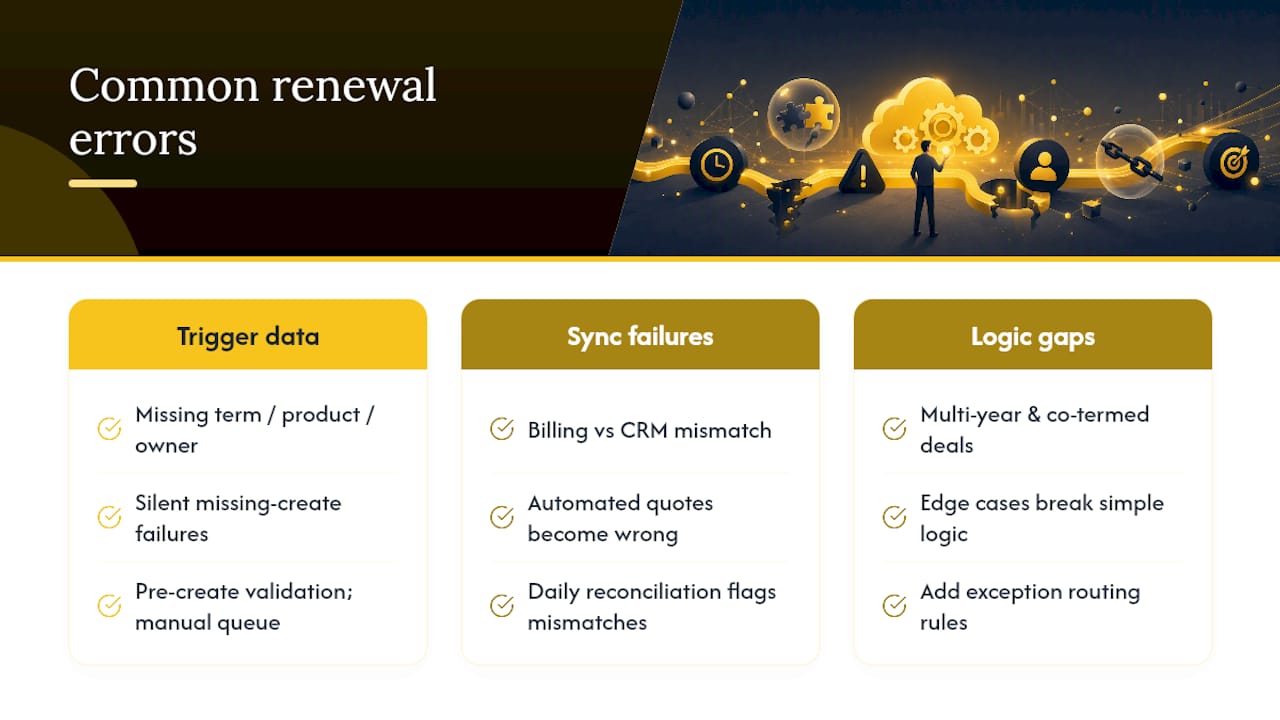
Most renewal automation errors fall into three categories: bad trigger data, sync failures between systems, and logic that doesn't account for an edge case.
Bad trigger data is the most common and the easiest to catch if you build in validation. Before a renewal opportunity auto-creates, run a check: does this asset have a valid term end date, a valid product, and a valid owner? If any field is missing, the record should fail into a manual review queue instead of generating a broken quote. Silent failures, where a renewal simply never gets created because a field was blank, are worse than loud ones.
Sync failures between Salesforce and your billing platform are the second-biggest source of trouble. If Chargebee or Stripe shows a different subscription status than Salesforce does, your automated quote will be wrong, and the customer will notice before your team does. Build a daily reconciliation check that flags mismatches between billing status and CRM asset status rather than trusting the sync blindly.
Logic gaps show up when real contracts don't fit the pattern you designed for. Multi-year deals with staggered uplift schedules, accounts with multiple co-termed contracts, or a customer mid-negotiation on an expansion deal all break simple renewal logic. When you find one of these edge cases, don't patch it as a one-off. Add it to the exception routing rules so the next account with the same shape gets caught automatically instead of causing the same fire drill twice.
What the Data Actually Tells You About Salesforce Renewals
Most advice on renewal automation treats it as a technical problem: connect the systems, build the workflow, done. That's backwards. The technical part is the easy part. The hard part, and the part that actually determines whether the program works, is discipline around data and timing before you automate anything.
The usage audit gets treated as optional in a lot of renewal playbooks, usually because it's uncomfortable. But skipping that audit is how shelfware compounds year over year until a renewal negotiation blows up over a number nobody saw coming. Do the audit first. Automate second.
The other place conventional advice falls short: treating the notice window as the start of the renewal process instead of the last checkpoint. By the time a 60 day notice fires, the real work, the usage review, the uplift decision, the negotiation prep, should already be done. If your automation is triggering the first real renewal conversation at day 60, you've built a faster path to the same last-minute scramble, not an actual fix.
Start with clean data and a longer runway. The automation matters less than most vendors want you to believe.
Patrik
How Customerscore.io Helps You Operationalize Renewal Signals
Salesforce automates the renewal transaction. It doesn't tell you which accounts are quietly drifting toward churn before the notice window even opens. That's the gap Customerscore closes: AI-driven churn prediction and explainable health scoring that pull billing, product usage, CRM, and support signals into one view, so your renewal automation is triggered by actual account health, not just a date on a contract.
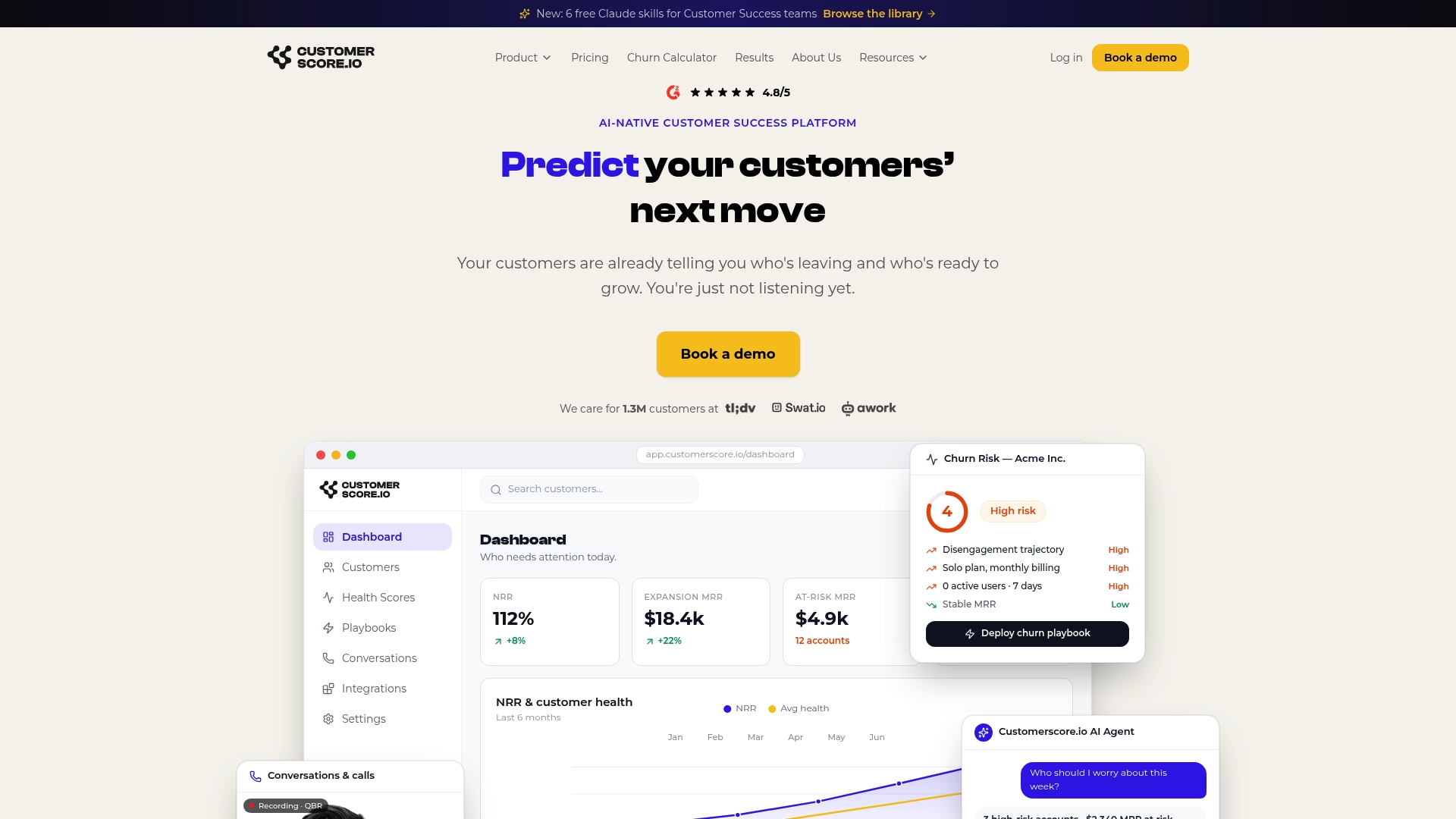
Customerscore's workflow templates help you validate renewal readiness before a quote goes out, and its health scoring surfaces which accounts need a human conversation versus which ones can run through your automated Salesforce workflow untouched. Pair it with churn prediction to catch the accounts your notice cadence would otherwise miss, and expansion scoring to flag upsell opportunity inside the same renewal cycle. If you're ready to see how this maps to your own renewal book, book a demo and walk through your specific account mix.
Sources
- Manage customer asset renewals and cancellations (Salesforce Trailhead)
- Revenue lifecycle management (Salesforce Revenue Cloud)
Recommended
Related articles
Five Fields to Fix Playbook Trigger Design for B2B SaaS CS & RevOps
Five Fields to Fix Playbook Trigger Design for B2B SaaS CS & RevOps ! Isometric trigger routing system illustration The most reliable approach to playbook trigger design is to sort every alert into
BlogStop SaaS Downgrades: Save 31% of At Risk Accounts for CS & RevOps
Stop SaaS Downgrades: Save 31% of At Risk Accounts for CS & RevOps ! Isometric account protection title card The fastest way to prevent SaaS downgrades is to stop treating every at-risk account the
Blog24–48 Hour Handoffs: B2B SaaS Support to CS Checklist, Six Fields
24–48 Hour Handoffs: B2B SaaS Support to CS Checklist, Six Fields ! Isometric handoff cards crossing between platforms A reliable support to CS handoff transfers ownership and context so the new owner
Blog90–120 Day Explainable AI Playbook to Reduce Renewal Risk for SaaS CS
90–120 Day Explainable AI Playbook to Reduce Renewal Risk for SaaS CS ! Isometric illustration of explainable renewal risk decisions To reduce renewal risk, you prioritize accounts daily using