
Five Fields to Fix Playbook Trigger Design for B2B SaaS CS & RevOps


The most reliable approach to playbook trigger design is to sort every alert into three categories (proactive, reactive, lifecycle), give each trigger five required fields (data source, threshold, owner, SLA, outbound motion), launch with a small number of high-signal triggers, and route them automatically while you track outcomes.
TL;DR:
- Focus on a small set of high-signal triggers across proactive, reactive, and lifecycle categories to avoid alert fatigue and gather meaningful data in 30 to 60 days.
- Use cohort-relative thresholds instead of absolute ones to ensure trigger sensitivity aligns with account size and activity level, reducing false alarms.
- Assign a clear owner, SLA, and documented playbook to each trigger; skipping these fields leads to inconsistent responses or ignored alerts.
- Regularly review trigger performance by tracking response times, risk resolution, playbook adherence, and impact on renewal and expansion metrics every month.
- Implement automatic, standardized follow-up actions and ensure triggers are paired with escalation paths to turn alerts into predictable, effective responses.
Table of Contents
- Trigger Taxonomy: Proactive, Reactive, and Lifecycle Ownership
- Designing Triggers: Required Fields, Thresholds, and Signal Quality
- Routing and Automation: Wiring Triggers Into Your CS Stack
- Governance and Measurement: KPIs, Cadence, and Optimization
- Copyable Trigger-to-Playbook Matrix Template
- Common Challenges and Pitfalls in Trigger Design
- Best Practices for Continuous Optimization
- Real-World Patterns in Trigger Design
- How Customerscore.io Approaches Trigger-Driven Playbooks
- Getting Your Trigger System Live Without the Overhead
- FAQ
- Sources
Trigger Taxonomy: Proactive, Reactive, and Lifecycle Ownership
Every alert your customer success platform fires belongs in one of three buckets, and mixing them up is how teams end up with noisy dashboards nobody trusts. The Pedowitz Group's framework for trigger design recommends this exact three-part split, with a documented owner, SLA and playbook attached to each one.
Proactive triggers catch problems before the customer feels them. Common examples:
- Product adoption falling below the cohort baseline for similar-sized accounts.
- An executive sponsor change on the customer's side with no new champion identified.
- A core feature going unused for 30 days after onboarding.
Reactive triggers respond to signals the customer has already surfaced. Common examples:
- A sudden surge in support tickets from one account.
- A billing failure or past-due invoice on a renewal-critical account.
- A negative NPS or CSAT score following a support interaction.
Lifecycle triggers run on a calendar rather than a signal. They fire at fixed points: the 30-day onboarding checkpoint, the quarterly business review due date, the 90-day renewal window opening, or an expansion-fit flag once usage crosses a license threshold.
Ownership typically splits along these lines: CSMs own proactive and most lifecycle triggers because they require relationship context. Support owns reactive triggers tied to tickets, escalating to CS only when churn risk appears. Account Management owns renewal and expansion lifecycle triggers once commercial terms enter the conversation. RevOps owns the system itself: the routing logic, the data pipes and the reporting that tells everyone whether the triggers are actually working.
Designing Triggers: Required Fields, Thresholds, and Signal Quality
A trigger that lacks any of five fields will eventually get ignored or misrouted. Every trigger needs:
- Data source: the system of record for the signal (product telemetry, billing, CRM, support ticketing).
- Threshold: the precise condition that fires the alert.
- Owner: the named role responsible for the first action.
- SLA: how fast that first action must happen.
- Outbound motion: the specific playbook or template the owner executes.
Thresholds work best when they are relative, not absolute. A 30% drop in daily active users month-over-month means something different for a $5,000 ARR account than a $500,000 one, so cohort-adjusted baselines catch real risk without flooding small accounts with false alarms. Combine signals where you can: a usage dip paired with an unanswered email carries more weight than either one alone, and Pedowitz Group's trigger matrix ties each proactive trigger to a specific enablement play rather than a generic check-in.
Signal quality follows a rough hierarchy: billing events are the most reliable because they are binary and auditable, product telemetry comes next if your instrumentation is solid, CRM activity is useful but easy to game, and support tickets are the noisiest because volume varies by account size and product complexity.
Noise control matters as much as detection. Batch low-priority alerts into a daily digest instead of real-time pings, build suppression windows so the same account does not fire the same trigger twice in a week, and review every alert that produced no action at all once a month to decide whether the rule needs tuning or retirement.
Pro Tip: Start every new trigger in "log only" mode for two weeks before routing it to a human, so you can see its false-positive rate before it costs anyone attention.
Routing and Automation: Wiring Triggers Into Your CS Stack
A trigger with no automated path to a human is just a log entry. Three routing patterns cover most cases: direct assignment works when one CSM clearly owns the account and the trigger needs no handoff; queueing works when volume is high and any available CSM can take the next item; auto-handoff to an Account Executive works when the trigger signals commercial risk or opportunity that sits outside the CSM's authority, such as a renewal at risk of non-renewal or a usage pattern suggesting an upsell.
Once a trigger fires, the automation should run through the same sequence every time:
- Create a task with the playbook checklist attached, not just a bare alert.
- Push a one-line summary of the trigger and its context to the CRM record.
- Notify the owner through Slack or email, wherever your team actually works.
- Log the outcome once the owner closes the task, so the next review has real data.
For CRM sync specifically, push the renewal date, the playbook outcome and the next committed step, since that is what revenue leaders need for forecasting. Our RevOps solution for customer health outlines this sync pattern in more detail for teams building it on top of HubSpot or Salesforce.
Outbound motions should be short enough that a CSM can execute them in minutes: an email brief with three bullet points of context, a call agenda with the risk driver stated up front, or an enablement checklist pointing to specific features the account has not adopted.
Governance and Measurement: KPIs, Cadence, and Optimization
Triggers without a measurement loop drift into irrelevance within a quarter. Track a minimum set of KPIs:
- Trigger response time: how long between the alert firing and the first logged action.
- Risk resolution rate: the share of risk triggers that close without churn.
- Playbook usage rate: how often the attached playbook steps actually get followed.
- Renewal delta versus baseline: how renewal rates shift for accounts that triggered versus those that did not.
- Expansion conversion rate: how often an expansion-fit trigger turns into closed revenue.
Pedowitz Group's governance model recommends reviewing response time, resolution rate, and renewal or expansion outcomes on a recurring cycle to catch thresholds that have drifted out of relevance, according to its customer health scoring framework.
Run a monthly CS and GTM council to review the KPI set and prune any trigger that produced mostly no-action outcomes, plus a quarterly strategic review that asks whether the taxonomy itself still matches the business. Evaluate efficacy with simple before-and-after comparisons: renewal rates for triggered accounts against a matched cohort that never fired the trigger, and time-to-first-action trends over the quarter. Include Sales, Product and Support in this loop, not just CS, since triggers routinely surface product gaps or sales handoff issues that CS alone cannot fix.
Copyable Trigger-to-Playbook Matrix Template
Start with a small set you can actually staff and measure. The matrix below gives five starting triggers. Copy it into a spreadsheet or your CS platform and adjust thresholds to your own ARR cohorts and product complexity before you add more.
Instrument these five to eight triggers first and give the data 30 to 60 days to settle before adding a sixth category.
Common Challenges and Pitfalls in Trigger Design
The most common failure is launching with too many triggers at once. Teams wire up 20 or 30 rules in week one, half of them fire constantly on accounts that are actually fine, and CSMs learn to ignore the alert channel entirely within a month. Alert fatigue kills more trigger programs than bad data does.
A second pitfall is setting absolute thresholds instead of cohort-relative ones.
Unclear ownership is the third recurring problem. When a trigger fires and nobody is explicitly named as the owner, it either gets picked up late by whoever notices first or gets dropped entirely. Every trigger needs exactly one named owner, even when the resolution requires several people.
Teams also tend to skip the outbound motion field and leave the owner to improvise a response each time. Without a standard playbook attached, the same trigger produces five different responses from five different CSMs, which makes it impossible to tell whether the trigger itself is useful or whether one person happens to be good at handling it.
Finally, many programs never revisit their thresholds after launch. A threshold that made sense for last year's customer base drifts out of relevance as the product and the customer mix change, and without a monthly pruning habit, half the active triggers end up producing no useful action at all.
Best Practices for Continuous Optimization
Treat your trigger set as a living system, not a one-time configuration. The single highest-leverage habit is the monthly no-action review: pull every trigger that fired in the past 30 days and fired zero meaningful follow-up action, then either tighten the threshold, reassign the owner or retire the rule outright.
Run cohort tests when you change a threshold rather than switching it for every account at once. Apply the new rule to a subset of accounts, compare resolution rates and response times against the untouched group for a few weeks, and only roll it out broadly once the numbers hold up.
Track time-to-first-action as its own metric separate from resolution rate. A trigger that resolves well but takes nine days to get a first response is really an SLA problem disguised as a detection problem, and no amount of threshold tuning fixes it.
Expand slowly and in order of confidence. Add a new trigger only after your existing set has stabilized, and prioritize new proactive triggers over new reactive ones, since proactive signals are the ones that actually prevent churn rather than just documenting it after the fact.
Keep Sales, Product and Support looped into the quarterly review even when they are not the trigger owners. A recurring reactive trigger around one feature often points to a product gap that no amount of CS process will solve, and that pattern only surfaces when the right people see the aggregated data.
Real-World Patterns in Trigger Design
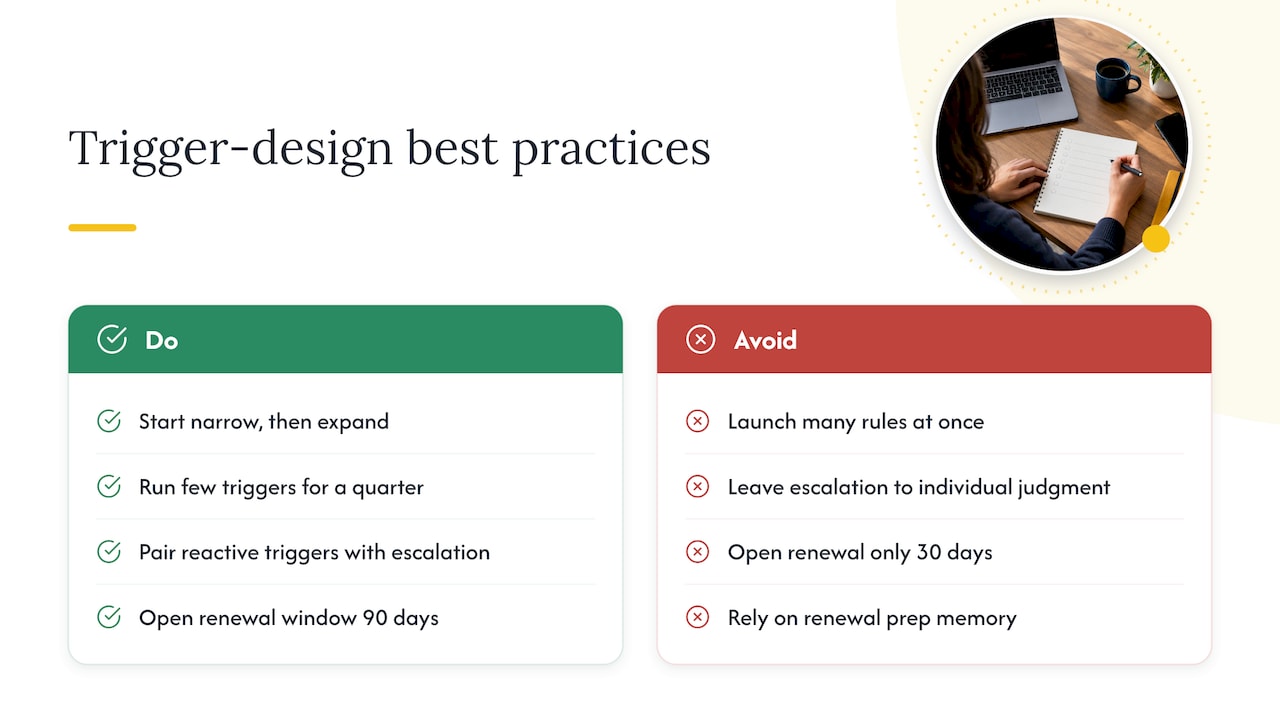
The clearest pattern across teams that get trigger design right is starting narrow and proving value before expanding. A team that wires up one proactive trigger (adoption below baseline) and one lifecycle trigger (renewal window open) and runs both cleanly for a full quarter learns more than a team that launches fifteen rules simultaneously and cannot tell which ones matter.
The second pattern is pairing every reactive trigger with an explicit escalation path rather than leaving the response to individual judgment. A six-step escalation playbook built around a ticket-surge trigger gives Support and CS a shared sequence: acknowledge, diagnose, communicate, resolve, document, follow up. Without that structure, the same ticket surge produces wildly different outcomes depending on who happens to be on call.
For renewal-specific lifecycle triggers, teams that open the window 90 days out rather than 30 consistently report fewer last-minute surprises, because there is enough runway to address a usage gap or a champion change before the contract deadline forces a rushed conversation. A documented 120 to 90 day renewal management template gives AMs a fixed sequence of checkpoints rather than leaving renewal prep to memory.
The common thread across these patterns is that the trigger itself is only half the system. The other half is the standard response that fires automatically behind it, which is exactly what separates a useful alert from an inbox notification nobody opens.
How Customerscore.io Approaches Trigger-Driven Playbooks
We built our platform around the same pattern this guide describes: triggers mean nothing without unified context behind them. We consolidate product telemetry, billing, CRM activity, support conversations and recorded calls into a single customer record, so a trigger firing on usage data shows up next to the support ticket and the CRM note that explain it.
Our predictive models forecast churn and expansion risk per account and explain the drivers in plain language, and our AI agent drafts QBR and renewal briefs from that same unified record, cutting the manual prep work usually buried in spreadsheets. We are ISO 27001 certified, EU-hosted and GDPR compliant.
— Patrik Chalupa
Getting Your Trigger System Live Without the Overhead
Most of the delay in trigger design comes from wiring together disconnected tools rather than from the logic itself. We built Customerscore.io so that unified signals, predictive and explainable health models, and prepared QBR and renewal briefs come out of one record instead of five dashboards, which is what lets a trigger and its playbook actually run on schedule.
Setup is expert-led, done alongside your team rather than handed off to a configuration guide, and most teams are live within days instead of the months a typical enterprise rollout takes, with no dedicated admin required to keep it running. Our customer success playbooks page walks through how triggers and playbooks operate inside the product.
Pricing runs on a flat platform fee tiered by ARR rather than per seat, and every customer gets the full platform. Answer three questions on our pricing page for a tailored quote. If you want to see how a trigger set like this runs inside a unified record, book a walkthrough with our team.
FAQ
What is playbook trigger design in customer success?
Playbook trigger design is the practice of defining the specific conditions (a usage drop, a ticket surge, a renewal date) that automatically alert a customer success, account management or RevOps team member and launch a standard response. Each trigger pairs a data source and threshold with a named owner, a response time and a documented playbook, following the three-part taxonomy of proactive, reactive and lifecycle alerts.
How many triggers should we start with?
Start with a small number of high-signal triggers spread across proactive, reactive and lifecycle categories rather than launching a large set at once. This keeps the initial load manageable for your team and gives you enough data within 30 to 60 days to see which triggers actually drive useful action, a pattern Pedowitz Group's framework recommends for new trigger programs.
What fields does every trigger need?
Every trigger needs five fields: a data source, a threshold that defines exactly when it fires, a named owner, a service-level agreement for first action, and an outbound motion or playbook the owner follows. Skipping any one of these fields is the most common reason a trigger produces inconsistent or no response.
How do we stop triggers from creating alert fatigue?
Set cohort-relative thresholds instead of flat ones, batch low-priority alerts into a daily digest rather than real-time pings, and review every trigger that produced no action in the past month to tighten or retire it. A platform like Customerscore can combine multiple weak signals into one higher-confidence alert instead of firing on each one separately.
How do we measure whether a trigger is working?
Track trigger response time, risk resolution rate, playbook usage rate, and the renewal or expansion outcome for accounts that fired the trigger compared to those that did not. Review these KPIs monthly with your CS and GTM council, since Pedowitz Group's measurement guidance ties trigger effectiveness directly to response time and downstream renewal or expansion results.
Recommended
Related articles
Stop SaaS Downgrades: Save 31% of At Risk Accounts for CS & RevOps
Stop SaaS Downgrades: Save 31% of At Risk Accounts for CS & RevOps ! Isometric account protection title card The fastest way to prevent SaaS downgrades is to stop treating every at-risk account the
Blog24–48 Hour Handoffs: B2B SaaS Support to CS Checklist, Six Fields
24–48 Hour Handoffs: B2B SaaS Support to CS Checklist, Six Fields ! Isometric handoff cards crossing between platforms A reliable support to CS handoff transfers ownership and context so the new owner
Blog90–120 Day Explainable AI Playbook to Reduce Renewal Risk for SaaS CS
90–120 Day Explainable AI Playbook to Reduce Renewal Risk for SaaS CS ! Isometric illustration of explainable renewal risk decisions To reduce renewal risk, you prioritize accounts daily using
BlogFix Product to CS Alignment in 60 Days for B2B SaaS CS and Product Leaders
Fix Product to CS Alignment in 60 Days for B2B SaaS CS and Product Leaders ! Product and CS alignment loop illustration Product to CS alignment is an operating model that turns customer signal into