
Six Step Escalation Playbook for B2B SaaS CSMs to Prevent Quiet Churn


An escalation playbook has one job: protect the relationship and resolve high-impact issues before they become renewal problems. The first hour matters most. Acknowledge the customer within your target window, assign a single named owner (a Directly Responsible Individual, or DRI), and start a daily update cadence that runs until the issue closes. Everything else in this guide, the severity matrix, the templates, the platform automation, exists to make those three actions repeatable instead of heroic.
TL;DR:
- Escalation triggers must be observable, such as multiple contacts in 24 hours or SLA thresholds, not subjective impressions like customer anger.
- Automations should enforce ownership and track key metrics like resolution time and repeat escalations, with required fields preventing ticket mishandling.
- Daily updates from the designated DRI are crucial, even if no progress is made, to prevent silence that fuels re-escalation.
- The recovery phase should be scheduled within 48 hours of resolution and focus on rebuilding customer trust through executive check-ins and success plan reviews.
- A single, clear ownership combined with automation alerts based on real signals improves escalation handling and reduces silent churn.
Table of Contents
- What Belongs on an Escalation Quick Checklist for CSMs
- The Six-Step Escalation Playbook, from Acknowledgment to Recovery
- What Severity Levels and Owners Should the Matrix Define?
- Templates and Scripts Every Escalation Should Use
- How Do You Operationalize the Playbook Across Systems?
- How Customerscore Supports Escalation Detection and Recovery
- A Real Escalation, and the One Lesson Worth Stealing
- Automate the Alerts, Keep the Ownership Human
- Sources
What Belongs on an Escalation Quick Checklist for CSMs
When an escalation lands on your desk, you don't have time to think through the whole framework. You need a checklist you can run in five minutes.
Do these first, in order:
- Acknowledge promptly. Send a short, empathetic message that confirms ownership and provides a specific next-update time. Don't promise a fix timeline you can't back up. Acknowledging fast and setting expectations matters more at this stage than having answers.
- Complete triage fields. Capture business impact, account ARR, renewal date, severity level, and the customer's desired outcome. Skipping this step is why escalations get re-triaged three times by three different people.
- Assign and announce a single DRI. One name, stated out loud to the customer and the internal team. No "the team is looking into it."
- Start the daily cadence. Set the next-update time before you leave the conversation.
Loop in executives or legal when you see:
- Contract or compliance language entering the conversation
- A threat to cancel or a public complaint
- Financial exposure above your team's authority limit
- A regulatory deadline attached to the complaint
The Six-Step Escalation Playbook, from Acknowledgment to Recovery
A structured sequence beats improvisation every time. The recommended framework runs through six stages: acknowledge, triage, assign a DRI, run a cadence, close out the root cause, and then recover the relationship. Here's how each stage actually works.
1. Acknowledge within the SLA window. Your target is promptly for anything flagged high severity. The message needs three things: recognition of the impact, a named owner, and a specific time for the next update. Skip vague reassurance. "We're on it" means nothing to a customer whose production system is down. Say who owns it and when they'll hear next.
2. Run the triage checklist. Inside the triage window (aim for under 30 minutes once you have the account open), answer these questions directly with the customer or their internal champion:
- What is the business impact, in the customer's own words?
- What is the account's ARR and renewal date?
- What severity level does this map to?
- What outcome does the customer actually want, fixed, refunded, escalated, or just heard?
- Has this happened before on this account?
That last question matters more than most CSMs realize. A repeat escalation on the same account is a different problem than a first-time issue, and it needs a different response.
3. Assign a named DRI. This person owns external communication, internal coordination across engineering or support, and the daily update. One person, not a rotating cast. The B2B escalation matrix approach ties a named owner to every severity level specifically because ambiguity is what turns a bad ticket into a lost account.
4. Maintain a daily cadence. Every day, even with nothing new to report, the DRI sends an update. Silence is the single biggest driver of re-escalation, not slow resolution. A customer who hears "still working on it, next update tomorrow at 3pm" stays calmer than one who hears nothing for 48 hours, even if the underlying problem is identical.
5. Close out with a root-cause document. Within 48 hours of resolution, produce a short document: what happened, why, what fixed it, and what changes prevent recurrence. Send a version to the customer. Keep a fuller internal version for your own systemic tracking.
6. Run post-escalation recovery. This is the step most teams skip, and it's the one that prevents the account from quietly churning three months later. Schedule an executive check-in, reset the account's health score to reflect the incident, and review the success plan with the customer. Recovery work done within 30 days of close meaningfully cuts repeat churn from the same account, because it addresses the relationship damage, not just the technical incident.
Pro Tip: Put the recovery step on a calendar the moment you close the ticket. If it's not scheduled within 48 hours of resolution, it tends to get pushed indefinitely, and that's exactly the window where quiet churn starts.
What Severity Levels and Owners Should the Matrix Define?
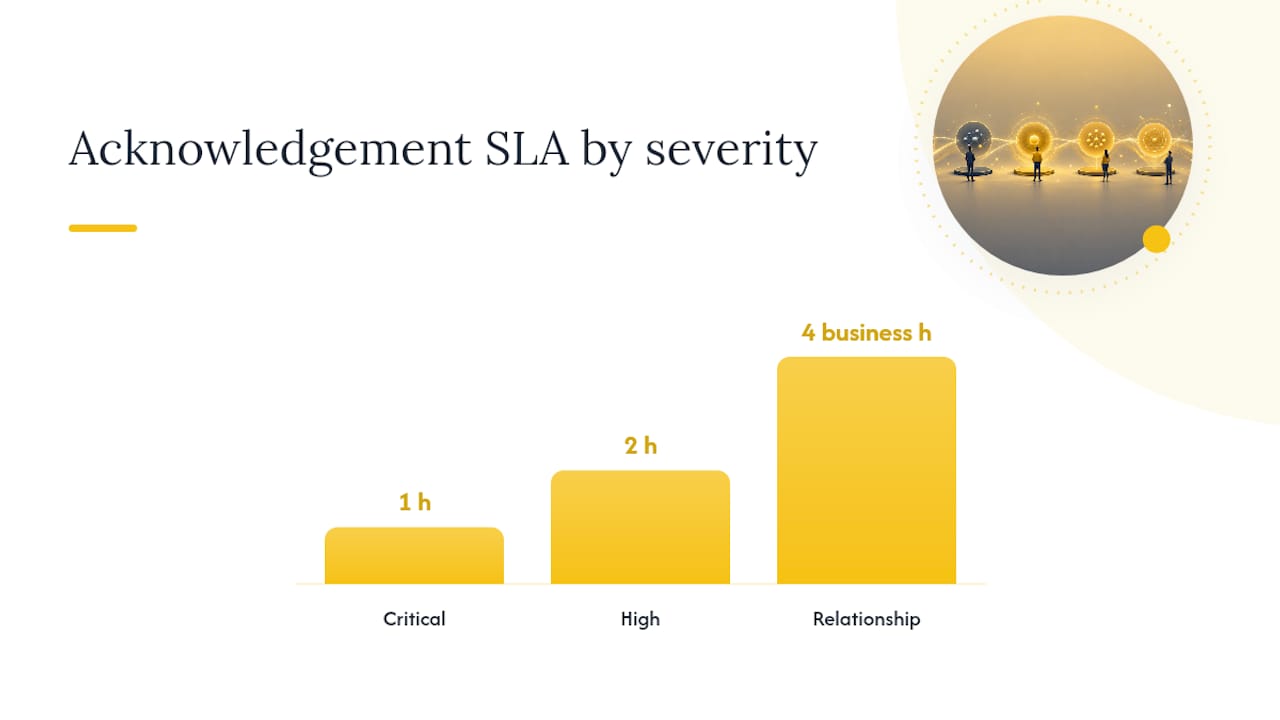
A severity matrix only works if the triggers are observable, not subjective. "The customer sounds angry" is not a trigger. "Three contacts in 24 hours" is. Trigger-based escalation rules, things like SLA consumption thresholds or negative sentiment detection, remove the guesswork that turns escalation decisions into a popularity contest among whoever's loudest.
Here's a matrix structure that maps cleanly onto most B2B SaaS support and CS org charts:
| Severity | Observable trigger | Owner | Customer commitment |
|---|---|---|---|
| Critical | Production outage, data loss, security issue, contract cancellation threat | VP of CS or CS leadership + engineering lead | Acknowledge within 1 hour, updates every 4 hours |
| High | Major feature broken, renewal at risk within 90 days, repeat contact within 24 hours | Senior CSM or team lead (DRI) | Acknowledge within 2 hours, daily updates |
| Relationship | Dissatisfaction, unmet expectations, no hard SLA breach yet | Assigned CSM | Acknowledge within 4 business hours, updates every 2 to 3 days |
The detail teams underestimate is the SLA clock itself. When a case hands off from support to CS to engineering, the clock has to keep running instead of resetting at each handoff. Preserving a single SLA clock across handoffs is the operational change most teams skip, and it usually requires actual tooling changes, per-account SLA fields and automation, not just a policy memo.
Templates and Scripts Every Escalation Should Use
Consistency beats improvisation, especially under pressure. Four templates cover almost every situation.
Acknowledgment message (send within your SLA window):
- Name the impact specifically ("your reporting dashboard has been down since 9am")
- State the owner by name
- Give a specific next-update time
- Avoid promising a fix timeline you haven't confirmed with engineering
Daily update (required fields):
- What changed since yesterday
- What's still in progress
- Next update time
- Current severity status (unchanged, upgraded, downgraded)
Internal handoff note. A seven-line handoff should travel with the case every time it moves between people: account name, one-sentence issue summary, business impact, what's already been tried, the remaining SLA clock, customer temperature, and the next action.
Close-out document: incident summary, root cause, fix applied, prevention steps, and a customer-facing summary paragraph.
Regulated accounts need one more layer. If a compliance or legal deadline shows up in the conversation, flag it as Critical automatically rather than waiting for someone to notice the legal exposure manually.
For exec calls or compensation conversations, the tone should shift from problem solving to trust rebuilding. De-escalation guidance from conflict resolution practice makes a useful point here: the goal isn't winning the conversation, it's restoring confidence. That changes how an exec should open the call, less defense of what happened, more acknowledgment of impact.
How Do You Operationalize the Playbook Across Systems?
A playbook that lives in a document nobody reads isn't a playbook, it's a wish. Getting it into your actual systems takes a few concrete steps.
Set automation triggers that mirror your matrix:
- SLA at 75% consumed triggers an automatic alert to the DRI's manager
- Two or more negative-sentiment signals in a support thread auto-flag for review
- A second escalation on the same account within 90 days auto-escalates to Critical
- Renewal date within 60 days plus an open escalation auto-notifies the CSM's leadership
Configure your systems to enforce ownership, not just track it. Required fields for severity, DRI name, and next-update time should block ticket creation if left blank. An escalation form that lets someone submit without naming an owner will get submitted without a named owner. Every time.
Track these metrics monthly, since escalations in B2B are revenue events, not just support tickets:
- Escalation rate (percentage of accounts with an open escalation per month)
- SLA compliance rate by severity tier
- Resolution time by tier
- Repeat-escalation rate on the same account within 90 days
Pro Tip: If your repeat-escalation rate on the same account is climbing, that's a product or onboarding problem wearing an escalation costume. Fix the upstream cause instead of just getting faster at the downstream fix.
Automation should tighten the process, not replace the human owner. A form field that requires a DRI name before a ticket routes anywhere preserves accountability even as the routing itself gets faster. Review our customer success metrics guide for a deeper breakdown of how these numbers connect to renewal forecasting.
How Customerscore Supports Escalation Detection and Recovery
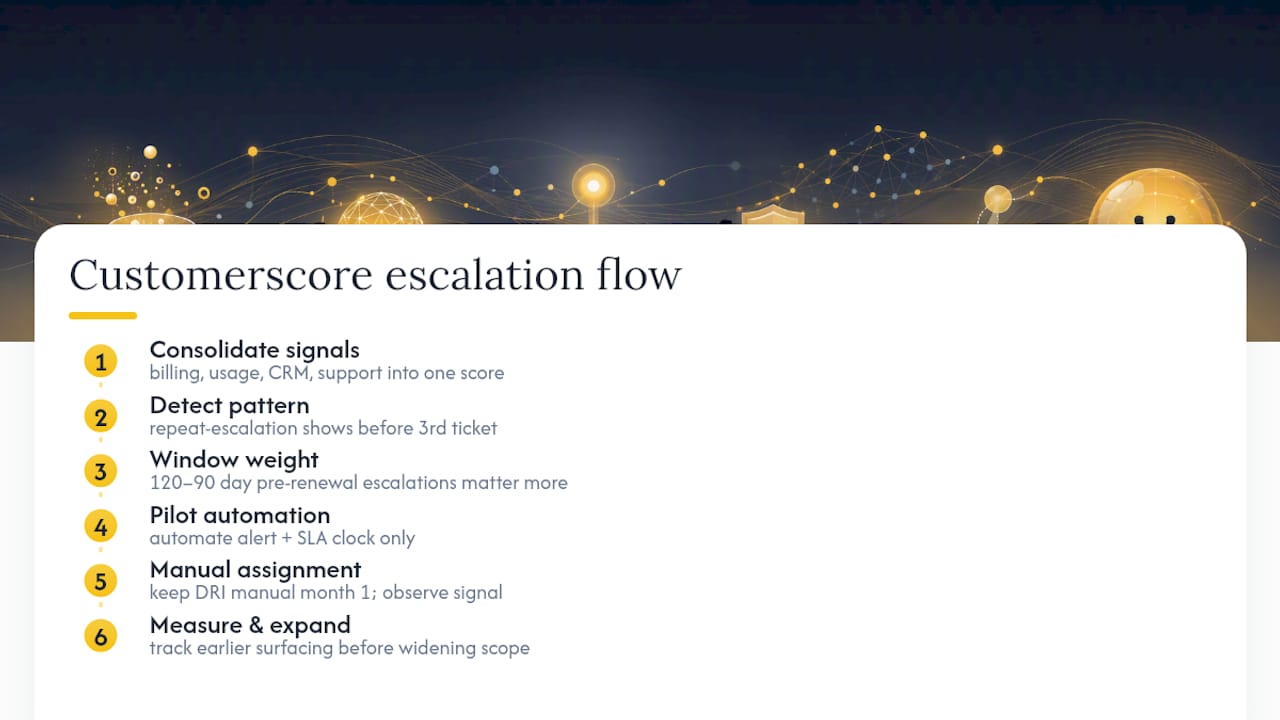
Most of the friction in running this playbook well comes from data sitting in five different tools: support tickets in one system, usage data in another, billing status somewhere else. Customerscore pulls billing, product usage, CRM, and support signals into one explainable health score, so a repeat-escalation pattern on an account shows up before the third ticket, not after.
The renewal window matters here specifically. An escalation on an account inside its 120 to 90 day pre-renewal window carries different weight than the same issue on an account that just renewed. Automated alerts tied to that window let a DRI see renewal exposure the moment an escalation opens, not when someone remembers to check the contract.
If you're piloting automation, start narrow: automate the alert and the SLA-clock tracking, but keep the DRI assignment manual for the first month. Watch whether repeat-escalation accounts surface earlier than they did before. That's the signal worth measuring before expanding scope.
A Real Escalation, and the One Lesson Worth Stealing
One account I reviewed had gone through three separate support threads over six weeks, each handled by a different rep, none of them aware of the others. By the time it reached CS, the customer had stopped believing anyone was actually listening.
The fix wasn't clever. It was one person taking ownership, sending a daily message even on days with no progress, and closing with a written root cause the customer could actually read. The lesson: silence costs more than slow progress ever will. Teams that send "no update yet, here's when you'll hear more" outperform teams that wait until they have good news.
— Patrik
Automate the Alerts, Keep the Ownership Human
Running this playbook by memory works until volume climbs, and then the ambiguity that causes re-escalations creeps back in. Customerscore is built for the gap between "we have a playbook" and "the playbook actually fires every time it should." The platform's customer success playbooks module triggers alerts on the same signals this guide covers, SLA consumption, sentiment shifts, renewal proximity, without removing the named DRI from the workflow.
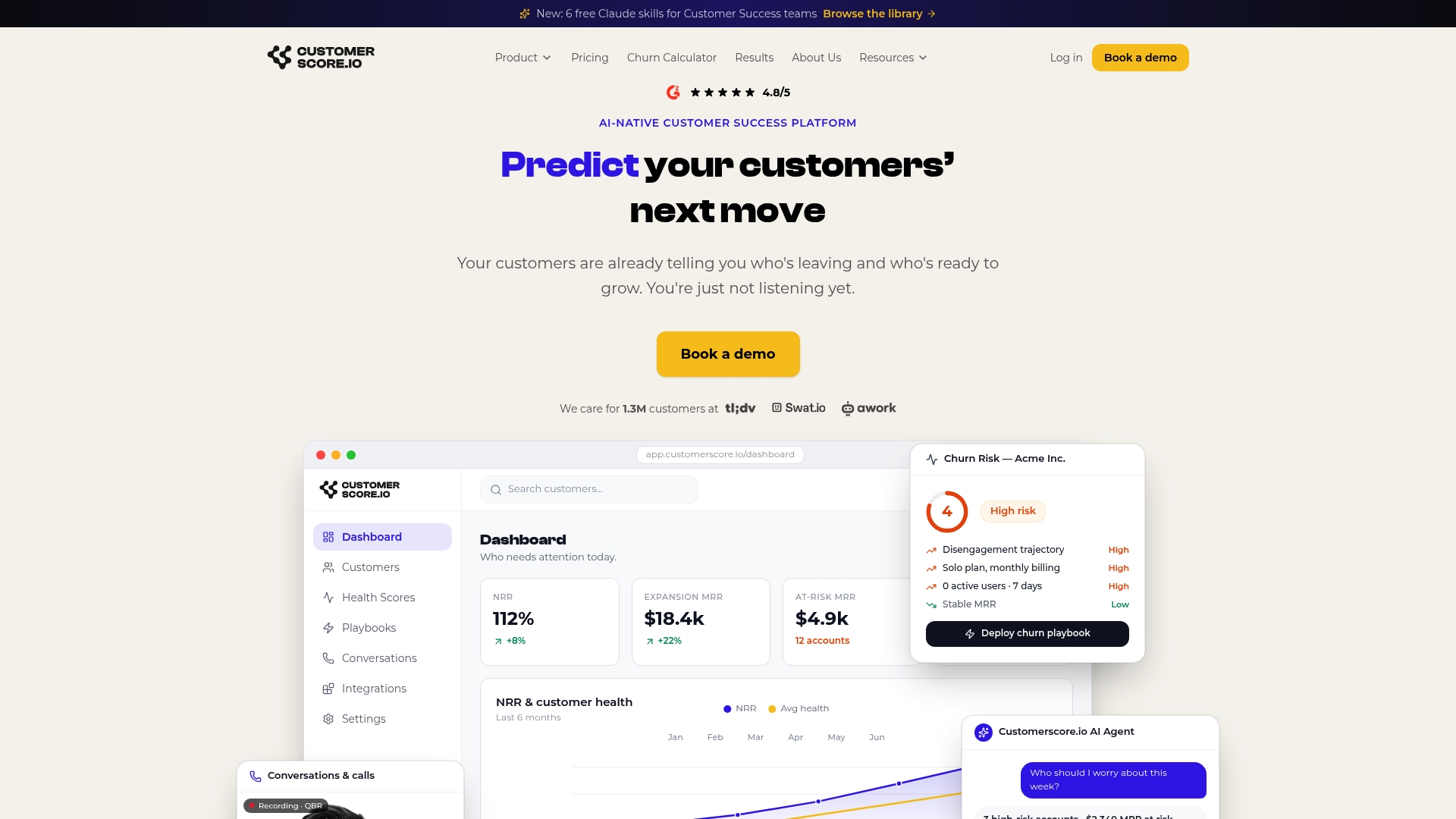
If you want to see this in action, bring your last blown escalation to a demo. Walk through what your health score would have shown a week before it blew up, and where the SLA clock actually broke down across handoffs. Book a demo and see how automated churn prediction fits into the playbook you already have, or explore the churn prediction software directly to see how alerting and health scoring work together before an issue reaches Critical.
Sources
- escalation-playbook (GitHub SKILL.md)
- Escalation management fundamentals and trigger design (HubSpot)
- Silence drives re-escalation (Nextiva)
Recommended
Related articles
Recover 55–70% of Failed Payments: SaaS Dunning Meets Churn Prediction
Recover 55–70% of Failed Payments: SaaS Dunning Meets Churn Prediction ! Specialist reviewing a failed payment alert Dunning is the structured recovery workflow that fixes failed subscription
BlogCut Churn: Product Usage Analytics for SaaS, Backed by 44,000 Users
Cut Churn: Product Usage Analytics for SaaS, Backed by 44,000 Users ! Analyst reviewing SaaS usage analytics dashboard Product usage analytics tracks what individual users actually do inside your
Blog70 Point PQL Score for SaaS: Scoring Template, Routing SLAs
70 Point PQL Score for SaaS: Scoring Template, Routing SLAs ! Analyst reviewing SaaS account scoring signals A product qualified lead (PQL) is a user whose in-product behavior, not a marketing form
Blog120–90 Day SaaS Renewal Management Playbook for CS & RevOps, Ops First
120–90 Day SaaS Renewal Management Playbook for CS & RevOps, Ops First ! CS and RevOps team planning renewal workflow SaaS renewal management is the operational system that moves a customer from