
Stop Neutral Bias in B2B Support Ticket Sentiment With Domain Tuning


Support ticket sentiment analysis converts the tone of a customer message into a score your team can route, escalate, or track over time. It's genuinely useful for spotting frustrated customers before they churn and for catching product problems in aggregate trends. The catch: a single ticket's sentiment score is noisy and unreliable on its own. The real value shows up when you look at trends across hundreds of tickets and pair sentiment with other signals like issue type and customer tier.
TL;DR:
- Sentiment trends across large ticket volumes provide more actionable insights than individual ticket scores, which are often noisy and unreliable.
- Using retrieval-augmented generation improves sentiment accuracy by considering historical tickets, reducing resolution time by up to 50 percent.
- Building a domain-specific sentiment dictionary and validating against a labeled set enhances model performance more than generic approaches.
- Combining sentiment with customer tier and issue intent yields more accurate support prioritization than relying on tone alone.
- Multi-language support requires either translation or native models, with cost and accuracy trade-offs depending on ticket volume per language.
Table of Contents
- What Support Ticket Sentiment Analysis Measures and Why It Matters
- How Sentiment Analysis on Support Tickets Works: Methods, Architectures, and RAG Augmentation
- Domain Tuning and Evaluation: Building a Support-Ready Pipeline
- Operational Best Practices: Routing, Priority Scoring, and Human-in-the-Loop Rules
- Accuracy, Failure Modes, and the Statistics Worth Tracking
- Tooling and Integration: What to Look For in Your Stack
- How Customerscore Combines Sentiment With Predicted Satisfaction and Health Scoring
- Data Privacy and Compliance Considerations
- Handling Multilingual Support Tickets and Cross-Language Sentiment
- Sarcasm, Mixed Sentiment, and Other Failure Modes
- Start With Trends, Then Pilot Structured Detection
- Sources
What Support Ticket Sentiment Analysis Measures and Why It Matters
Sentiment analysis on support tickets assigns a tone label, usually positive, negative, or neutral, to the text a customer writes. Some systems add a numeric intensity score. The output feeds three practical use cases that customer support managers actually care about: triage (which tickets need attention right now), prioritization (whose anger gets a human first), and voice-of-customer reporting (what's breaking across the whole product, not just one account).
None of that works if you treat one ticket's score as gospel. A customer who writes "this is fine I guess" might be masking real frustration, and a model trained on product reviews will misread that flatness as neutral. The pattern that holds up under scrutiny is aggregation: watch how sentiment shifts across a feature launch, a pricing change, or an outage window, and use that curve to decide where to invest support resources. Individual tickets should trigger routing rules, not strategic decisions.
For B2B SaaS teams specifically, sentiment ties directly into churn risk. A customer success platform like Customerscore treats ticket tone as one input into a broader health score, not the whole story, because tone alone misses the difference between a customer who's mildly annoyed and one who's quietly building a case to cancel at renewal.
How Sentiment Analysis on Support Tickets Works: Methods, Architectures, and RAG Augmentation
Four architectural approaches dominate the field, and picking the wrong one for your ticket volume or budget is the most common early mistake teams make.
- Lexicon and rule-based scoring: Assigns weights to specific words and phrases ("frustrated," "unacceptable," "thank you so much") and sums them into a score. Fast, cheap, transparent, and terrible at sarcasm or context.
- Off-the-shelf transformer models: Pretrained models like general-purpose BERT variants classify text without support-specific tuning. Better than lexicons at context but often calibrated on product reviews or social media, not ticket language.
- Fine-tuned transformer models: The same architecture, retrained on your labeled support tickets. Meaningfully more accurate but requires a labeled dataset and ongoing maintenance as your product language shifts.
- Single-task LLM agents: A large language model constrained to do one job, classify sentiment, rather than general-purpose chat. This approach directly addresses a documented weakness in general LLMs.
That weakness has a name in recent research: an "alignment tax." General-purpose LLMs, tuned to be cautious and inoffensive, tend to hedge toward neutral far more often than the text warrants. One ACL Anthology industry paper found that switching from a lexicon tool like TextBlob to a dedicated single-task LLM agent cut neutral-bias predictions substantially, while the Matthews Correlation Coefficient, a metric that accounts for class imbalance better than raw accuracy, jumped from a near-zero negative to a clearly positive value on B2B technical support tickets. That's the difference between a model that's barely better than guessing and one that's actually catching signal.
Retrieval-Augmented Generation, or RAG, adds a different capability entirely: instead of judging a ticket in isolation, the system retrieves similar historical tickets and their resolutions before generating a sentiment or intent read. This matters because a curt one-line reply means something different from a customer who's opened eight tickets on the same bug versus one filing their first request. RAG-powered ticket intelligence tools that pull in that historical context have reported 30 to 50 percent faster issue resolution and 25 to 35 percent efficiency gains in deployment case studies, largely because agents stop re-diagnosing problems the system already has context for.
The trade-offs run roughly in this order: lexicon tools are cheapest and fastest but least accurate; off-the-shelf transformers sit in the middle on all axes; fine-tuned models and single-task LLM agents cost more to build and maintain but deliver the accuracy gains that make automated routing trustworthy. RAG adds latency and infrastructure complexity on top of whichever model you choose, but it's the piece that turns sentiment from a static label into something closer to root-cause detection.
Domain Tuning and Evaluation: Building a Support-Ready Pipeline
Generic sentiment models fail on support tickets for a specific reason: support language doesn't behave like product reviews or social media posts. "This is broken again" is negative in a support context and neutral almost everywhere else. Building a pipeline that actually works means tuning for that vocabulary, then proving it works before you trust it with routing decisions.
- Build a domain-specific sentiment dictionary. Pull terms unique to IT and support conversations, "escalate," "still broken," "third time," "no response," and weight them based on how they actually correlate with customer anger in your historical tickets, not generic word lists.
- Create a gold-standard labeled set. Sample tickets across ticket types, channels, and time periods, then have at least two human annotators label sentiment independently and reconcile disagreements. Aim for enough volume to catch edge cases, not just the easy, obviously angry or obviously happy tickets.
- Run the model against historical tickets before going live. Simulate the full pipeline on tickets you already know the outcome for, did they escalate, did the customer churn, was the issue resolved fast or slow, and check whether sentiment predictions would have flagged the right ones.
- Report precision, recall, MCC, and neutral-rate together. A model that's 90% accurate but labels everything neutral is useless for triage. MCC in particular exposes that failure mode where raw accuracy hides it.
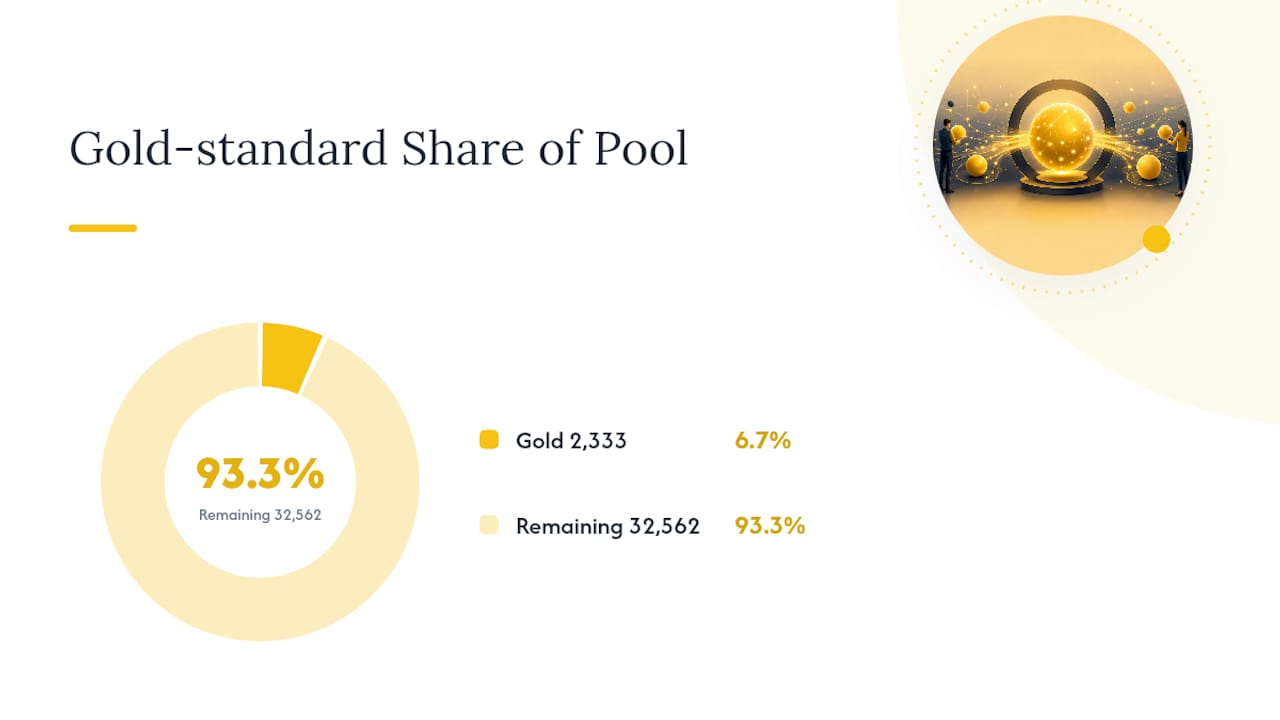
Domain dictionaries move the needle more than most teams expect. A study published in the Proceedings of the Mining Software Repositories conference built a domain-specific sentiment dictionary for IT support tickets and tested it against a gold-standard set of 2,333 labeled tickets drawn from a pool of 34,895.
That gold-standard test set size is worth noting for your own project planning. A few thousand carefully labeled tickets, sampled from tens of thousands of raw ones, is a realistic target for a domain-tuning project. You don't need millions of labels. You need representative ones, with disagreements between annotators resolved before the set gets treated as ground truth.
Operational Best Practices: Routing, Priority Scoring, and Human-in-the-Loop Rules
Sentiment becomes useful the moment you stop treating it as a standalone score and start combining it with intent and customer tier to compute a single priority number. A furious message from a trial user and an equally furious message from your largest account should not land in the same queue position, and sentiment alone can't tell you that. Intent classification (billing issue, bug report, feature question) plus account tier plus sentiment gives you a composite score that actually reflects business risk.
- Route tickets scoring strongly negative from accounts above a revenue threshold directly to a senior agent or CSM, bypassing the standard queue.
- Set a confidence threshold, commonly around 80 to 85%, below which the ticket gets a "needs human review" flag instead of an automated routing decision.
- Require human sign-off before any sentiment-triggered action that touches a customer directly, like an automated apology email or a proactive discount offer.
- Re-run your simulation against a rolling window of recent tickets monthly, since product changes and support language drift over time.
- Log every override where a human disagreed with the model's sentiment call. That log becomes your next training set.
Practical guidance from teams running this in production consistently comes back to the same warning: validate against historical tickets before deploying, because most helpdesk sentiment features handle high-volume, clearly-worded tickets well but degrade fast on sarcasm, one-word replies, and mixed sentiment. Trust the trend line before you trust the individual flag. A rollout checklist that skips simulation is the single most common reason teams abandon sentiment-based routing within the first quarter. For teams building this workflow inside a broader escalation process, mapping out escalation management rules alongside the sentiment pipeline keeps the human review step from becoming a bottleneck.
Accuracy, Failure Modes, and the Statistics Worth Tracking
The MCC swing from -0.018 to 0.347 mentioned earlier isn't just an academic curiosity. It's the clearest evidence available that model choice, not just data volume, determines whether sentiment analysis is worth deploying at all. A negative or near-zero MCC means the model is functionally random. That single-task LLM agent result, documented in the same ACL Anthology paper, represents the difference between a pilot that gets shelved and one that gets funded for production.
Neutral bias is the failure mode that quietly undermines the most sentiment projects. When a model defaults to "neutral" for anything ambiguous, it hides frustration that doesn't announce itself with angry words, the customer who's tolerating friction rather than escalating it. A structured alternative studied in recent research reads tickets on two axes instead of one: predicted customer satisfaction and whether an issue is actually present. That two-axis read correlated with actual CSAT scores at 0.47, compared to 0.36 for tone-based sentiment alone, and it specifically surfaces "tolerated friction," customers who never say they're angry but are quietly accumulating reasons to leave.
Market-level figures back up the ROI case even for simpler deployments, as explained in strategies where customer feedback drives revenue growth. Vendor and market analyses report that AI-driven sentiment analytics reduce resolution times by roughly 15 to 20 percent and cut escalations by about 30 percent in reported implementations.
Track these operational KPIs before and after rollout:
- Reduction in escalation volume month over month.
- Time-to-first-response specifically for tickets flagged as high-negative.
- MCC and neutral-rate on a rolling evaluation set, not just at launch.
- Correlation between sentiment trend and churn or renewal outcomes, measured quarterly.
Tooling and Integration: What to Look For in Your Stack
Three tooling categories cover most of what teams actually deploy. Built-in helpdesk sentiment features come bundled with your existing ticketing platform, cheapest to turn on, but usually generic and weak on domain language. RAG-powered ticket intelligence engines retrieve historical tickets and resolutions to add context before scoring, better at catching repeat issues and root causes. Custom ML pipelines built on fine-tuned or single-task models offer the highest accuracy ceiling but demand ongoing MLOps investment: retraining, monitoring drift, and relabeling as your product changes.
Integration depth matters more than the sentiment model itself in most real deployments. Sentiment without account context is a tone score in a vacuum.
- CRM data tells you whether the angry customer is a trial user or a seven-figure renewal risk.
- Product telemetry (usage drops, error rates, feature adoption) often explains why sentiment is trending negative before a single ticket confirms it.
- Billing data flags whether frustration correlates with a recent price change or a failed payment, which changes how you respond entirely.
Open-source routing examples show the pattern well: combining sentiment scores with priority factors, VIP account flags, and urgency keywords into one composite score, an approach demonstrated in SupportIQ's open-source ticket routing project, rather than acting on sentiment in isolation.
Cost factors worth budgeting for: per-message inference cost scales fast at high ticket volume, multilingual support usually costs more per language pair you add, and real-time scoring costs more than nightly batch processing. Most teams start with batch analysis for trend reporting and add real-time scoring only for the routing use case where speed actually changes the outcome.
How Customerscore Combines Sentiment With Predicted Satisfaction and Health Scoring
Tone alone tells you a customer is unhappy. It doesn't tell you whether that unhappiness is about to become a lost renewal. Customerscore's platform pulls ticket data alongside billing, product usage, and CRM signals to build an explainable health score, so a spike in negative sentiment gets weighed against actual usage trends and contract timing, not treated as an isolated alarm.
The platform extracts recurring ticket themes and flags issue presence alongside predicted satisfaction, closer to the two-axis approach that catches tolerated friction than a single tone label ever could. That combination feeds directly into churn prediction and account-level alerts, so a customer success manager sees the pattern, not just the ticket. Customerscore's AI health score treats support sentiment as one input among several rather than the deciding factor, which matches what the research on structured state detection actually recommends.
Data Privacy and Compliance Considerations
Support tickets often contain personal data, account numbers, payment references, sometimes health or identity information a customer volunteers while explaining a problem. Running sentiment analysis on that text means you're processing personal data, and depending on your customer base, that triggers obligations under frameworks like the GDPR in the European Union or the CCPA in California.
Practical steps matter more than policy language here. Redact or mask personally identifiable information before it reaches a third-party model, especially if you're calling an external LLM API rather than running inference in-house. Know where your vendor's model actually processes data, some send text to external servers for inference, which changes your data residency obligations. Retention policy matters too: sentiment scores tied to specific customers should follow the same deletion and access rules as the underlying ticket data, not live indefinitely in a separate analytics system nobody's auditing.
If you're evaluating a platform that runs AI over support data, ask specifically how training data is handled versus inference-only calls, since some vendors use customer data to improve shared models unless you opt out. Customerscore publishes its AI feature terms covering exactly this distinction. The safest default for any B2B SaaS handling regulated customer data is treating sentiment analysis output with the same access controls as the ticket content itself, not as a lower-stakes derivative.
Handling Multilingual Support Tickets and Cross-Language Sentiment
Sentiment analysis trained and tuned on English tickets will misread tone in other languages, and not just because of vocabulary. Directness reads as rudeness in some languages and as normal customer communication in others, so a model calibrated on English support tickets often over-flags terse non-English messages as negative when they're not.
Two approaches handle this in practice. The first translates tickets into English before running sentiment analysis, which is cheaper to build but loses nuance, sarcasm and idiom rarely survive machine translation cleanly. The second runs sentiment models natively in each language, which requires either a multilingual model architecture or separate tuned models per language, and multiplies your domain-dictionary work across every language you support.
Neither approach is free of trade-offs, and the cost difference is real: native multilingual pipelines cost more per message and require language-specific gold-standard test sets, which means your labeling budget scales with your language count, not just your ticket volume. If your support volume in a given language is small, translate-then-analyze is usually the pragmatic starting point. Once a language crosses a meaningful volume threshold, usually somewhere in the low thousands of tickets a month, a language-specific tuned model tends to justify its cost through better routing accuracy. Test both approaches against a small labeled set in each language before committing to one at scale, because the accuracy gap between them varies more by language than most teams expect going in.
Sarcasm, Mixed Sentiment, and Other Failure Modes
Sarcasm remains the hardest case in the entire field, and no architecture solves it reliably yet. "Great, another bug, love this" reads as positive to a lexicon model, ambiguous to a transformer, and only sometimes correctly negative to a well-tuned LLM agent that's seen similar patterns before. There's no clean fix here beyond flagging low-confidence predictions for human review rather than trusting the automated label.
Mixed sentiment is nearly as common and less discussed. A single ticket frequently contains both: "Your support team was amazing, but this is the third time I've had this exact bug." A model that outputs one label per ticket loses that split entirely, scoring it neutral when it should flag both a support win and a product failure. Some teams solve this by scoring sentiment at the sentence or clause level rather than the whole ticket, which adds processing overhead but catches these blended cases that whole-ticket scoring smooths over.
Short replies present a related problem: "Fine." or "Ok thanks" carry almost no signal for a model to work with, and forcing a confident label onto them produces noise. The practical fix isn't a better model, it's accepting that some tickets simply won't yield reliable sentiment and routing them on other signals like account tier or issue type instead. Teams that build sentiment pipelines expecting 100% coverage with high confidence on every ticket are setting themselves up for a rollout that underperforms its pilot results.
Start With Trends, Then Pilot Structured Detection
Roll this out in stages, not all at once. Start with trend dashboards to build trust in the signal and catch obvious product issues early. Once that's stable, pilot structured state detection, predicted satisfaction plus issue presence, on a narrow ticket segment before expanding it. Measure ROI through resolution time, escalations avoided, and churn correlation, not model accuracy in isolation.
Resist automating customer-facing responses off a single sentiment label. The failure modes here, sarcasm, mixed sentiment, tolerated friction, are exactly where an automated reply does the most damage.
— Patrik
Sources
- TextBlob to LLM Agents: Sentiment Model Selection for B2B Technical Support (ACL Anthology 2026)
- Sentiment analysis in tickets for IT support (Proceedings of the Mining Software Repositories conference)
- Ticket Analyzer – RAG-Powered Support Ticket Intelligence Engine (AWS Marketplace)
- 33 Support Ticket Sentiment Analysis Statistics in 2026 (Unthread)
Recommended
Related articles
90–120 Day Renewal System for CSMs: SaaS Renewal Playbook
90–120 Day Renewal System for CSMs: SaaS Renewal Playbook ! Team planning a structured SaaS renewal Run renewals as a 90 to 120 day managed pipeline, not a calendar reminder.
BlogCut Response Time 60% with This Slack for Customer Success Playbook
Cut Response Time 60% with This Slack for Customer Success Playbook ! Customer success team routing a Slack conversation Slack works best for customer success when it functions as the conversation
BlogProduct Led Customer Success in 90 to 180 Days Without a Data Team
Product Led Customer Success in 90 to 180 Days Without a Data Team ! Customer success operator reviewing product signals Product-led customer success uses product usage data and in-product
BlogPredict Churn 60–90 Days: Five Phase Customer Risk Scoring for B2B SaaS
Predict Churn 60–90 Days: Five Phase Customer Risk Scoring for B2B SaaS ! Customer success manager reviewing account risk dashboard Customer risk scoring produces a predictive, explainable health