
Churn Survey Questions: Templates and How to Use the Answers


The most effective churn survey for SaaS is a two-question in-flow cancel prompt: one required multiple-choice reason and one optional open-text follow-up. In-flow prompts routinely outperform post-cancellation emails on response rate, and the answers route directly into support escalation, pause or downgrade offers, targeted save discounts, and product feedback loops, no separate campaign required.
TL;DR:
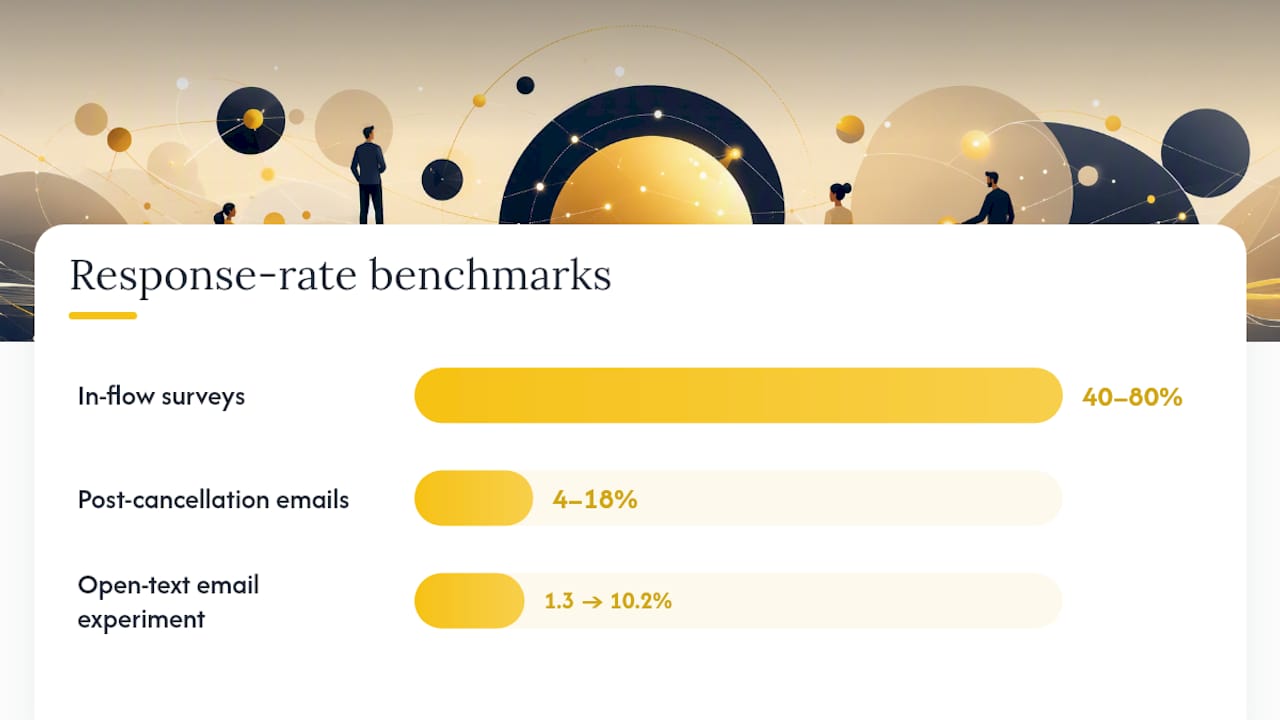
- In-flow cancellation prompts with a required reason and optional open-text follow-up yield response rates of 40-60%, significantly higher than post-cancel emails.
- Routing responses immediately allows support teams, product teams, and pricing teams to act quickly on specific reasons like technical issues or price sensitivity.
- Keeping the survey short to one or three questions, with reason options limited to 6-8, maximizes completion and data quality.
- Segmenting respondents by cohort, tenure, and plan tier helps interpret reasons and tailor retention efforts effectively.
- Small wording tweaks, like replacing "Why did you cancel?" with "What made you cancel?" can substantially boost response rates.
Table of Contents
- What Is a Churn Survey, and Where Should You Trigger It?
- Why Running Churn Surveys Pays Off for SaaS Teams
- How to Build a Churn Survey: Setup and Testing Plan
- Churn Survey Questions and Templates You Can Copy
- Question Types: Multiple-Choice, Open-Ended, and Mixed Flows
- How to Analyze Churn Survey Answers
- Turning Churn Survey Answers Into Fewer Cancellations
- Response-Rate Benchmarks and Best Practices Worth Knowing
- How Customerscore Turns Survey Answers Into Retention Actions
- Where to Find More on Churn Surveys and Cancellation Flows
- What I'd Actually Do With This
- Sources
- FAQ
What Is a Churn Survey, and Where Should You Trigger It?
A churn survey (also called a cancellation survey or exit interview) asks a customer why they're leaving at the moment they decide to leave. The format and timing matter more than most teams assume, and there are three distinct triggers worth knowing.
In-flow surveys appear inside the cancellation flow itself, before the account is actually closed. Post-cancellation emails go out after the account is already gone, usually within 24 to 48 hours. Pre-churn probes target accounts showing risk signals, like a usage drop or a support ticket spike, before they ever hit "cancel."
Timing changes everything about response quality. In-product cancel prompts get answered far more often than any later survey, because the reasoning is still fresh and the customer is already in the flow. Post-cancel emails see a fraction of that.
Match the trigger to the cohort. Trial users abandoning before conversion respond well to a single in-flow question. Long-tenure customers deserve the fuller two-question treatment, since their churn carries more diagnostic value. High-ARR accounts should skip the survey entirely in favor of a live save conversation. Save the automated flow for self-serve and mid-market tiers.
Why Running Churn Surveys Pays Off for SaaS Teams
A churn survey turns a vague "we're losing customers" problem into trendable, weekly data you can act on. Instead of guessing why revenue slipped, you get a ranked list of reasons updating in real time.
The payoff shows up in three places. Support teams get targeted win-back opportunities the moment a fixable complaint surfaces. Product teams get a prioritized list of gaps, not a hunch. And pricing teams get calibration data instead of anecdotes from the one loud customer who complained on social media.
The real value sits in the open-text field, though. A broad reason like "too expensive" tells you almost nothing on its own. It could mean the price is genuinely too high, or it could mean the customer never got enough value to justify any price. Only the open-text follow-up tells you which, and that distinction determines whether your fix is a discount or a better onboarding sequence.
How to Build a Churn Survey: Setup and Testing Plan
Building a working churn survey is less about design polish and more about discipline: fewer questions, tighter targeting, and a clear plan for what "success" means before you launch anything.
- Define the purpose first. Are you tracking churn reasons over time, trying to win customers back in the moment, or hunting for product gaps? Each goal changes what you measure and how you weight the answers.
- Segment your audience. Split by tenure, average revenue per account, and acquisition channel. A self-serve trial user and a two-year enterprise contract should never see the same flow.
- Pick the channel. In-flow captures the highest intent and the highest response rate. Reserve email follow-ups for accounts that canceled through a channel you don't control, like an app store.
- Cap the question count at one to three. Every question past the first lowers both completion and the chance to save the account.
- Decide what's required versus optional. Make the reason picker mandatory and the elaboration field optional, then use conditional logic to ask a smarter follow-up based on the first answer.
- Test wording and order. Run small A/B tests on phrasing before locking anything in, and track response rate and save rate as your two core metrics.
Pro Tip: Swap "Why did you cancel?" for "What made you cancel?" The second version reads as more specific and less accusatory, and it's the kind of small wording shift that measurably lifts response rates, based on experiments cited by Paddle.
Self-serve and high-touch accounts need different tactics around the survey; our guide on how to reduce churn in SaaS covers both.
Churn Survey Questions and Templates You Can Copy
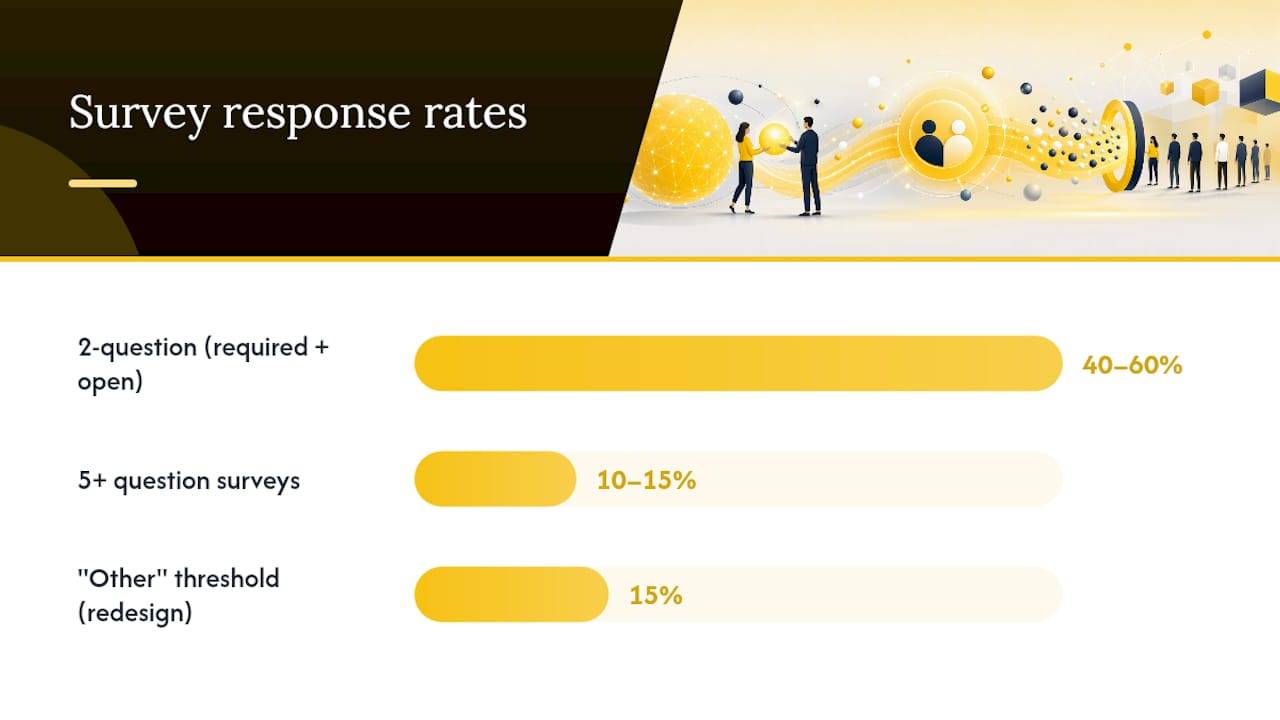
The canonical structure is simple: one required multiple-choice reason, one optional open-text elaboration. That two-question shape gets far more answers than surveys with five questions or more.
Standard in-flow template:
- Q1 (required, single-select): "What's the main reason you're canceling?"
- Q2 (optional, open text): "Anything you'd want us to know? We read every response."
Trial-user variation shortens Q1's options to reflect early-stage friction: didn't find value fast enough, too complex to set up, chose a different tool, not ready yet.
Enterprise variation adds a required routing field before Q1, like "Is this cancellation final, or would a conversation with your account team help?" That single branch can save a renewal outright.
Single-select works better than multi-select for the primary reason question. Multi-select feels more thorough, but it dilutes the data. If a customer can pick three reasons, you lose the ability to rank what actually drove the decision, and your reporting turns into mush.
A well-scoped reason list runs 6 to 8 specific options, plus an "Other" field. Here's a template that covers most SaaS cancellation scenarios:
| Option | What it typically signals |
|---|---|
| Too expensive for the value I'm getting | Price or value mismatch, needs a follow-up probe |
| Missing a feature I need | Product gap, roadmap input |
| Switching to a different tool | Competitive loss, worth a win-back offer |
| Not using it enough to justify the cost | Onboarding or adoption failure |
| Technical issues or bugs | Support escalation, urgent |
| Business change (closing, downsizing, project ended) | Not saveable, log and move on |
| Poor customer support experience | Support process review |
| Other (please specify) | Requires required text field |
Make the "Other" text field mandatory when selected. If "Other" responses climb past roughly 15% of total volume, that's a sign your list is missing a common reason and needs a redesign.
For accounts that cancel outside your product (app store cancellations, for instance), a short follow-up email works as a fallback: "Sorry to see you go. Would you mind sharing the one thing that would have kept you? Two-minute reply, no survey link required." Keep it conversational. Dropdown-heavy emails perform worse than an open, plain-text ask.
Question Types: Multiple-Choice, Open-Ended, and Mixed Flows
Each question type reveals something different, and routing depends on which type you're reading.
- Multiple-choice example: "Why are you canceling?" with options mapped directly to action: "too expensive" routes to a pricing team review, "missing a feature" routes to product, "technical issues" routes to support with priority flagging.
- Open-ended probes separate the stated reason from the actual root cause. Someone who picks "too expensive" but writes "I never got around to setting up the integrations" isn't describing a pricing problem. They're describing an onboarding failure.
- Conditional follow-ups catch this automatically. If a customer selects "too expensive," trigger a second question: "Would a discount have changed your decision?" A no answer confirms the issue is value, not price, saving your team from offering a discount that wouldn't have worked anyway.
How to Analyze Churn Survey Answers
A pile of answers is not insight yet. Turn it into a ranked list of fixes in four steps:
- Join every answer to the account. Add MRR or ARR, the renewal date, the last 90 days of usage and recent support tickets. Separate customers who left at renewal from those who left mid-contract.
- Code the free text. Use a short list of reasons (product fit, price, support experience, competitor switch, internal change), label a sample of 50 to 100 answers by hand, and let a second person check the labels. Simple keyword rules can handle obvious cases; anything ambiguous goes to a person. Keep the original wording on the account record.
- Weight by lost revenue, not by count. Ten small accounts asking for one integration can matter less than one large account that left over onboarding. Sort reasons by lost MRR and by whether you can realistically change them in the next two quarters.
- Give every top reason an owner and a date. Product owns missing features, CS owns onboarding and value, finance owns pricing. Reasons you cannot change, like a budget cut or an acquisition, go to the winback list instead.
Repeat it monthly. A reason that was out of reach last quarter, such as a feature now on the roadmap, can move up quickly.
Turning Churn Survey Answers Into Fewer Cancellations
Collecting answers is the easy part. Acting on them consistently is where most teams fall short.
- Route immediately by category. Technical complaints go to support same-day. Price objections go to a save-offer workflow. Usage-based cancellations (customer barely logged in) get a pause option instead of a discount, since a paused account rarely comes back from a straight percentage-off deal.
- Aggregate weekly, not just per-cancellation. A single "missing feature" complaint is noise. Twenty of them in a month pointing at the same gap is a roadmap item, and Customerscore's own breakdown of churn analysis in SaaS walks through how to convert that volume into prioritized fixes.
- Set a review cadence. Monthly is the minimum. Weekly is better for high-volume self-serve products, where reason trends shift fast enough that a monthly review misses the window to fix anything.
Response-Rate Benchmarks and Best Practices Worth Knowing
Keep it to one to three questions. That's not a stylistic preference, it's the single biggest lever on completion rate.
In-flow surveys get many times more responses than post-cancellation emails. That gap alone should settle most placement debates.
Randomize the order of your reason options. Customers tend to pick whatever appears first when they're rushing through a cancellation, which quietly skews your data toward whatever you happened to list at the top. Avoid vague catch-all options like "other reasons," since they collect volume without giving you anything to act on. And always segment results by cohort, tenure, plan tier, acquisition channel, before drawing conclusions. A reason that dominates among month-one trial cancellations might barely register among two-year customers.
Response rate isn't the only number that moves. Wording changes it too: one experiment cited by Paddle found that replacing a dropdown with an open-text field lifted email response rates from 1.3% to 10.2%.
Pro Tip: If you want a quick sense of what churn is actually costing you before you invest in survey tooling, run the numbers through a churn calculator first. It's a fast way to get stakeholder buy-in for the project.
Turning Survey Answers Into Retention Actions
A churn survey answer is only as useful as what happens to it next. The practical workflow looks like this: a cancellation reason comes in, it updates the account's health score, that score change triggers a playbook, and the assigned customer success manager gets an alert with the specific context attached, not just a generic "at risk" flag.
That last part matters. A CSM who sees "selected: too expensive, elaborated: never used the reporting features" can walk into a save conversation already knowing what to offer, instead of starting from scratch.
Where to Find More on Churn Surveys and Cancellation Flows
For deeper reading, see Leah Tharin's writeup on building a good churn survey.
Survey answers explain the customers who already decided to leave. To catch the next ones earlier, Customerscore.io's churn prediction platform reads usage, billing and support signals and tells each CSM which accounts need them today and why. Pricing is one platform fee based on your ARR, with every feature included and never per seat. You get a tailored offer after one call.
What I'd Actually Do With This
Most teams overbuild their churn survey before they've even confirmed anyone will answer it. Start smaller than feels comfortable: ship the two-question in-flow prompt this month, not a five-question research project you'll spend three sprints designing.
Give it 90 days. Route answers to the right team immediately, but don't touch your product roadmap or pricing based on week one data. Wait for the trend to stabilize, then act on the top two or three reasons, not the long tail. The templates and workflow patterns here should get you running in an afternoon, and Customerscore's resources on churn analysis are worth a second look once you've got real response data to work with.
Patrik
Sources
- Paddle: How to build cancellation & exit surveys that reduce churn
- How to build a good churn survey - by Leah Tharin
FAQ
What Are Good Example Questions for a Churn Survey?
The two essentials are a required multiple-choice reason ("What's the main reason you're canceling?") with 6 to 8 specific options, plus an optional open-text field asking what would have kept them. A conditional follow-up, like asking whether a discount would have helped after someone selects "too expensive," adds root-cause depth without adding friction.
What Is an Example of Customer Churn?
Customer churn is any customer who stops paying for a subscription, whether that's a SaaS user canceling their monthly plan, a trial user who never converts, or an enterprise account that doesn't renew at contract end. Each of those scenarios calls for a different survey trigger, in-flow for the first, a lighter probe for the second, and a live conversation instead of a survey for the third.
What Should a Customer Satisfaction Survey Include?
An effective customer satisfaction questionnaire typically pairs a rating question (like a satisfaction score or Net Promoter Score) with one open-ended "why" question, mirroring the same structured-plus-open-text logic that makes churn surveys work. Keep it to two or three questions total to protect completion rates.
What Should I Ask in a Market Research Survey?
Strong market research surveys typically cover need, current solution, decision criteria, price sensitivity, and satisfaction, but for churn-specific research the priority narrows to two questions: why the customer is leaving, and what would have changed that decision. Broader market questions belong in separate research, not the cancellation flow.
Should Churn Surveys Be Required or Optional?
Make the multiple-choice reason question required and the open-text elaboration optional. Requiring only the first question keeps response rates high while still giving customers room to add context without feeling forced, which is part of why two-question in-flow surveys outperform longer, fully mandatory versions.
Recommended
Related articles
How Accurate Is Churn Prediction? What Data on 48,000 B2B SaaS Customers Shows
How accurate is churn prediction? We checked the risk scores of 48,000 B2B SaaS customers against what happened next, for AI and rule-based scoring.
BlogHow to Score Accounts for Expansion: Build an Upsell Score Step by Step
How to score accounts for expansion: which signals predict upsell, how to weight and back-test them, and how to read the score next to churn risk. Step by step.
BlogBest Customer Success Software for SaaS Teams in 2026
The 8 best customer success software platforms for SaaS in 2026, compared by company size and use case: health scoring, churn prediction, automation, pricing.
BlogMulti-Year Renewals in B2B SaaS: When to Offer Them and How
When a multi-year renewal pays off, what discount to expect, which clauses protect both sides, and how to time the offer.