
Upsell Timing Signals for B2B SaaS: A Practical Playbook


The highest-confidence upsell timing signals in B2B SaaS are: a value-realization milestone just completed, storage or seat capacity crossing 80–85% of plan limits, repeated clicks on locked or gated features, a team-growth event (seats added in the last 24 hours), and an upcoming renewal window within 60 days. When any of these fires, the window to convert is short and the buyer's resistance is lowest.
Your three-step checklist:
- Detect: Instrument the five signals above. Set threshold alerts at 80% capacity, first milestone completion, 3+ locked-feature clicks in 7 days, 2+ seats added, and 60-day renewal proximity.
- Match the offer: Capacity triggers get a prorated capacity bump. Feature-gate triggers get a short-term unlock or trial. Milestone triggers get a bundle that accelerates the next outcome.
- Choose the channel: For low-ACV accounts (typically under $5,000 ARR), use a product-triggered in-app prompt or automated email. For high-ACV or complex expansions, route to a CSM or AE for a human-led conversation. Upsell timing based on engagement signals consistently outperforms calendar-based campaigns across every tracked dataset.
Key Takeaways
Trigger-based upsell timing, anchored to recency-weighted expansion signals, converts at roughly twice the rate of calendar-driven campaigns and compounds into a structural shift in expansion revenue share.
| Point | Details |
|---|---|
| Top signals to instrument | Capacity proximity (80–85%), locked-feature clicks, seats added, milestone completions, and renewal window within 60 days. |
| Recency-weighted scoring | Apply decay multipliers (1.0 / 0.7 / 0.4 for 7 / 30 / 90 days) so stale signals don't trigger live outreach. |
| Match channel to ACV | Use in-app prompts for low-ACV, email nurture for mid-ACV, and CSM-led outreach for high-ACV or complex expansions. |
| Measure attach rate and expansion MRR | These two metrics tell you whether timing rules are calibrated; track 90-day downgrade rate as a guardrail. |
| Protect trust with guardrails | Suppress all expansion outreach during open P1 tickets, post-price-increase windows, and for accounts with declining health scores. |
| Customerscore for expansion scoring | Customerscore automates signal ingestion, recency-weighted scoring, playbook routing, and CSM alerts across HubSpot, Salesforce, Stripe, and Mixpanel. |
Table of Contents
- What upsell timing signals should you instrument?
- How to weight and score signals: a worked numeric example
- How should you design automated upsell workflows?
- Upsell playbooks by trigger type
- How do you measure and test upsell timing?
- Implementation checklist for ops and engineering teams
- Research-backed timing rules you can rely on
- Customerscore turns these signals into live expansion plays
- Sources
What upsell timing signals should you instrument?
Reliable expansion detection requires pulling from at least four data sources: product telemetry, billing records, CRM events, and support ticket themes. Calendar-only models miss the actual moment of readiness because they fire on schedule rather than on behavior.
Capacity and limit signals are the most direct. Track storage_used_pct, api_calls_7d_trend, seats_used / seats_licensed, and records_count / plan_limit. These are leading indicators: the account is growing into its plan and will either upgrade or churn when it hits the wall.
Value-realization milestones are subtler but often higher-converting. Define them per product: first report exported, first integration connected, first campaign sent, first API response in production. Log a milestone_completed event with a timestamp and account ID every time one fires.
Engagement and power-user behaviors signal that a subset of users has moved beyond basic adoption. Track locked_feature_clicks_count (how many times users clicked a feature they can't access), advanced_feature_sessions_7d, and power_user_count (users who log in 5+ days per week). When three or more users hit power-user status, the account is ready for a broader seat or tier conversation.
Intent signals from the product itself are underused. Log pricing_page_views, upgrade_modal_dismissed, and checkout_started_but_abandoned. An account that opened the pricing page twice in a week and didn't convert is a warm lead, not a cold one.
Firmographic and team-growth signals come from CRM and billing. Track seats_added_24h, new_domain_users_7d, and company_headcount_change (pulled from enrichment tools or LinkedIn data via your CRM). Team growth is a high-probability expansion trigger because new hires need licenses and the buyer already trusts the product.
Support ticket theme shifts are a lagging but valuable signal. When tickets shift from "how do I do X" to "can your product do Y" or "we need more of Z," that's a feature-request cluster. Flag tickets containing terms like "limit," "more seats," "API quota," or "enterprise feature" and route them to your expansion queue rather than your support queue.

Among these, capacity signals and milestone completions have the best signal-to-noise ratio. Intent signals (pricing page, checkout abandonment) have the highest conversion potential but lower coverage since not every account visits the pricing page before upgrading.
How to weight and score signals: a worked numeric example
A flat signal list tells you who might be ready. A weighted, recency-decayed score tells you who is ready now and how urgently to act.
Why recency decay matters
A usage spike from 60 days ago is nearly meaningless. An account that hit 83% storage capacity yesterday is a live opportunity. A recency multiplier corrects for this: apply 1.0 to signals from the last 7 days, 0.7 for days 8–30, and 0.4 for days 31–90. Signals older than 90 days drop to zero weight. Prospeo recommends this decay structure specifically to prevent stale behavior from triggering outreach.
Scoring schema
Routing thresholds:
- Score ≥ 80: auto-trigger in-app prompt or email immediately
- Score 60–79: enqueue for email nurture within 48 hours
- Score < 60: monitor; re-score weekly
Worked example: Account A
Account A is at 82% storage, has clicked a locked analytics feature three times this week, and added two seats yesterday. All three signals fired within the last 24 hours, so each carries a 1.0 recency multiplier. The composite score lands at 87.1, well above the 80-point auto-trigger threshold. The system fires an in-app prompt immediately. No CSM time required unless the account ignores two touches, at which point the score and account ACV determine whether a human escalation is warranted.
Stat to know: Proactive trigger-based outreach converts at roughly 68% vs. 34% for reactive, complaints-first approaches in tracked company datasets, a 2x gap that compounds across your entire expansion pipeline.
The scoring job itself can run as a nightly SQL aggregation or a near-real-time stream processor, depending on your data infrastructure. The schema above maps directly to a SQL CASE WHEN structure or a simple weighted-sum function in dbt.
How should you design automated upsell workflows?
Signals and scores are inputs. Workflows are what actually move revenue. Three archetypes cover the vast majority of B2B SaaS expansion scenarios, and the right one depends on ACV and signal type rather than team preference.
Archetype 1: Self-serve in-app prompt
Best for: Low-ACV accounts (under ~$5,000 ARR), capacity triggers, clear single-step upgrades.
Trigger: Composite score ≥ 80, driven primarily by capacity or locked-feature clicks.
Cadence: Immediate in-app modal or banner → if dismissed, a 48-hour in-app reminder → if still no action, a 72-hour automated email with usage evidence.
Engineering note: Encode as a feature flag or in-app messaging rule in tools like Intercom or Pendo. Pass the triggering metric as a variable so the copy reads "You're at 82% of your storage limit" rather than a generic upgrade ask.
Archetype 2: Email nurture with in-product evidence
Best for: Mid-ACV accounts ($5,000–$25,000 ARR), feature-request signals, team-growth triggers.
Trigger: Score 60–79, or a feature-request support ticket flagged by keyword routing.
Cadence: Day 0 automated email with the specific metric cited → Day 3 follow-up with a case study or ROI example → Day 7 CSM soft-touch if no response.
Key rule: The email subject line and first sentence must reference the exact triggering behavior. Personalization tied to the specific metric (e.g., "You've hit 8,247 of your 10,000 monthly API calls") lifts relevance and conversion compared with generic upgrade messaging.
Archetype 3: Sales-assisted outreach
Best for: High-ACV accounts (above $25,000 ARR), renewal-window triggers, multi-product expansions, or any account where the expansion involves a new budget owner.
Trigger: Score ≥ 80 AND ACV above threshold, OR renewal within 60 days AND expansion score ≥ 60.
Cadence: CSM or AE reaches out within 24 hours of trigger → schedules a discovery call or QBR → presents a tailored proposal within 5 business days.
Orchestration rules that apply to all three archetypes:
- One proactive touch per account per 14-day window. No exceptions.
- If an account has an open P1 or P2 support ticket, suppress all expansion outreach until the ticket closes.
- If an account triggered an expansion workflow in the last 30 days and didn't convert, apply a 30-day cooldown before re-triggering.
- Escalate from Archetype 1 to Archetype 3 automatically when ACV crosses the high-touch threshold, regardless of which signal fired first.
You can route upsell leads directly into HubSpot or Salesforce workflows once the scoring job flags an account, keeping the handoff clean and the CSM's queue pre-prioritized. For teams building PLG customer success motions, Archetype 1 often handles 70–80% of expansion volume with no human involvement.
Upsell playbooks by trigger type
Each trigger type calls for a different offer structure, channel, and message frame. Generic "upgrade now" copy fails because it ignores the specific reason the account is ready.
Capacity trigger playbook
- Offer: Prorated capacity bump or next-tier plan with a 30-day price lock.
- Channel: In-app prompt (Archetype 1) for low-ACV; email + CSM call for mid-to-high ACV.
- Sample in-app copy: "You're at 82% of your storage limit. Upgrade now and lock in your current rate: your next tier adds 5× the capacity with no setup required. [See your options →]"
- Why it works: The customer already feels the constraint. You're solving a problem they're about to have, not creating one. Proactive outreach before a limit hits converts better and causes less friction than waiting for the account to hit the cap and complain.
Feature-gate trigger playbook
- Offer: 14-day free unlock of the gated feature, followed by a paid add-on or tier upgrade offer on day 10.
- Channel: Email on day 0, CSM-led demo call on day 3 for mid-to-high ACV.
- Sample email subject: "You've been exploring [Feature Name]: here's 14 days free"
- Sample email opening: "Hi [Name], I noticed your team has been clicking into [Feature Name] a few times this week. We've unlocked it for 14 days so you can see what it does for your workflow. I'd love to show you how [Company X] used it to cut reporting time by half. Worth 20 minutes?"
Team-growth trigger playbook
- Offer: Seat bundle at a volume discount (e.g., 10-seat pack at 15% below per-seat rate).
- Channel: Automated email within 4 hours of
seats_added_24hevent firing; CSM follow-up at 48 hours for high-ACV. - Frame: Position as proactive planning, not a sales call. "You added two team members yesterday; here's a seat bundle that saves you 15% versus adding seats one at a time."
Success milestone trigger playbook
- Offer: A bundle that accelerates the next logical outcome. If the milestone was "first campaign sent," the offer is advanced analytics or A/B testing. If it was "first API integration live," the offer is higher API limits or a second integration tier.
- Channel: QBR or CSM-led conversation for high-ACV; automated email for low-ACV.
- Frame: Low-risk and momentum-driven. HubSpot's research shows 37% of sales reps identify the post-delivery moment as the highest-converting window: the customer just saw value and their confidence in the product is at its peak.
Renewal-window trigger playbook
- Offer: Multi-year discount, tier upgrade bundled into renewal, or add-on at renewal pricing.
- Channel: CSM-led, always. Renewal is a relationship moment, not a transactional one.
- Timing: Open the expansion conversation 60 days before renewal, not 14. By 14 days out, the customer has already decided.
Pro Tip: For feature-gate triggers, always set the free unlock to expire before the billing cycle closes. A 14-day trial that ends mid-month creates a natural, low-pressure decision point without the customer feeling cornered at renewal.
For a deeper look at how these plays map to SaaS revenue models, the upselling in SaaS guide covers the revenue math behind each trigger type.
How do you measure and test upsell timing?
Knowing which signals to track is half the job. Knowing whether your timing rules are actually working requires a small set of metrics and a disciplined experiment design.
Core KPIs
- Attach rate: The percentage of triggered accounts that upgrade within 30 days of the first touch. Compute as
conversions / accounts_triggered. This is your primary signal that timing rules are calibrated correctly. - Expansion MRR: New MRR generated from existing accounts in a given period. Track separately from new-logo MRR so you can see expansion as a share of total revenue growth.
- Time-to-upsell: Median days from first signal fire to closed expansion. A shorter median means your offer and channel are well-matched to the trigger.
- Downgrade rate (90-day): Percentage of upgraded accounts that downgrade within 90 days. A high downgrade rate means you're converting accounts that weren't actually ready: a timing or qualification problem.
- Expansion ARR per CSM: Total expansion ARR divided by CSM headcount. Tracks efficiency as you scale.
Experiment design checklist
- Define eligibility: Accounts must meet the signal threshold AND have been active for at least 30 days. Exclude accounts with open P1 tickets or recent price-change communications.
- Randomize at the account level: Split eligible accounts into treatment (trigger-based outreach) and holdout (no proactive touch). Never randomize at the user level within an account; it creates inconsistent experiences.
- Set your primary metric upfront: Attach rate within 30 days. Secondary metrics: time-to-upsell and 90-day downgrade rate.
- Calculate sample size before you start: For a 5-percentage-point lift in attach rate from a 15% baseline, you need roughly 400 accounts per arm at 80% power. If your triggered volume is lower, run the test longer rather than underpowering it.
- Set stopping rules: Stop early only for harm (downgrade rate in treatment exceeds holdout by more than 3 percentage points) or for a pre-specified interim analysis at 50% of target sample.
- Run a guardrail metric: Monitor churn rate in the treatment group. If it rises relative to holdout, the outreach is creating friction rather than value.
Stat to know: Expansion revenue rose from a median 38% to top-quartile 62% of total revenue growth in a 19-company dataset when teams switched from reactive to trigger-based expansion programs. That's not a marginal improvement; it's a structural shift in how revenue compounds.
Example test: Compare a scheduled monthly campaign (control) against trigger-based outreach firing within 24 hours of the composite score crossing 80 (treatment). Stop the test if the treatment group's 90-day downgrade rate exceeds the control group's by more than 3 points. For a practical framework on measuring causal uplift rather than correlation, incrementality testing methodology is worth reviewing before you design your first holdout.
Implementation checklist for ops and engineering teams
Getting from "we want to do this" to "the first trigger fired and converted" takes about 30 days if you scope it tightly.
-
Instrument minimum-viable telemetry (days 1–10): Add
account_idto every product event. Logstorage_used_pct,seats_used,locked_feature_clicks,milestone_completed, andpricing_page_viewedas named events with timestamps. Push them to your data warehouse or a product analytics tool like Mixpanel, PostHog, or Segment. -
Build the scoring aggregation (days 11–20): Write a daily SQL job that computes the weighted, recency-decayed composite score per account. Use the schema from Section 3. Store results in a
expansion_scorestable withaccount_id,score,top_signal,score_date. -
Set up routing rules (days 18–25): Write a routing function that reads
expansion_scoresand outputs one of three actions:trigger_in_app,enqueue_email, orcreate_csm_task. Apply the ACV threshold and cooldown logic before writing any output. -
Connect to your outreach stack (days 23–30): Push
trigger_in_appevents to Intercom or your in-app messaging layer. Pushenqueue_emailto your email automation tool. Pushcreate_csm_taskto HubSpot or Salesforce as a task with the triggering signal and score attached. -
Add monitoring and guardrails: Set a daily alert if
accounts_triggered_todayexceeds 5% of your active account base (a spike usually means a scoring bug). Log every suppression (cooldown, open ticket, opt-out) so you can audit false-positive rates weekly.
Decision-rule pseudocode for routing:
IF expansion_score >= 80
  AND days_since_last_touch > 14
  AND open_p1_tickets = 0
  AND account_arr < high_acv_threshold
    → trigger_in_app
ELIF expansion_score >= 80
  AND account_arr >= high_acv_threshold
    → create_csm_task
ELIF expansion_score BETWEEN 60 AND 79
    → enqueue_email
ELSE
    → no_action
Pro Tip: Before connecting the routing function to live outreach, run it in "dry-run" mode for one week. Log every action it would have taken without actually sending anything. Review the output manually to catch miscategorized accounts, scoring bugs, or cooldown gaps before real customers see a single message.
For teams using HubSpot as their CRM, the HubSpot customer success integration covers how to route scored accounts directly into deal pipelines and task queues without custom middleware.
Research-backed timing rules you can rely on
The evidence base for signal-driven upsell timing is consistent across multiple practitioner datasets and sales research. A few findings are specific enough to build rules around.
The 80–85% capacity sweet spot. Accounts approaching 85% of plan capacity are high-probability expansion candidates, and proactive outreach at that threshold converts better than waiting for the account to hit 100% and experience friction. That's the window.
The "Decision After Delivery" checkpoint. HubSpot reports that 37% of sales reps identify the moment immediately after delivering a measurable result as the highest-converting upsell window. Build this checkpoint into your milestone events: when milestone_completed fires, the expansion score gets a temporary 15-point boost for the next 7 days to reflect elevated buyer confidence.
Trigger-based vs. reactive conversion gap. Proactive trigger outreach converts at roughly 68% versus 34% for reactive, complaints-first approaches in tracked company datasets. The mechanism is straightforward: reactive outreach reaches a customer who is already in pain, already skeptical, and already considering alternatives.
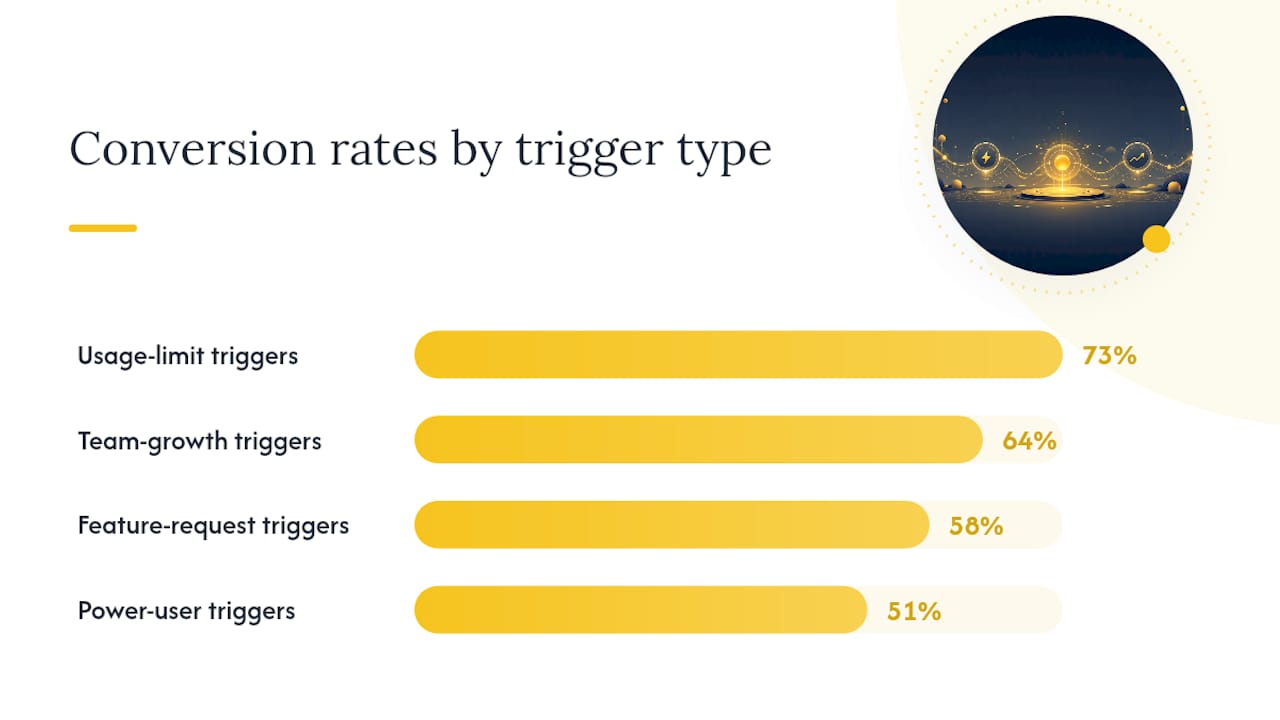
Conversion rates by trigger type. Usage-limit triggers convert at approximately 73% when proactively engaged, team-growth triggers at 64%, feature-request triggers at 58%, and power-user behavior triggers at 51%. These rates inform how aggressively to weight each signal in your scoring model.
Time-limited offers in low-ACV contexts. For self-serve, low-ACV accounts, a short-window offer (48–72 hours) can accelerate the decision. One Shopify case example showed AOV rising 12.6% in the first 24 hours after adding a countdown offer. Apply this tactic selectively in B2B: it works for clear, low-stakes upgrades but feels manipulative in high-ACV, relationship-driven contexts.
Pro Tip: Never trigger an expansion play while an account has an open P1 or P2 support ticket, immediately after a price increase communication, or when the account's health score is trending downward. Those moments require retention work first. An upsell attempt during a support crisis doesn't just fail; it damages the relationship and accelerates churn risk.
For a broader view of how product telemetry feeds both health scoring and expansion detection, turning product data into growth signals covers the data-to-decision pipeline in practical terms.
A practitioner's take on what actually moves the number
Most teams that switch from calendar sequences to trigger-based timing see attach rate climb within the first quarter. The improvement isn't subtle. It reads like a CSM who's paying attention, not a marketing automation tool running a drip.
The common failure mode isn't the scoring model. It's the volume of touches. Customers notice. The fix is stricter cooldowns and a single-highest-signal-per-window rule: pick the one signal with the highest score contribution and build the message around that, not a laundry list of everything the account did.
For high-ACV accounts, the automation's job is to surface the signal and brief the CSM, not to close the deal. The best outcomes come from a well-timed human conversation that opens with "I noticed your team has been exploring X", not from an automated sequence that tries to do the whole job without a person involved.
Customerscore turns these signals into live expansion plays
Knowing the framework is one thing. Running it across hundreds of accounts without a dedicated data team is another. Customerscore ingests billing data from Stripe and Chargebee, product telemetry from Mixpanel, PostHog, and Segment, and CRM records from HubSpot and Salesforce to compute a real-time expansion score for every account. When a score crosses a threshold, Customerscore routes the account to the right playbook automatically: an in-app prompt, an email sequence, or a CSM task with the triggering signal already attached.
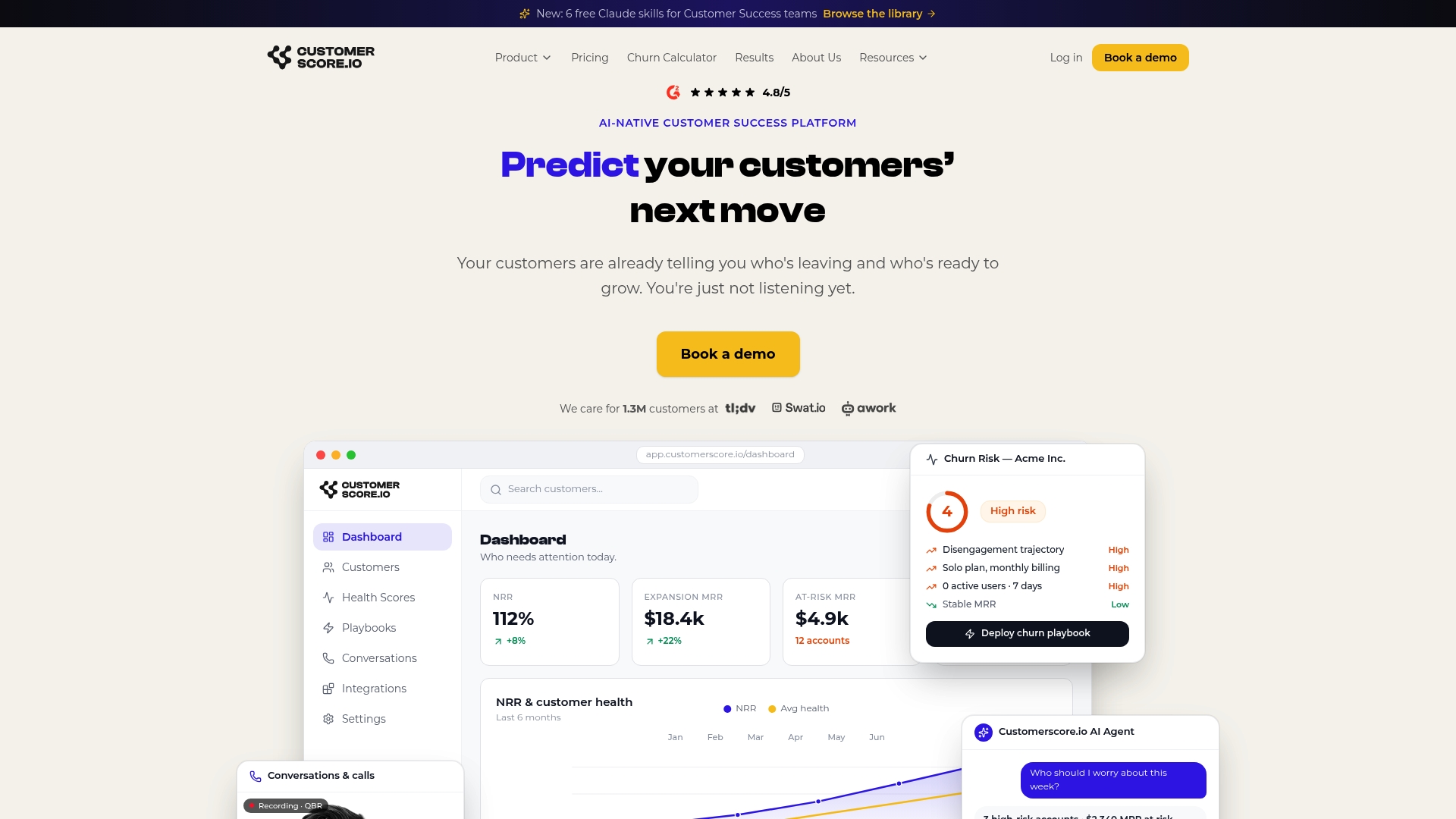
The customer health score software combines churn risk and expansion readiness in a single view, so your CS team isn't context-switching between a retention dashboard and an upsell queue. Intercom, Slack, and MCP/AI agent integrations mean alerts reach the right person in the right tool without manual triage. If you want to see how your current account base scores against the 80–85% capacity threshold and the "Decision After Delivery" rule, book a demo and run a live expansion pilot on your own data.
Sources
- Upsell & cross-sell timing | Greta Agency
- Expansion Revenue Playbook: Identify Upsell Moments 21 Days Before Customers Ask | GetAthenic (Remery)
- Upsell Opportunities: How to Find & Convert Them | Prospeo
Recommended
Related articles
Cut CSM Intervention 18%: Predictive Playbooks for CS & RevOps
Cut CSM Intervention 18%: Predictive Playbooks for CS & RevOps ! Predictive playbook geometric title card Predictive playbooks link a churn prediction to a specific, repeatable action so customer
BlogPinpoint B2B SaaS Adoption Gaps and the Fix That Lifts Renewal
Pinpoint B2B SaaS Adoption Gaps and the Fix That Lifts Renewal ! Analysts reviewing SaaS adoption gaps Adoption gap analysis identifies the funnel stage where eligible users or accounts fail to reach
BlogAnalysts: 6–12 Month Cohort Forecasts for Net Dollar Retention
Analysts: 6–12 Month Cohort Forecasts for Net Dollar Retention ! Analyst reviewing cohort retention forecast The most reliable way to forecast net dollar retention is cohort-based modeling that
BlogStop Surprise Churn: 5 Phase Data Mapping for RevOps and CS
Stop Surprise Churn: 5 Phase Data Mapping for RevOps and CS ! Analyst mapping customer data fields Data mapping for CS means connecting product usage, billing, CRM, and support data to the fields your