
The SaaS Onboarding Checklist for Product Managers & CS


A high-impact SaaS onboarding checklist is a phase-by-phase set of prioritized tasks that moves a new account from signup to its first clear business value. The single metric to optimize is time-to-value (TTV): the faster a user reaches their "aha" moment, the higher your activation rate and the lower your early churn. Every item on your checklist should trace directly back to that activation event.
Copy this checklist and assign an owner to each item before you build anything else:
- Pre-onboarding: Send a pre-welcome email with account setup instructions (Owner: Marketing/CSM)
- Day 0: Deliver a personalized welcome email + trigger first-login walkthrough (Owner: PM/Engineering)
- Day 1–3: Guide the user to complete one core action that delivers value (Owner: PM/CSM)
- Week 1: Confirm activation event fired; send a check-in if it has not (Owner: CSM/Automation)
- Week 2–4: Drive adoption of two to three adjacent features tied to the user's stated goal (Owner: CSM/PM)
- Day 30–90: Review ROI signals, identify expansion triggers, schedule a business review (Owner: CSM)
Pro Tip: Instrument every item above as a named event in your analytics tool before you write a single line of in-app copy. You cannot fix what you cannot see.
Key Takeaways
A SaaS onboarding checklist only drives retention when every item traces back to the activation event that predicts 30-day retention.
| Point | Details |
|---|---|
| Activation is the north star | Optimize for the behavioral event that predicts 30-day retention, not checklist completion. |
| Benchmark your targets | Aim for 40%+ activation within 7 days and time-to-value under 10 minutes for simple flows. |
| Segment from day one | Route users by role and company size at signup; even two tracks outperform a single generic flow. |
| Instrument before you build | Define and track first-value events before writing in-app copy or building tours. |
| Customerscore for measurement | Customerscore's health scoring and churn prediction turn onboarding data into a real-time revenue signal. |
Table of Contents
- Why onboarding is your highest-leverage retention investment
- The complete SaaS onboarding checklist, stage by stage
- Copyable templates for three common onboarding tracks
- What KPIs actually tell you whether onboarding is working
- How segmentation and progressive profiling sharpen your checklist
- How to test and iterate your onboarding without guessing
- Common onboarding mistakes and how to fix them fast
- Your 30/60/90-day implementation plan
- What I've learned building onboarding at scale
- Customerscore turns your onboarding checklist into a revenue signal
- Sources
Why onboarding is your highest-leverage retention investment
Onboarding is not a courtesy. It is the period when a user decides whether your product is worth their time, and that decision happens faster than most teams expect. Users who reach activation within their first week are significantly more likely to retain at 30 and 90 days than those who do not. That gap compounds: a user who never finds value in week one rarely comes back, no matter how many re-engagement emails you send.
The business outcomes of getting onboarding right stack up quickly:
- Reduced early churn: Users who complete a defined activation event churn at materially lower rates in the first 90 days.
- Faster expansion: Activated users adopt additional features sooner, shortening the path to upsell and expansion revenue.
- Lower support load: A well-instrumented onboarding flow catches confusion before it becomes a ticket.
- Higher NPS and CSAT: Users who reach value fast rate the product higher, even when the product itself has not changed.
The Zeigarnik effect explains part of the psychology: people remember and return to unfinished tasks. A visible onboarding checklist with a progress bar keeps the activation goal top-of-mind between sessions. That is not a UX nicety; it is a behavioral mechanism that drives completion.
Benchmark targets worth tracking: aim for 40%+ activation within 7 days for B2B SaaS and a time-to-value under 10 minutes for simple self-serve flows. If your numbers are below those thresholds, the checklist stages below will tell you exactly where to look.
The complete SaaS onboarding checklist, stage by stage
Phase-based onboarding with explicit success criteria is the structure that scales. Each phase below includes the tasks, the owner, and the event to instrument.
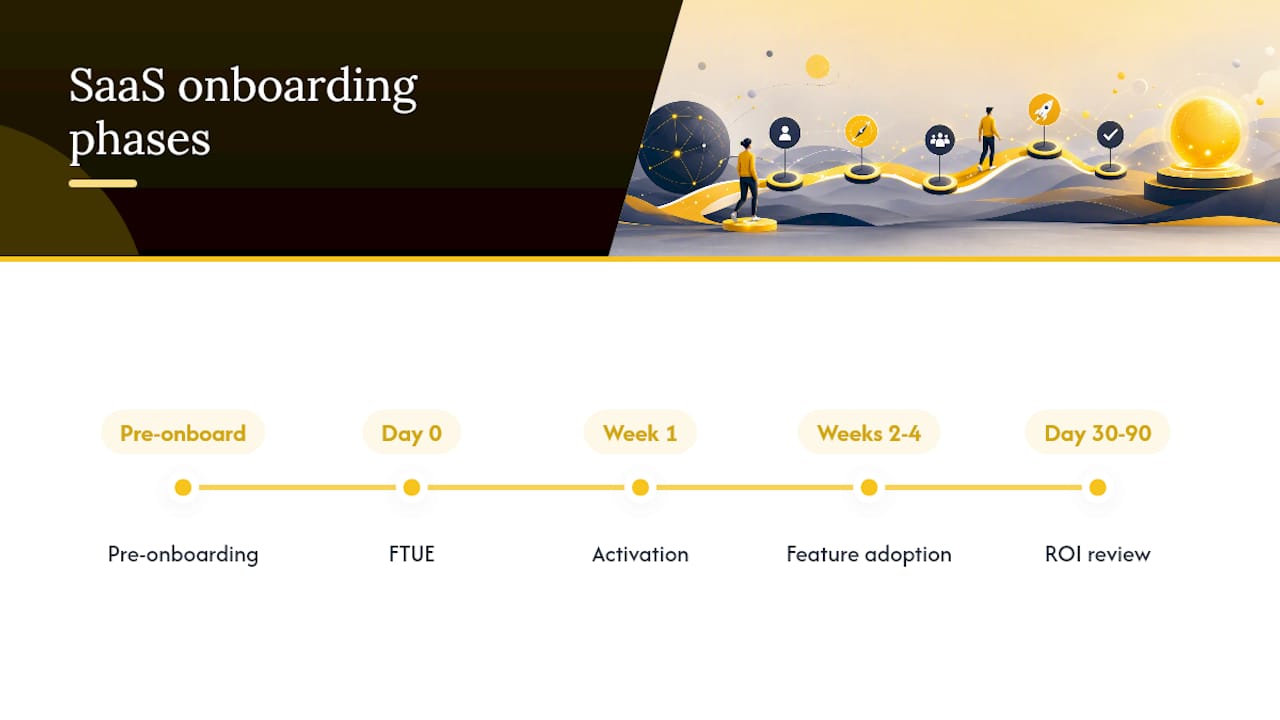
Pre-onboarding (before first login)
| Task | Owner | Success Criteria | Event to Track |
|---|---|---|---|
| Send pre-welcome email with setup steps | Marketing/CSM | Email opened; link clicked | pre_welcome_email_opened |
| Provision account and configure defaults | Engineering | Account active in system | account_provisioned |
| Assign CSM for mid-market/enterprise | CSM Lead | CSM introduced via email | csm_assigned |
| Prepare personalized onboarding plan | CSM | Plan shared with champion | onboarding_plan_sent |
| Confirm integrations required by account | CSM/Engineering | Integration list documented | integration_requirements_logged |
Day 0: Welcome and first login (FTUE)
| Task | Owner | Success Criteria | Event to Track |
|---|---|---|---|
| Trigger welcome email within 5 minutes of signup | Marketing/PM | Email delivered; opened promptly | welcome_email_sent |
| Launch first-time user experience (FTUE) flow | PM/Engineering | User completes step 1 of tour | ftue_started |
| Show role-selection or use-case prompt | PM | Role captured in profile | role_selected |
| Surface empty-state CTA for first core action | PM | CTA clicked | first_action_cta_clicked |
| Display progress checklist (3–5 items max) | PM | Checklist rendered and visible | checklist_displayed |
Welcome email subject line example: "Your [Product] account is ready: here's your first step"
FTUE microcopy example: "Let's get your first [core outcome] set up. It takes about 3 minutes."
Pro Tip: Keep your FTUE checklist to 3–5 items that map directly to the activation moment. A setup checklist that asks users to fill in their profile, upload a logo, and invite teammates before they see any value is a churn accelerator, not an onboarding flow.
Week 1: Technical activation and first quick win
| Task | Owner | Success Criteria | Event to Track |
|---|---|---|---|
| User completes core activation action | PM/Engineering | Activation event fires | activation_event_completed |
| Connect first integration or data source | PM/Engineering | Integration live | integration_connected |
| User creates first meaningful output | PM | Output created | first_project_created |
| Send Day 3 check-in if activation not fired | CSM/Automation | Reply or re-engagement | day3_checkin_sent |
| Trigger in-app tooltip for second feature | PM | Tooltip dismissed or acted on | tooltip_feature2_shown |
| Log first-value confirmation (user or behavioral) | CSM/Analytics | Confirmation recorded | first_value_confirmed |
For enterprise accounts, the "aha" may take longer. A complex integration or data migration can push first value to week two or three. Flag those accounts early and assign a CSM touchpoint at day 5, not day 30.
Weeks 2–4: Feature adoption
Drive adoption of two to three features adjacent to the core activation event. The goal is habit formation, not feature tourism. Use behavioral triggers: if a user has completed the activation event but has not touched a related feature after seven days, fire an in-app prompt or a targeted email.
Track feature_X_first_used events for each secondary feature. Compare adoption rates across cohorts segmented by role and company size. That comparison will tell you which features need better in-app guidance and which are genuinely low-priority for certain segments.
Day 30–90: ROI review and expansion prep
By day 30, you should have enough behavioral data to assess whether an account is healthy or at risk. Schedule a business review for mid-market and enterprise accounts. For self-serve, trigger an automated "How's it going?" survey at day 30 and surface expansion offers to accounts showing strong usage signals.
Expansion triggers to watch: consistent feature usage above a threshold, team invitations sent, or integration depth increasing. Each of those signals is a conversation starter, not just a metric.
Copyable templates for three common onboarding tracks
Not every account follows the same path. Routing users into the wrong template is one of the most common and most avoidable mistakes in SaaS onboarding.
Choosing the right track
Route accounts automatically based on company size and plan at signup. Manual routing is fine for enterprise; it does not scale for self-serve.
Self-serve track (individual or small team, no CSM):
- Day 0: Welcome email + FTUE checklist (3 items)
- Day 1: In-app prompt to complete activation event
- Day 3: Automated check-in email if activation not fired
- Day 7: Feature adoption email (second feature)
- Day 30: NPS survey + upgrade prompt for power users
Freemium/trial-to-paid track (trial user, conversion goal):
- Day 0: Welcome email with trial timeline and value proposition
- Day 1: FTUE focused on the feature that drives conversion
- Day 3: Social proof email (case study or testimonial)
- Day 7: Usage summary + "You're X% of the way to [outcome]"
- Day 14: Trial expiry warning + upgrade CTA
Mid-market/enterprise track (CSM-led, complex setup):
- Day 0: CSM introduction email + kickoff call invite
- Day 1–3: Kickoff call; document goals, integrations, and success criteria
- Week 1: Technical setup with Engineering support
- Week 2: First training session; confirm activation event
- Day 30: Business review; document ROI signals; identify expansion opportunities
The trial-to-paid track lives or dies on one thing: getting the user to experience the feature that drives conversion before the trial ends. Short, goal-oriented flows that teach by doing outperform documentation-heavy tours every time. Use empty states, pre-filled templates, and example data to show value before the user has done any real setup.
For self-serve churn reduction, the day 3 automated check-in is the highest-leverage single touchpoint. Users who do not activate by day 3 have a sharply lower probability of converting or retaining.
What KPIs actually tell you whether onboarding is working
Checklist completion is not a KPI. It is a leading indicator at best, a vanity metric at worst. Track behavior, not box-checking.
| KPI | Definition | Calculation | Suggested Target |
|---|---|---|---|
| Activation rate | % of new users who complete the activation event | Activated users / Total signups × 100 | 40–60% within 7 days |
| Time-to-value (TTV) | Time from signup to first activation event | Median time delta: signup_ts to activation_event_ts | Under 10 minutes (simple flows) |
| Onboarding completion rate | % of users who complete all checklist items | Completed users / Started users × 100 | 60%+ |
| 7-day retention | % of users active on day 7 | Users active day 7 / Cohort size × 100 | Benchmark against your baseline |
| 30-day retention | % of users active on day 30 | Users active day 30 / Cohort size × 100 | Benchmark against your baseline |
| Feature adoption depth | Avg. number of features used in first 30 days | Sum of features used / Cohort size | 3+ features for healthy accounts |
| Support tickets (new users) | Tickets from accounts under 30 days old | Count of tickets tagged new_user | Declining month-over-month |
Events to instrument from day one:
signup_completedfirst_loginrole_selectedintegration_connectedfirst_project_created(or your activation event equivalent)onboarding_item_completedonboarding_checklist_completedfeature_X_first_used(one event per secondary feature)
Cohort activation rate SQL (adapt to your warehouse):
SELECT
  DATE_TRUNC('week', signup_date) AS cohort_week,
  COUNT(DISTINCT user_id) AS total_signups,
  COUNT(DISTINCT CASE WHEN activation_event_date <= signup_date + INTERVAL '7 days'
    THEN user_id END) AS activated_7d,
  ROUND(100.0 * COUNT(DISTINCT CASE WHEN activation_event_date <= signup_date + INTERVAL '7 days'
    THEN user_id END) / COUNT(DISTINCT user_id), 1) AS activation_rate_pct
FROM user_events
GROUP BY 1
ORDER BY 1;
Track behavior-focused metrics rather than checklist completion alone. The most useful validation: compare 30-day retention for activated vs. non-activated cohorts. If the gap is large, your activation metric is real. If it is not, you have the wrong activation event.
For feature adoption tactics that tie directly to these KPIs, the Customerscore blog covers the instrumentation and playbook side in depth.
How segmentation and progressive profiling sharpen your checklist
A single onboarding flow for every user is a compromise that serves no one well. Segmentation is what turns a generic checklist into a relevant one.
Segment on these variables at signup:
- Role: Admin, developer, end user, executive
- Company size: Solo, small team (2–10), mid-market (11–200), enterprise (200+)
- Use case: The primary job the user hired your product to do
- Tech stack: Integrations they need (CRM, billing, analytics)
- Experience level: First-time user of this category vs. switching from a competitor
A simple conditional routing example:
- If
role = admin→ show account configuration steps first, then invite teammates - If
role = developer→ show API docs and integration setup before UI walkthrough - If
role = end_user→ skip configuration entirely; go straight to the core task flow - If
company_size > 200→ assign CSM and trigger enterprise onboarding track
Interactive, behavior-driven guides with branching flows let you implement this routing in-app without engineering tickets for every variation. Tools that support segmented checklists, tooltips, and modals based on user attributes are worth the investment precisely because they remove the "one size fits all" problem at scale.
Progressive profiling means collecting user data across multiple sessions rather than front-loading a long signup form. Ask for role at signup. Ask for use case after first login. Ask for team size after the first activation event. Each question arrives when it is contextually relevant, which means users answer it.
Pro Tip: Aim for 70%+ of users completing your onboarding flow, but always include a skip option. Experienced users who skip and self-activate are not a problem; they are a signal that your flow is too basic for that segment. Track skip rates by role and use them to refine routing.
Combine behavioral triggers with profile data for the sharpest routing. A user who selected "developer" at signup but has not connected an integration after 48 hours gets a different prompt than a developer who connected on day one. The profile tells you who they are; the behavior tells you where they are stuck.
For a broader look at user engagement strategies that complement segmented onboarding, the tactics around habit loops and re-engagement timing apply directly to weeks two and three of your flow.
How to test and iterate your onboarding without guessing
The teams that improve onboarding fastest are not the ones with the most ideas. They are the ones with the tightest experiment loop.
Hypothesis template:
"We believe that [change] will increase [metric] for [cohort] because [reason]. We will know it worked when [metric] improves by [threshold] over [duration]."
A/B test checklist for onboarding experiments:
- Define the single metric the test will move (activation rate, TTV, step completion rate)
- Identify the cohort (new signups only; segment by plan or role if needed)
- Calculate minimum sample size before starting (use a power calculator; do not call tests early)
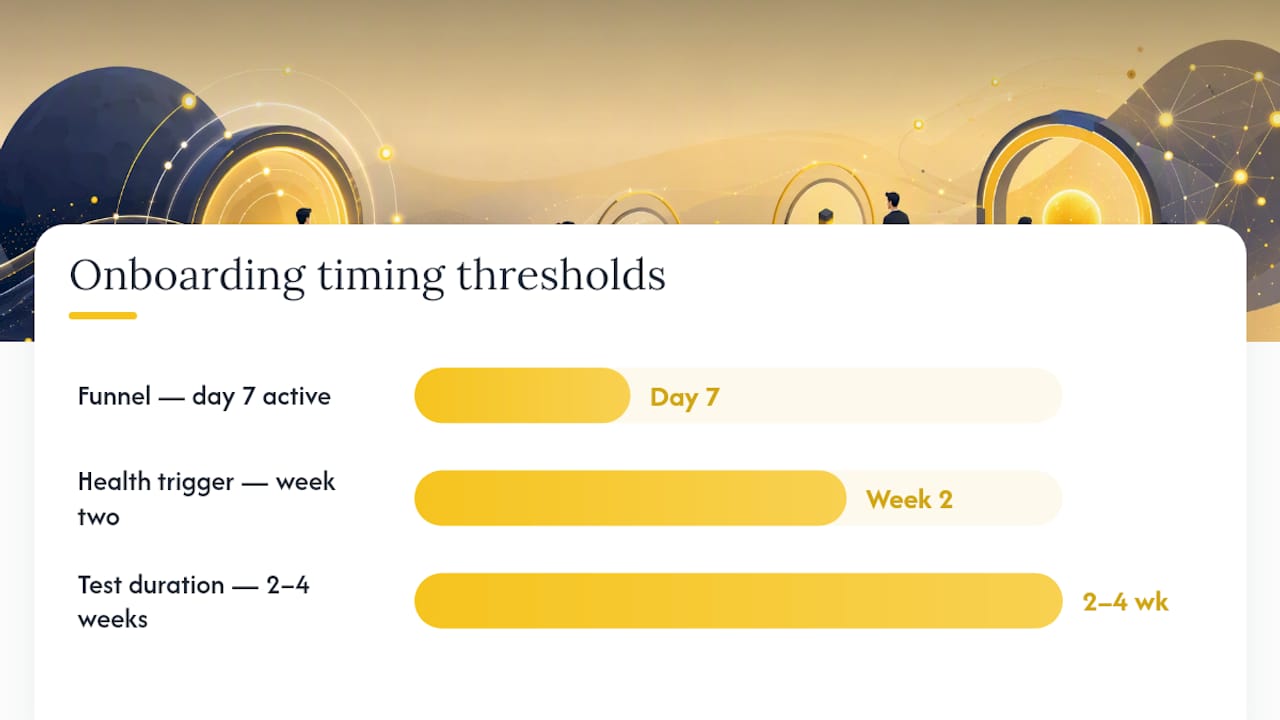
- Set a fixed duration (two to four weeks minimum for B2B SaaS with lower signup volume)
- Document the hypothesis and expected direction before launch
- Analyze results by cohort, not just aggregate
Cohort analysis steps to find where onboarding breaks:
- Pull a funnel report: signup → first login → activation event → day 7 active
- Identify the step with the largest drop-off percentage
- Segment that drop-off by role, plan, and acquisition channel
- Prioritize the segment with the highest volume and the worst conversion
Health scores are the most underused tool for enterprise onboarding iteration. A customer health score that aggregates product usage, support tickets, and CSM engagement gives you a single number to watch per account. When a new enterprise account's health score drops below a threshold in week two, that is the trigger for a proactive CSM call, not a scheduled day-30 check-in.
Pro Tip: Run one onboarding experiment per month, not ten. A single well-instrumented test that moves activation rate by five percentage points is worth more than ten underpowered tests that produce inconclusive results. Prioritize the step with the highest drop-off first.
Common onboarding mistakes and how to fix them fast
Most onboarding problems fall into a small set of patterns. Recognizing them early saves months of iteration.
Mistake 1: Too many checklist items. A 12-step onboarding checklist is not thorough; it is a churn driver. Users see the length and disengage before step three. Fix: cut to the 3–5 items that directly map to your activation event and move everything else to a secondary resource center.
Mistake 2: Measuring completion, not value. A user who checks every box but never reaches the activation event is not onboarded. Fix: instrument the activation event as your primary KPI and treat checklist completion as a secondary signal only.
Mistake 3: One flow for every user. A developer and an executive have different first-value paths. Fix: add a role-selection prompt at first login and branch the checklist accordingly. Even two tracks are better than one.
Mistake 4: No owner for integrations. Integrations are the most common place onboarding stalls, especially for mid-market accounts. Fix: assign a named owner (CSM or Solutions Engineer) to every integration requirement documented in pre-onboarding.
Mistake 5: Building tours before instrumenting events. You cannot measure whether a tour improves activation if you have not defined and tracked the activation event first. Fix: instrument first-value events before writing a single line of in-app copy.
Red-flag metrics that need immediate attention:
- First-login rate below 60% within 48 hours of signup
- Drop-off above 50% at any single onboarding step
- Day 7 activation rate below 25%
- Support ticket volume from new users increasing month-over-month
- Median TTV increasing across cohorts
Your 30/60/90-day implementation plan
Converting this checklist into a working system requires clear ownership and a sequenced rollout.
Days 1–30: Instrument and define
- Define your activation event (the single behavioral signal that predicts 30-day retention)
- Instrument all events listed in the metrics section above
- Audit your current onboarding flow against the stage-by-stage checklist
- Identify the step with the highest drop-off and form one hypothesis to test
- Assign owners for each checklist phase (PM, CSM, Engineering, Marketing)
Days 31–60: Build and launch
- Build or update the FTUE flow based on the audit findings
- Implement role-based routing for at least two user segments
- Launch the Day 3 automated check-in for users who have not activated
- Set up a weekly onboarding KPI report for the team (activation rate, TTV, 7-day retention)
- Run your first A/B test on the highest-drop-off step
Days 61–90: Iterate and expand
- Analyze the A/B test results and ship the winning variant
- Add progressive profiling for the second and third data points
- Build the expansion-trigger workflow for accounts showing strong usage signals
- Review enterprise accounts using health scores; run proactive CSM outreach for at-risk accounts
- Document what worked and update the onboarding playbook for the next quarter
Owner table:
| Phase | PM | CSM | Engineering | Marketing |
|---|---|---|---|---|
| Pre-onboarding | Defines flow | Assigns accounts | Provisions accounts | Sends pre-welcome |
| Day 0 FTUE | Owns in-app flow | Reviews enterprise plan | Builds triggers | Sends welcome email |
| Week 1 activation | Monitors events | Checks-in on at-risk | Fixes instrumentation bugs | Sends check-in email |
| Week 2–4 adoption | Adds feature prompts | Runs training calls | Builds feature tooltips | Sends adoption emails |
| Day 30–90 expansion | Reviews adoption data | Runs business reviews | Builds expansion triggers | Sends upgrade offers |
For onboarding software features that support this kind of workflow automation, centralized task management and audit-ready logs become important at scale. Gartner's onboarding software market reviews confirm that high-volume or compliance-heavy flows benefit most from platforms with built-in workflow automation and verification tracking.
What I've learned building onboarding at scale
The most common mistake I see is teams building onboarding flows before they have defined the activation event. They spend weeks on tooltips and welcome emails, then discover they have no idea whether any of it is working because they never instrumented the moment that actually predicts retention.
The fix is simple and unglamorous: instrument first-value events before you build anything visible to the user. Know exactly what behavioral signal you are trying to move, then build the flow backward from that signal. Every checklist item, every email, every in-app prompt should exist to accelerate that one event.
The second thing I have learned is that health scores change the conversation with leadership. When you can show a dashboard where every new account has a health score that updates daily based on product usage, support tickets, and CSM engagement, onboarding stops being a "customer success thing" and starts being a revenue metric. That shift in framing is what gets engineering resources allocated to instrumentation and what gets marketing aligned on pre-welcome email timing.
Customerscore turns your onboarding checklist into a revenue signal
Tracking activation rates in a spreadsheet works until it does not. Customerscore connects your product usage data, CRM, billing, and support signals into a single customer health score that updates in real time, so your CS team sees which new accounts are on track and which need a call today, not at the next quarterly review.
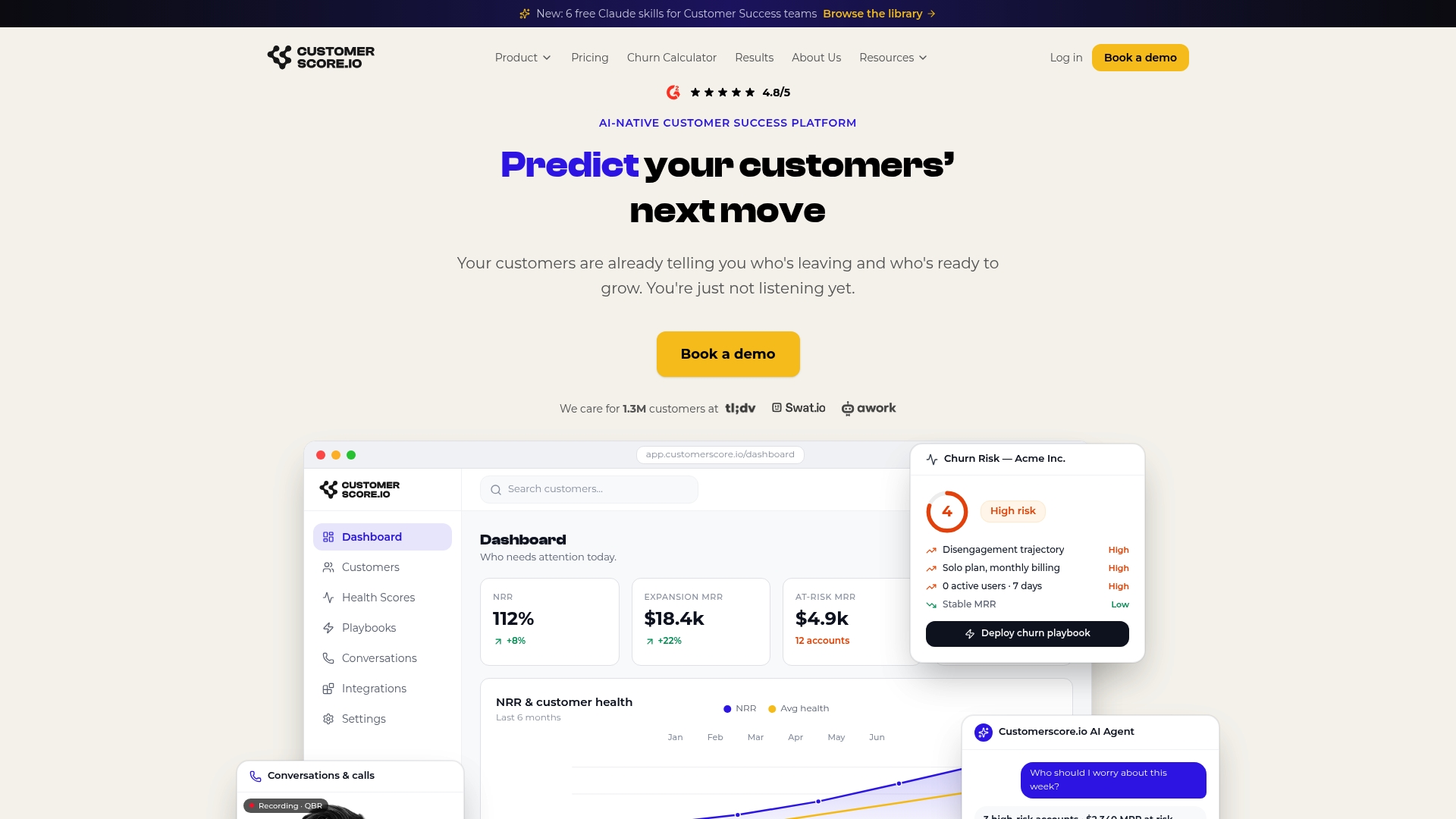
The churn prediction engine flags at-risk accounts during onboarding, before the 30-day mark, giving CSMs the window to intervene when it still matters. Playbooks automate the Day 3 check-in, the week-one activation nudge, and the expansion trigger, so the right action happens at the right moment without manual tracking. Customerscore integrates with HubSpot, Salesforce, Stripe, Intercom, Mixpanel, and Segment, so your onboarding data lives where your team already works. Book a demo to see how teams use it to cut time-to-value and surface expansion opportunities earlier.
Sources
- SaaS Onboarding Checklist 2026: Signup to Value
- The Ultimate Product Onboarding Checklist for SaaS Success
- #1 SaaS Onboarding Software | Seamless Customer Experience - Userpilot
- Onboarding software reviews and market overview
Recommended
Related articles
SaaS Onboarding Best Practices for B2B Teams in 2026
SaaS Onboarding Best Practices for B2B Teams in 2026 ! Team discussing SaaS onboarding strategies in office Compress your time-to-value and define one observable activation event.
BlogCut CSM Intervention 18%: Predictive Playbooks for CS & RevOps
Cut CSM Intervention 18%: Predictive Playbooks for CS & RevOps ! Predictive playbook geometric title card Predictive playbooks link a churn prediction to a specific, repeatable action so customer
BlogPinpoint B2B SaaS Adoption Gaps and the Fix That Lifts Renewal
Pinpoint B2B SaaS Adoption Gaps and the Fix That Lifts Renewal ! Analysts reviewing SaaS adoption gaps Adoption gap analysis identifies the funnel stage where eligible users or accounts fail to reach
BlogAnalysts: 6–12 Month Cohort Forecasts for Net Dollar Retention
Analysts: 6–12 Month Cohort Forecasts for Net Dollar Retention ! Analyst reviewing cohort retention forecast The most reliable way to forecast net dollar retention is cohort-based modeling that