
Best Client Onboarding Software (2026)

Client onboarding software helps you guide a new customer through the steps to go live, in a shared space both teams can see. Done well, it replaces the scattered email threads, spreadsheets, and status calls with one plan: phases, tasks, owners, and resources that the customer can follow along with.
This guide compares the best client onboarding software in 2026: which tool fits which type of team, how each handles the client-facing side, and where it falls short. Start with the overview by team type below, then read the detail on each tool.
Best client onboarding software by team type
| If you are… | Best fit | Why |
|---|---|---|
| A mid-market B2B SaaS company | Customerscore.io (Customer Rooms) | A shared onboarding room per customer, in the same platform that tracks adoption, renewals and expansion |
| A services team running staffed implementation projects | Rocketlane | Client portal, project management, resourcing and time tracking in one PSA-grade suite |
| A team with complex, task-heavy implementations | GUIDEcx | Disciplined project structure with customer-facing task lists |
| An agency or team that wants a polished client hub | Dock | Personalized client workspaces with plans, forms and content, fast to set up |
| A team that wants lightweight onboarding inside HubSpot | Arrows | Onboarding plans built in HubSpot and synced to deals |
| A team onboarding many similar customers | OnRamp | Repeatable onboarding turned into guided, automated workflows |
Best for mid-market B2B SaaS: Customerscore.io (Customer Rooms)
Customerscore.io gives each new customer a shared onboarding room on one link, with no login on their side: phases, tasks, files and participants from both teams. The room lives in the same platform that scores every account for churn risk and expansion, so after go-live you see whether the customer actually adopts the product, and you manage, retain and grow the account in one place.
Best for services and implementation teams: Rocketlane
Rocketlane is the most complete choice when onboarding is professional-services delivery: a client portal plus project management, resource and capacity planning, and time tracking. It is PSA-grade, so it suits a dedicated implementation team more than a repeatable onboarding plan.
Best for complex, task-heavy implementations: GUIDEcx
GUIDEcx runs onboarding as a structured project with customer-facing task lists, clear owners and CRM integration. It is strong at running the plan; resource management and AI are lighter.
Best for agencies and a polished client hub: Dock
Dock builds personalized client hubs where you share plans, forms, onboarding content and assets in one clean place. It is fast to set up, which suits agencies and teams that care most about the client experience.
Best for lightweight onboarding inside HubSpot: Arrows
Arrows builds onboarding plans inside HubSpot and syncs task completion to deal and company records. It is simple and stays close to the sales pipeline.
Best for high-volume, repeatable onboarding: OnRamp
OnRamp turns repeatable onboarding into guided, automated workflows with customer-facing steps, which suits teams onboarding many similar customers.
Client onboarding software vs project management tools
Client onboarding software is built for one job: getting a new customer from signed contract to first value, with a plan the customer can see. Project management and PSA tools are built for running any internal or billable project.
| Project management or PSA tool | Client onboarding software | |
|---|---|---|
| Main job | Run internal or billable projects | Get a new customer live and to first value |
| Who sees it | Your team | Your team and the customer |
| Reusable plans | Project templates | Onboarding templates per customer type |
| What happens after go-live | Project closes | Ideally, adoption and account health are tracked |
| Typical owner | Delivery, PMO, services | Onboarding, implementation, customer success |
Do you need a dedicated tool? If onboarding is a few emails and a call, a shared doc or your CRM is often enough. Once you run onboarding for many accounts with several steps and owners on both sides, a dedicated tool pays off, because the customer can see progress and you can reuse the plan.
Core features to look for in client onboarding software
Most tools in this category cover the basics: a shared plan, tasks with owners and due dates, and a link you can send the customer. The differences that matter for a B2B SaaS team are:
- A real client-facing workspace, not just an internal project board, so the customer sees progress without logging into your tools.
- Reusable plans, so you can run the same onboarding across every new account instead of rebuilding it each time.
- Owners on both sides, with due dates and reminders, so nothing waits on an unanswered email.
- Integrations with your stack (CRM, billing, product data), so onboarding status is not stranded in a separate tool.
- Visibility after go-live. Onboarding is the first retention moment. The best setups show whether a completed onboarding turns into an account that adopts the product and renews.
Why trust us?
We compared each tool against the core features above using publicly available pricing data, vendor documentation, and the pattern of praise and complaints across verified G2 reviews (ratings cited as of September 2026). We build in this category ourselves and hear every week from SaaS teams evaluating onboarding tools alongside ours, so where our own product is concerned, we state its limitations as plainly as its strengths. Pricing and ratings change, so verify the current numbers on each vendor's site before you buy.
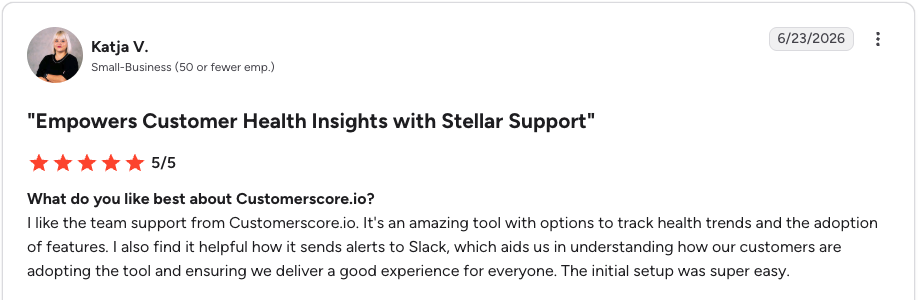
We also hold ourselves to the same standard we judge the others by: Customerscore.io is rated 4.8/5 on G2, tied for the highest rating of the six tools in this guide. Reviews like this one are why we build the way we do:
The best client onboarding software in 2026
1. Customerscore.io (Customer Rooms): Best for mid-market B2B SaaS
Customerscore.io approaches client onboarding from inside a Customer Success platform. Customer Rooms is a shared, customer-facing workspace created per account and shared as a single public link, with no login required on the customer side. Inside a room you get the onboarding plan broken into phases with tasks, files and links (resources), and participants from both teams. You build and manage rooms from an editor in the app, duplicate them for the next customer instead of starting over, and archive them when the project is done.
What makes it different from a standalone onboarding tool: Customer Rooms lives in the same platform that scores every account for churn risk and expansion. So a completed onboarding is not the end of the story. The same system tells you whether the account is actually adopting the product, flags the ones stalling before renewal, and explains why. Onboarding becomes the first step of retention, not a separate silo, and the customer you onboard is the same one you then manage, retain, and grow, all in one place instead of handing off between tools.
Key features:
- Customer Rooms: a per-customer workspace on one public link, no customer login, with phases, tasks, resources, comments, and participants from both teams; duplicate for the next account, archive when done
- My Day: every CSM starts the day knowing which accounts need them today and why, with what is due
- QBR and meeting briefs: prepared from the account's full history and touchpoints, so prep takes minutes instead of an afternoon
- Tasks: follow-ups with assignees, due dates, and priorities, linked to the account they are about
- Predictive churn and expansion scoring: a model trained on your own data scores every account daily, with the drivers behind each score, so the CSM knows whether onboarding actually worked
- MCP support: ask about your customer base straight from Claude or Slack in natural language, plus a conversational AI agent in the app
- Integrations and security: Stripe, HubSpot, Salesforce, Mixpanel, PostHog, Segment, Intercom, Chargebee; ISO 27001 certified, EU hosting, GDPR compliant
- Enrich the platforms you already run: churn and upsell signals can also flow into HubSpot, Intercom, Slack, and webhooks, so insights reach the tools your team works in
Pricing: One platform fee based on your ARR, with every feature included and never per seat. You get a tailored offer after one call. See pricing.
Pros:
- Onboarding, adoption tracking, renewals, and expansion in one platform instead of a handoff between tools
- Public-link rooms remove all friction on the customer side, no login, no invites to manage
- Live in 1 to 3 weeks with expert-led setup, no dedicated admin needed
"Setup was super easy and the team support is amazing." Katja V., Head of Customer Success, tl;dv
Cons:
- Not a professional-services suite: no resource management, capacity planning, or time tracking, where a PSA-style tool like Rocketlane goes deeper
- Rooms are built for repeatable B2B SaaS onboarding, not for staffed, billable delivery projects
G2 rating: 4.8/5. Reviewers highlight the easy setup, the automated alerts, and how it connects data across tools. See Customer Rooms and the wider Customer Success platform, or book a demo.
2. Rocketlane: Best for services and implementation teams
Rocketlane is the most complete option for teams that treat onboarding as professional-services delivery. It combines a customer-facing onboarding portal with project management, resource and capacity planning, time tracking, and increasingly agentic AI. For mid-size SaaS with a dedicated implementation team, it is hard to outgrow.
The trade-off is weight and cost. It is a PSA-grade platform, so it is more platform than a team needs when onboarding is a repeatable plan rather than a staffed delivery project, and pricing sits in that tier. If your onboarding is a handful of steps rather than a staffed delivery project, it can be more platform than the job requires.
Key features:
- Customer-facing onboarding portal with shared project plans
- Full project management: templates, milestones, dependencies
- Resource management, capacity planning, and time tracking
- AI features for status updates and project automation
Pricing: Per seat with published tiers; costs scale with the size of your delivery team, and PSA-grade deployments land well above the entry price.
Pros:
- The most complete delivery suite in the category, repeatedly ranked the leading client onboarding tool on G2
- Portal, project management, and PSA operations in one place
- Strong customer satisfaction marks for support and ease of doing business
Cons:
- PSA-grade weight and cost for teams that just need a shared onboarding plan
- Deep configuration options mean a real learning curve up front
- Onboarding data stays in the delivery tool; account health after go-live lives elsewhere
G2 rating: 4.7/5. Reviewers praise the structured, transparent client projects; the initial learning curve is the most common criticism.
3. GUIDEcx: Best for complex, task-heavy implementations
GUIDEcx is built around structured project management with customer-facing task lists and CRM integration. It handles implementation tracking and gives customers clear visibility into what is due and who owns it, which is exactly what many onboarding teams want.
The gaps, per public positioning, are around resource management and financial tracking, which are absent, and AI capabilities, which are minimal. It is strong at running the plan, less so at telling you what the plan means for the account afterward.
Key features:
- Structured project templates with phases, tasks, and dependencies
- Customer-facing task lists with clear owners and due dates
- CRM integration so implementation status reaches the pipeline
- Reporting on project progress and time to launch
Pricing: Tiered and quote-based; reviewers note that resource management and time tracking sit in higher tiers.
Pros:
- Disciplined, template-driven project structure that scales across accounts
- Excellent support marks on G2
- Mid-market teams rate its scalability highly
Cons:
- No resource management or financial tracking
- Minimal AI capabilities
- Occasional performance complaints (slow loading) in reviews
G2 rating: 4.6/5. Reviewers praise the ease of use and structured workflows; gated features and performance draw the most criticism.
4. Dock: Best for agencies and a polished client hub
Dock approaches onboarding from the customer-workspace side. It creates personalized hubs where you share project plans, forms, onboarding content, and assets in one clean place, with fast setup and no PSA investment. Teams that care most about a polished client experience like it.
Because it is centered on the workspace, it is lighter on the delivery-operations side (resourcing, deep project management) than a tool like Rocketlane, and like most tools here it does not connect onboarding to account health scoring.
Key features:
- Personalized client hubs for plans, forms, content, and assets
- Fast setup with reusable templates
- Salesforce and HubSpot integrations
- Doubles as a sales and mutual-action-plan workspace
Pricing: Per seat, positioned well below PSA-grade tools.
Pros:
- One of the most polished client experiences in the category
- Fast to set up and easy to reuse across accounts
- Works across the funnel, from sales rooms to onboarding
Cons:
- Lighter on delivery operations: no resourcing or deep project management
- Reviewers note occasional slow performance and limited mobile functionality
- No link from onboarding to account health after go-live
G2 rating: 4.7/5. Reviewers praise the ease of use and centralized resources; performance and layout flexibility draw the most criticism.
5. Arrows: Best for lightweight onboarding inside HubSpot
Arrows is a lightweight onboarding tool that builds plans inside HubSpot and syncs task completion to deal and company records. Teams that want a simple onboarding experience mapped closely to the pipeline like how tightly it connects to the CRM.
The flip side is that it is built specifically around HubSpot and stays close to the CRM. If you want onboarding connected to a full Customer Success platform with health scoring, you would pair it with another tool. Customerscore.io integrates with HubSpot and runs onboarding, account health, and the account record in one platform.
Key features:
- Onboarding plans that live inside HubSpot records
- Task completion synced to deals and companies
- Customer-facing plan pages without extra logins
- Sales rooms for the pre-sale side of the same motion
Pricing: Published tiers, positioned as a lightweight add-on to a HubSpot stack.
Pros:
- The #1-rated customer success app in the HubSpot marketplace
- Extremely low friction for teams already living in HubSpot
- Simple, fast onboarding experience for the customer
Cons:
- Built specifically around HubSpot; little value outside that ecosystem
- Reviewers want more advanced task-management flexibility
- No account health scoring; onboarding data stays in the CRM
G2 rating: 4.8/5. Reviewers praise the ease of use and seamless HubSpot integration; limited task flexibility is the most common criticism.
6. OnRamp: Best for high-volume, repeatable onboarding
OnRamp focuses on turning manual, repeatable onboarding into automated, guided workflows with customer-facing steps and internal task automation. It suits teams onboarding a high volume of similar customers who want to reduce manual coordination.
As a focused onboarding tool, it does not carry the broader Customer Success workspace or the churn and expansion scoring you would use to manage the account after go-live.
Key features:
- Guided, customer-facing onboarding steps
- Internal task automation for repeatable workflows
- Templates for high-volume, similar onboardings
- Progress tracking across the customer portfolio
Pricing: Quote-based.
Pros:
- Strong at reducing manual coordination on repeatable onboardings
- Reviewers praise the ease of use and hands-on support team
- Focused scope keeps it simple to adopt
Cons:
- No broader CS workspace or health scoring after go-live
- Focused scope means pairing it with other tools for the rest of the journey
- Lower G2 rating than the other dedicated tools here
G2 rating: 4.4/5. Reviewers praise day-to-day ease of use and support; scope limits draw the most criticism.
Comparison table: client onboarding software at a glance
| Tool | Best for | Client-facing space | After go-live | Setup | G2 rating |
|---|---|---|---|---|---|
| Customerscore.io (Customer Rooms) | Mid-market B2B SaaS | Room on one public link, no customer login | Churn and expansion scoring, adoption and renewals in the same platform | 1 to 3 weeks, expert-led | 4.8 |
| Rocketlane | Services and implementation teams | Client portal | Project closes; PSA reporting | Heavier, PSA-grade | 4.7 |
| GUIDEcx | Complex, task-heavy implementations | Customer task lists | Project closes; CRM sync | Moderate | 4.6 |
| Dock | Agencies, polished client hub | Personalized hub | Hub stays as a client space | Fast | 4.7 |
| Arrows | Lightweight onboarding inside HubSpot | Plan view synced to HubSpot | Task status in the CRM, no health scoring | Fast | 4.8 |
| OnRamp | High-volume, repeatable onboarding | Guided steps | Workflow ends at go-live | Moderate | 4.4 |
Comparison last updated October 2026, based on publicly available information and vendor positioning; G2 ratings as of September 2026. Verify current details on each vendor's site.
How to choose the right client onboarding tool
- Match it to how you deliver. If onboarding is a staffed delivery project, a PSA-grade tool (Rocketlane) fits. If it is a repeatable plan you send customers, a workspace tool (Customer Rooms, Dock, Arrows) is lighter and faster.
- Check the client-facing side. The customer should see progress without logging into your internal tools. A public link with no customer login removes friction.
- Decide whether onboarding should stand alone. If you want onboarding connected to whether the account activates, renews, and expands, choose a tool that lives in a Customer Success platform rather than a separate silo, with customer health scoring and daily priorities next to the plan.
- Confirm it fits your stack. Check the CRM, billing and product-data integrations. If you want onboarding plus billing, product and CRM data in one account view, that points to Customerscore.io.
If you want client onboarding that doubles as the first step of retention, Customer Rooms is built for exactly that.
Related guides: 8 best customer success software · Best customer health score software · Best customer retention software
FAQs
What is client onboarding software?
Client onboarding software helps you guide a new customer from signed contract to going live, using a shared plan of phases, tasks, owners, and resources that both your team and the customer can follow. The best tools give the customer a client-facing workspace so they see progress without logging into your internal systems.
What is the difference between client onboarding and customer onboarding software?
In practice the terms are used interchangeably for B2B SaaS: both mean guiding a new account through setup and first value after the sale. "Client onboarding" is more common in agencies and services, "customer onboarding" in product-led SaaS, but the tools overlap heavily. This guide covers both.
What is the best client onboarding software for mid-market SaaS?
Customerscore.io (Customer Rooms) is built for mid-market B2B SaaS companies: each new customer gets a shared onboarding room on one link, and the same platform then tracks adoption, renewals and expansion for that account, so onboarding and customer success run in one place.
What is the best client onboarding software for agencies and services teams?
Rocketlane fits services teams running staffed, billable implementation projects, with resourcing and time tracking. Dock fits agencies that want a polished client hub that is fast to set up.
What is the difference between client onboarding software and project management tools?
Project management and PSA tools run internal or billable projects for your team. Client onboarding software is built to get a new customer to first value, with a plan the customer can see and reusable templates per customer type. The best onboarding tools also show what happens after go-live.
What is the best client onboarding software?
There is no single best tool, only the best fit for how you deliver onboarding. Rocketlane is strongest for services teams running onboarding as staffed projects; Dock and Arrows are strong lightweight client workspaces; GUIDEcx is strong on structured task management. Customerscore.io (Customer Rooms) is the best fit if you want a client-facing onboarding space tied to churn and expansion scoring in one platform.
Do I need a separate onboarding tool if I already have a CRM?
A CRM tracks the deal, not the customer-facing onboarding plan. Onboarding tools add a shared workspace the customer can follow and reusable plans your team runs each time. Some, like Arrows, build the plan inside HubSpot; Customerscore.io integrates with your CRM (including HubSpot) and adds onboarding plus account health in one place.
How is Customer Rooms different from a generic client portal?
A generic client portal is a login-gated document space. Customer Rooms is a per-customer onboarding workspace shared as a public link with no customer login, structured into phases and tasks, and it sits inside a platform that also scores the account for churn risk and expansion, so onboarding connects to retention.
Key Takeaways
- Client onboarding software replaces scattered emails and spreadsheets with one shared plan the customer can follow.
- The dedicated leaders each have a lane: Rocketlane for services-grade delivery, GUIDEcx for structured tasks, Dock for a polished hub, Arrows for lightweight CRM-synced onboarding, OnRamp for automating repeatable flows.
- Most stop at go-live. Customerscore.io (Customer Rooms) is the option that ties onboarding to churn and expansion scoring, so onboarding becomes the first step of retention rather than a separate tool. See Customer Rooms.
Related articles
Best Churn Prediction Software (2026)
The best churn prediction software in 2026, compared on what matters: how each tool predicts churn, whether it explains the why, reads product usage, and turns the risk into work for your team.
BlogBest Rocketlane Alternatives for B2B SaaS CS Teams
Rocketlane alternatives for B2B SaaS teams: when you need a PSA suite, when a lighter onboarding workspace is enough, and when onboarding should live next to account health.
BlogAccount Health Dashboard: A B2B SaaS Guide for 2026
What an account health dashboard is, the metrics it should track, how to implement one your team actually trusts, and how it fits into your B2B SaaS workflows.
BlogHow to Build a Customer Health Score in HubSpot (Step by Step)
A step-by-step guide to building a customer health score in HubSpot, from a manual RAG score to weighted workflows, how to bring in product usage, and the pitfalls to watch.