
AI Customer Success: A Practical Pilot Playbook for 2026


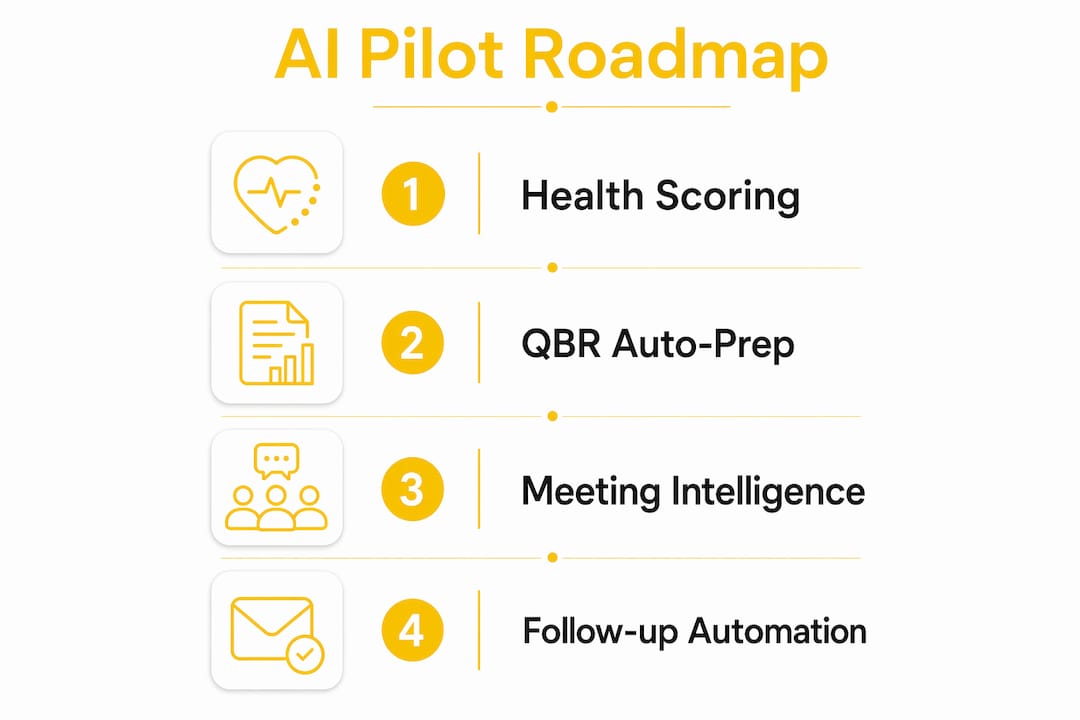
Start with account health scoring and QBR auto-prep. Those two pilots deliver measurable gains on net revenue retention (NRR), customer satisfaction (CSAT), and CSM capacity faster than any other AI entry point, and they carry the lowest risk because the outputs stay internal until you've validated them. Your immediate next steps: grant pilot access to one product line, map your data sources (billing, product usage, CRM), and block two weeks for prompt and model validation before anything touches a customer.
This is not a "someday" initiative. Teams that have operationalized AI in customer success are handling account loads that would have required 1.3 to 1.5 times as many CSMs three years ago, and the productivity gap between early adopters and everyone else is widening fast.
Table of Contents
- Why AI in customer success is a 2026 priority
- High-impact AI use cases organized by job-to-be-done
- KPIs to track and how AI changes them
- A practical roadmap from pilot to scale
- What your tooling and data architecture need to support
- What the evidence actually shows
- How CSM roles and daily workflows should change
- Key Takeaways
- The case for keeping humans at the center
- How Customerscore.io helps you run an AI pilot
- Further reading and authoritative sources
Why AI in customer success is a 2026 priority
The business case is straightforward: AI shifts CS work from reactive to proactive. Instead of a CSM discovering a churned account in the renewal call, behavioral signals surface the risk weeks earlier. Instead of spending three to five hours building a QBR deck, a CSM spends thirty minutes reviewing and personalizing one that the system drafted.

Efficient AI implementation can enable a smaller CS team to deliver the output previously requiring a larger headcount by collapsing preparation and administrative time. That's not a marginal gain; it's a structural change in how CS organizations scale.
The high-level business impacts worth tracking:
- Higher account load per CSM without sacrificing relationship quality
- Faster time-to-value for new customers through personalized onboarding paths
- Earlier expansion identification from usage and engagement signals
- Lower admin time on data entry, meeting prep, and follow-up drafts
One risk deserves a clear flag upfront: the biggest mistake teams make is automating human moments. Renewal calls, escalation conversations, and executive relationships are not prep problems. They're relationship problems. AI handles the prep; humans handle the moment. Build that guardrail into your pilot design from day one.
Many CX leaders believe AI will play a critical role in the future success of their businesses, according to the Zendesk AI-powered CX Report.
High-impact AI use cases organized by job-to-be-done
The table below maps the most valuable use cases to the job a CSM is trying to get done, the AI capability that addresses it, and the KPI most likely to move.
| Job-to-be-done | AI capability | Primary KPI impact |
|---|---|---|
| Identify at-risk accounts early | Churn prediction and health scoring | Gross retention, NRR |
| Prepare for QBRs and EBRs | Auto-compiled review packs from usage, billing, and support data | CSM prep time, CSAT |
| Onboard new customers faster | Personalized onboarding path recommendations | Time-to-value |
| Trigger the right playbook at the right time | Rule- and signal-based workflow automation | Churn rate, expansion MRR |
| Capture and act on meeting intelligence | Call transcription, summary, and follow-up drafting | CSM capacity, response time |
| Find expansion opportunities | Usage-pattern segmentation and upsell signal detection | Expansion MRR |
| Deflect routine questions | Contextual AI agents and self-service knowledge routing | First-contact resolution, CSAT |
Churn prediction and health scoring is the right first pilot for most teams. The inputs are already in your stack (product telemetry, billing events, support tickets), the output is internal, and a two-week validation window is enough to check whether the model's risk flags match what your CSMs already know anecdotally. If they do, you have a working signal. If they don't, you've learned something about your data quality before it costs you a customer.
QBR auto-prep is the second pilot to run in parallel. The five high-leverage CS AI workflows identified in the Treetop 2026 playbook are QBR prep, account health summaries, onboarding personalization, internal handoffs, and customer-facing communication drafts. Start with the first two; they're entirely internal and validate your data pipeline before you touch anything customer-facing.
Meeting intelligence and follow-up automation comes next. Call transcription tools that auto-generate action items and draft follow-up emails save 30–60 minutes per customer interaction. The ROI compounds quickly at scale.

Pro Tip: Prioritize use cases that collapse prep and admin time first. Internal automation validates your data and builds team confidence before you expose AI-generated content to customers.
Self-service AI agents and customer-facing personalization are powerful, but they belong in Stage 2 or 3. Practitioners consistently recommend starting with internal workflows before exposing outputs to customers. The cost of a bad AI-generated customer message is much higher than the cost of a slightly imperfect internal summary.
KPIs to track and how AI changes them
Measurement is where most pilots fail. Teams run AI for eight weeks, feel good about it, and can't prove anything because they didn't set a baseline. Fix that before you start.
| KPI | Business meaning | How AI affects it | Pilot success threshold |
|---|---|---|---|
| Gross retention | % of ARR retained before expansion | Earlier churn signals reduce preventable losses | Measurable reduction in surprise churn events |
| Net revenue retention (NRR) | Retention + expansion as % of prior ARR | Expansion detection lifts NRR | Positive NRR trend over 6 months |
| Expansion MRR | New revenue from existing accounts | Usage-signal playbooks surface upsell timing | At least one expansion attributed to AI signal |
| Churn rate | % of accounts or ARR lost | Predictive alerts enable earlier intervention | Reduction in late-stage churn interventions |
| CSAT / NPS by interaction type | Customer satisfaction at key touchpoints | Faster, more consistent responses improve scores | No CSAT erosion; ideally a 5–10 point lift |
| Time-to-value | Days from signup to first meaningful outcome | Personalized onboarding shortens the path | Measurable reduction in onboarding duration |
| CSM capacity utilization | Accounts per CSM, time on prep vs. customer work | Prep automation frees time for strategic work | Shift in time distribution toward customer-facing work |
Key KPIs that AI commonly improves include CSAT/NPS, churn rate, time-to-value, first-contact resolution, and NRR. The Salesforce data aligns with what practitioners report: efficiency gains show up first (CSM capacity, prep time), then retention metrics improve as playbooks mature, and expansion MRR lifts last.
A few practical notes on experiment design:
- Set a baseline period of at least 60 days before the pilot starts. You need a comparison point.
- Use a matched cohort where possible: accounts similar in size, segment, and tenure, split between AI-assisted and standard CS coverage.
- Minimum evaluation window: 3–6 months for predictive models to show retention impact; 6–12 months for full ROI on the investment.
- Data sufficiency: AI models typically need 6–12 months of historical data or enough labeled churn events to train reliably. If your dataset is thin, start with rule-based health scoring and layer in ML as data accumulates.
Measure both halves of CSM time: customer-facing minutes and prep/administrative minutes. AI success is as much about shifting that time distribution as it is about raw productivity increases.
A practical roadmap from pilot to scale
The stages below give you a time-bound structure. Adjust the calendar to your team's size and data readiness, but don't compress Stage 1 below four weeks.
Stage 0: Discovery and hypothesis (2–4 weeks)
- Identify your pilot cohort (one product line or customer segment).
- Map your data sources: product telemetry, CRM records, billing events, support tickets, call transcripts, and customer feedback.
- Define your success criteria and baseline metrics before touching any tooling.
- Run consent and data privacy checks, especially if you're in a regulated industry or handling EU customer data.
Stage 1: Pilot (4–8 weeks)
- Ingest data into your health-scoring model or QBR prep workflow.
- Run a manual review loop: every AI output gets a CSM check before it's used.
- Track your pilot KPIs weekly.
- Document every false positive and false negative in your churn model.
Stage 2: Learn and refine (2–3 months)
- Reduce false positives by adjusting signal weights based on pilot data.
- Operationalize the playbooks that showed the strongest signal-to-action correlation.
- Build a shared prompt library and document what works.
- Begin measuring CSAT by interaction type to catch any erosion in human-touch moments.
Stage 3: Scale (3–9 months)
- Integrate AI outputs into your CRM, ticketing system, and communication tools.
- Create guardrails for any customer-facing AI-generated content: templates, tone guidelines, and mandatory human review.
- Assign a CS ops or AI lead to own prompt governance, model monitoring, and tooling decisions.
- Open expansion experiments using reinvested CSM time.
Pilot checklist before you go live:
- Data sources mapped and accessible
- Consent and privacy review complete
- Success criteria and baseline metrics documented
- Human review cadence scheduled (weekly minimum in Stage 1)
- Escalation paths defined for model errors
- Rollback plan in place
Pro Tip: AI pilots commonly show efficiency gains first; full ROI timelines for many teams fall in the 6–12 month range once data and playbooks are operationalized. Set stakeholder expectations accordingly.
What your tooling and data architecture need to support
You don't need a monolithic AI suite. In fact, starting with one is a common mistake. Specialized tools that integrate into your existing CRM and analytics stack are easier to configure, easier to maintain, and easier to replace if they underperform.
Data sources to consolidate before any model runs:
- Product telemetry (feature usage, login frequency, session depth)
- CRM records (contact history, health notes, CSM assignments)
- Billing events (payment status, plan changes, contraction signals)
- Support tickets (volume, severity, resolution time, escalation patterns)
- Call transcripts and meeting notes
- Customer feedback (NPS responses, CSAT scores, survey verbatims)
Integration patterns that work at scale:
- Event stream ingestion for real-time health score updates
- Nightly batch syncs for billing and CRM data
- Feature stores that normalize data into model-ready formats
- CRM-embedded inference so CSMs see health scores inside the tools they already use
- Explainability routes that show why a score changed, not just what it is
The explainability piece is underrated. A health score that says "red" without explaining which signals drove it is nearly useless for a CSM trying to take action. Configurable signal weights and human-readable explanations are non-negotiable features.
What to look for in any CS AI tool:
- Explainable health scores with visible signal contributions
- Configurable signal weights by segment or product line
- Human-in-the-loop review for any customer-facing output
- Audit logs for model decisions
- Easy data exports for analysis and reporting
Pro Tip: Avoid large monolithic AI suites at the start. Specialized agents or focused tools that integrate into your existing CRM and analytics stack tend to be easier to customize and maintain. You can always consolidate later.
Operational ownership matters too. Someone needs to own the prompt library, monitor for model drift, and manage data retention policies. At companies above roughly $20M ARR, a dedicated CS ops or AI lead role typically appears. Below that threshold, assign the responsibility explicitly to a senior CSM or RevOps team member.
What the evidence actually shows
The productivity gains from AI in customer success are real, but the distribution is uneven. Teams that reinvest saved time into higher-value activities see the biggest returns. Teams that treat AI as a headcount-reduction tool tend to see short-term savings followed by relationship erosion and churn upticks.
The Treetop playbook documents that successful AI adoption increases account-load capacity by roughly 1.3 to 1.5 times when teams reinvest saved time into higher-value activities. That's meaningful: a team of six CSMs can now cover the workload that previously would have required up to nine in the pre-AI era, without degrading relationship quality.
"Use AI aggressively for prep, research, and synthesis. Protect human-to-human interactions to preserve trust." (Treetop Customer Success AI Playbook, 2026)
The trade-offs teams actually encounter:
- Deploying customer-facing automation too early is the most common pitfall. An AI-drafted email that misreads account context damages trust faster than a delayed response.
- Over-relying on monolithic AI suites creates vendor lock-in and makes it hard to swap underperforming components.
- Premature headcount cuts based on early efficiency gains eliminate the human capacity needed for complex escalations and strategic expansion work.
The mitigation is staged exposure: internal automation first, human review gates at every customer-facing touchpoint, and a deliberate policy of reinvesting productivity gains into expansion and relationship work rather than immediate headcount reductions. Teams that follow this sequence see positive ROI within 6–12 months; teams that skip stages typically don't.
For a concrete data point on retention patterns across SaaS accounts, the 44,000-user retention study on the Customerscore blog provides useful baseline benchmarks for setting realistic pilot expectations.
How CSM roles and daily workflows should change
AI doesn't eliminate CSM roles. It changes which skills matter most and which tasks disappear from the job description.
Role shifts to plan for:
- Fewer entry-level coordinators handling manual data entry and meeting scheduling
- More senior strategic advisors who can interpret AI outputs and act on them
- A rising need for CS ops or AI owners at mid-market and above to manage tooling and governance
Core skills to build on your team:
- Data literacy: reading health score dashboards, understanding signal weights, and spotting model errors
- Playbook design: translating AI signals into repeatable workflows that CSMs can execute consistently
- Prompt engineering basics: writing clear, scoped prompts for QBR prep, account summaries, and email drafts
- Model validation: knowing when a churn prediction is trustworthy and when to override it
- Customer empathy preservation: recognizing which interactions require a human voice and protecting those moments
Sample daily workflow for an AI-assisted CSM:
- Review AI-synthesized health summary for the day's accounts (10 minutes).
- Triage alerts: flag any accounts with significant score drops for same-day outreach.
- Pull AI-drafted QBR pack for the week's scheduled reviews; personalize and add context (30 minutes per account instead of 3–5 hours).
- Use expansion signal alerts to identify accounts ready for an upsell conversation.
- Log outcomes back into the system to improve model accuracy over time.
Training checklist for CS teams adopting AI:
- Short workshops on reading and interpreting health score dashboards
- Shared prompt library with tested templates for QBR prep, account summaries, and follow-ups
- Shadowing sessions where senior CSMs demonstrate how they validate and override AI outputs
- Measurement sprints (4-week cycles) to validate whether skill adoption is shifting time distribution toward customer-facing work
Pro Tip: AI shifts the CSM role toward strategic advising by surfacing early churn signals and expansion opportunities from behavioral data. Frame training around that shift, not just the tools.
The customer success software landscape has matured enough that most modern platforms support these workflows out of the box. The skill gap is rarely about the tools; it's about building the habits and governance to use them well.
Key Takeaways
AI in customer success delivers the fastest, most defensible ROI when teams start with internal automation, validate signals before exposing AI outputs to customers, and reinvest saved time into expansion and relationship work rather than headcount cuts.
| Point | Details |
|---|---|
| Start with health scoring and QBR prep | These two pilots are internal, low-risk, and deliver measurable NRR and CSM capacity gains fastest. |
| Measure both halves of CSM time | Track customer-facing minutes and prep/admin minutes; the shift in distribution is the early success signal. |
| AI adoption increases account-load capacity by approximately 1.3–1.5x | This gain only materializes when teams reinvest saved time into higher-value activities, not headcount cuts. |
| Full ROI typically takes 6–12 months | Efficiency gains appear first; retention and expansion metrics improve as playbooks mature over time. |
| Customerscore for B2B SaaS pilots | Customerscore's explainable health scoring, churn prediction, and QBR auto-prep integrations make it a practical starting point for the pilots described in this guide. |
The case for keeping humans at the center
There's a version of AI in customer success that looks great on a dashboard and quietly destroys the relationships that drive renewal. I've seen the pattern: a team automates check-in emails, response times improve, CSAT holds steady for a quarter, and then renewal rates drop because customers haven't spoken to a human in six months.
The right frame isn't "how much can AI handle?" It's "what does AI free humans to do better?" Use AI to collapse the prep, the synthesis, the triage, and the drafting. Then use the time you get back for the conversations that actually build trust: the escalation call where a customer needs to feel heard, the QBR where you challenge their roadmap, the expansion conversation where you've done enough homework to make a genuinely useful recommendation.
Start small. Validate internally. Measure CSAT by interaction type, not just overall, so you can detect erosion before it shows up in churn. And treat your pilot results as learning assets: document what worked, what the model got wrong, and what guardrails you added. Share that documentation across CS and RevOps. The teams that scale AI well aren't the ones with the most sophisticated models. They're the ones with the most disciplined feedback loops.
How Customerscore.io helps you run an AI pilot
Most CS teams spend the first month of an AI pilot just connecting their data. Customerscore.io connects billing (Stripe, Chargebee), product analytics (Mixpanel, PostHog, Segment), CRM (HubSpot, Salesforce) and support (Intercom) into one account record, so the pilot can start with the work instead of the plumbing.
Every account gets a Churn Risk Score from 1 to 5 and an Upsell Score from 1 to 3, refreshed daily and predicted from the account's own history by a model pre-trained on tens of thousands of SaaS users, with the drivers and brakes behind each score. Briefs, QBR and renewal prep are built from the full account history for the CSM to review. Playbooks turn a flagged account into tasks for its owner, and My Day shows each CSM who needs them today and why. The AI does the watching; your team stays in control and acts.
The time you free up belongs in expansion and relationship work, not in headcount cuts. To see how it works, book a demo.
Further reading and authoritative sources
The sources below back the claims in this guide and provide templates, playbooks, and research you can use to design your own experiments.
- Customer Success AI Playbook (2026) | Treetop: The most practical 2026 playbook available; covers staged adoption, productivity benchmarks, and guardrail design.
- AI for customer success: Benefits + use cases | Zendesk: Covers CX leader adoption data, use-case taxonomy, and KPI frameworks.
- AI in Customer Success: 7 Use Cases and Real ROI | monday.com: Useful for ROI timeline expectations and role-shift framing.
- AI for Customer Success (KPIs and Tools) | Salesforce: KPI mapping and tool evaluation criteria from an enterprise perspective.
- AI-Powered Customer Success Specialization | Coursera: Structured learning path for CSMs building data literacy and AI fluency.
- SaaS Retention & Customer Success Blog | Customerscore: Playbooks, case studies, and retention research specific to B2B SaaS teams.
Use these to design your experiment plan, build your evaluation criteria, and source templates for QBR packs and health-score configurations. Not every model or approach scales the same across segments; match the research to your product type and customer data availability before committing to a specific architecture.
Recommended
Related articles
How Accurate Is Churn Prediction? What Data on 48,000 B2B SaaS Customers Shows
How accurate is churn prediction? We checked the risk scores of 48,000 B2B SaaS customers against what happened next, for AI and rule-based scoring.
BlogHow to Score Accounts for Expansion: Build an Upsell Score Step by Step
How to score accounts for expansion: which signals predict upsell, how to weight and back-test them, and how to read the score next to churn risk. Step by step.
BlogBest Customer Success Software for SaaS Teams in 2026
The 8 best customer success software platforms for SaaS in 2026, compared by company size and use case: health scoring, churn prediction, automation, pricing.
BlogMulti-Year Renewals in B2B SaaS: When to Offer Them and How
When a multi-year renewal pays off, what discount to expect, which clauses protect both sides, and how to time the offer.