
Playbook Automation for B2B SaaS CS and RevOps


Playbook automation for B2B SaaS customer success means prebuilt, data-driven workflows that convert multi-source signals (product usage, billing events, support tickets, CRM data) into triggered tasks and alerts, while keeping a human CSM accountable for every customer-facing moment. The single most valuable place to start: instrument a 90-day onboarding playbook tied to time-to-value (TTV) and product activation signals. Get that one working before touching renewal or expansion.
Three metrics to anchor everything you build:
- Gross retention rate: the floor that tells you whether automation is preventing churn
- Time-to-value: the clock that starts at contract signature and stops at first meaningful outcome
- Health score: the composite signal that decides which playbook fires next
Key Takeaways
Automated customer-success playbooks work when they combine reliable multi-source signals, named ownership, and a conversation-first workspace that keeps CSMs in control of every customer-facing moment.
| Point | Details |
|---|---|
| Start with onboarding | The 90-day onboarding playbook is the highest-leverage place to begin; instrument it with TTV and activation signals first. |
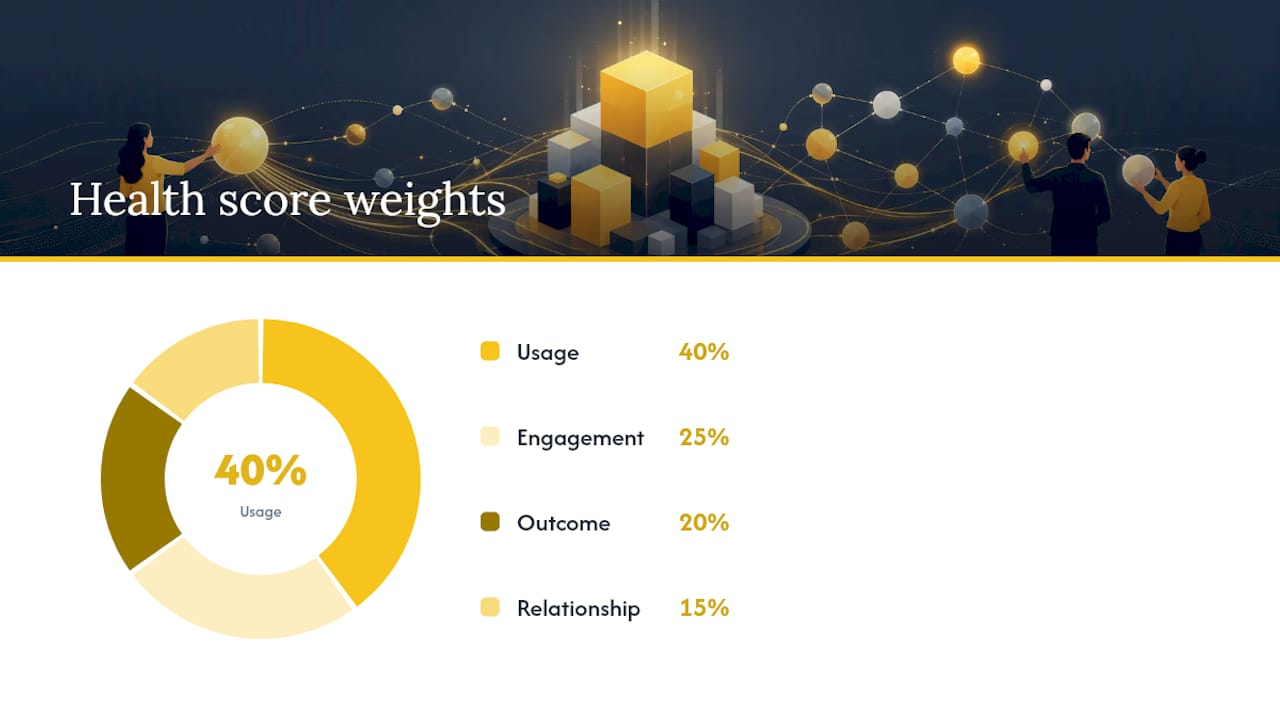
| Calibrate your health score | Use the formula (Usage × 0.4) + (Engagement × 0.25) + (Outcome × 0.2) + (Relationship × 0.15) and backtest against 12 months of churn data before going live. |
| Automate internally first | Apply automation to QBR prep, account summaries, and alert routing before extending it to customer-facing messages. |
| Enforce ownership on every trigger | Every automated task must route to a named CSM owner with a due date; unowned tasks are the primary cause of playbook failure. |
| Customerscore for execution | Customerscore connects churn prediction, explainable health scoring, and playbook templates to Chargebee, PostHog, and your CRM in one workspace. |
Table of Contents
- Why playbook automation changes CS outcomes
- When should automation support CSMs instead of replacing them?
- What does an effective playbook automation system actually need?
- How do you build your first automated playbook in 90 days?
- Three sample automated playbooks you can adapt today
- How do you measure whether your playbooks are working?
- What technology and integrations does your platform need?
- How do you roll out playbook automation without losing control?
- Common pitfalls in playbook automation and how to avoid them
- An editorial perspective on how playbook automation actually gets built
- Customerscore gives you the infrastructure to run these plays
- Sources
Why playbook automation changes CS outcomes
Automated customer-success playbooks produce measurable gains in three areas: churn reduction, faster TTV, and CSM capacity. When signals trigger tasks automatically, CSMs spend less time on account reviews and more time on conversations that actually move accounts forward. High-performing teams instrument proactive engagement motions (coaching, webinars, scaled programs) to grow coverage without proportionally growing headcount, according to TSIA's customer success playbook guide.
The measurement frame matters as much as the tactics. Track gross retention (what you keep), net retention (what you grow), expansion rate, and CSAT or NPS by interaction type. Those four numbers tell you whether automation is working or just generating activity. Decision-support automation preserves relationship value by handling prep and routing, so CSMs show up to conversations with context rather than scrambling for it.
When should automation support CSMs instead of replacing them?
The rule is simple: automate preparation, signal detection, and routine coordination first. Keep escalation calls, executive relationships, and renewal negotiations human-led.
A quick decision checklist before automating any motion:
- Signal reliability: can you trust the data source enough to act on it automatically?
- Personalization risk: would a generic automated message damage this account?
- Escalation cost: if the automation fires incorrectly, how bad is the fallout?
- Segment fit: high-touch accounts need decision-support prompts; digital-touch segments can tolerate more automated outreach under tight guardrails
Treetop's Customer Success AI Playbook makes the case clearly: AI should be applied first to internal prep, synthesis, and QBR packs, augmenting CSMs' work rather than replacing customer-facing relationship moments.
Pro Tip: Pilot internal automation before customer-facing automation. Start with automated QBR prep, account summaries, and health-score digests. Once your team trusts the signals, extend automation to customer-facing touchpoints.
What does an effective playbook automation system actually need?
Four building blocks, all required:
| Component | What it does | Examples |
|---|---|---|
| Data sources | Feed signals into the system | Billing (Chargebee), usage (PostHog), CRM (HubSpot, Salesforce), support (Intercom), engagement (Segment) |
| Orchestration layer | Converts signals into tasks with owners and deadlines | Trigger logic, action routing, completion tracking, audit trail |
| Conversation-first workspace | Keeps signals, messages, and ownership in one place | Shared customer timeline, CSM handoff notes, escalation threads |
| Measurement layer | Tracks whether plays complete and whether outcomes improve | Health score, KPI dashboards, playbook completion rates |
The orchestration layer is where most teams underinvest. A Zendesk analysis of customer success playbooks defines what every playbook must contain: triggers, owners, workflow steps, completion criteria, and inspection signals. Without all five, you have a checklist, not a system.
Conversation-first architecture prevents the most common failure mode: context fragmentation. When signals live in one tool, conversations in another, and ownership in a spreadsheet, playbooks fail at scale. A unified workspace where every CSM can see the full account timeline is the structural fix. Customerscore's customer rooms approach builds this shared context directly into the onboarding workflow.
How do you build your first automated playbook in 90 days?
Follow this sequence. Skip a step and you will likely rebuild it later.
- Segment your accounts. Group by ARR band, product line, or use case. Write two sentences per segment: what success looks like at 90 days and what failure looks like. This is your north star for every trigger you design.
- Define milestones and completion criteria. For each segment, map three to five milestones in the first 90 days (e.g., account activated, first core feature used, first team member invited, first outcome reported). Each milestone needs a measurable completion criterion, not a vague description.
- Design triggers from real signals. Map each milestone to a data event: a billing event (contract signed), a product event (feature activated), or an engagement event (no login in 14 days). Use SaaS onboarding best practices to validate your trigger logic against common adoption patterns.
- Assign owners and actions. Every triggered task needs a named owner (CSM, CS ops, account executive) and a due date. Automation without ownership is just noise.
- Build templates. Welcome emails, kickoff agendas, TTV checkpoint decks, and training invites should all be templated so the system can personalize and send without CSM effort. Zendesk's playbook framework specifically calls out templates and assets as what separates repeatable execution from ad hoc behavior.
- Pilot with a narrow cohort. Pick 10–20 accounts. Track signal reliability, action completion rates, and TTV against your baseline. Measure both customer outcomes and how much CSM time the playbook frees up, as Treetop's pilot guidance recommends.
- Set success gates before scaling. Define what "good enough to expand" looks like: completion rate above a threshold, TTV improvement, no increase in support tickets during onboarding.
Stratridge's B2B playbook guide reinforces the segmentation-first approach: onboarding is outcome acceleration, and the first 90 days are the decisive window for adoption.
Three sample automated playbooks you can adapt today
| Playbook | Trigger | Automated actions | Owner | Success criteria |
|---|---|---|---|---|
| Onboarding | Contract signed; activation event fired | Welcome pack sent, role-based training assigned, TTV checkpoint scheduled | CSM | First core feature used within 14 days; TTV milestone hit by day 60 |
| At-risk / churn prevention | Health score drops below threshold; usage declines significantly week-over-week; support tickets spike | Skip-level call booked, remediation plan template opened, executive brief drafted | CSM + CS ops | Health score recovers within weeks; usage returns to baseline |
| Expansion | Overage detected; power-user signal fires; feature adoption crosses threshold | Expansion QBR scheduled, tailored ROI summary generated, pricing offer routed to AE | CSM + AE | Expansion opportunity qualified within 14 days of trigger |
How do you measure whether your playbooks are working?
Primary KPIs to track from day one: gross retention rate, net revenue retention, TTV by segment, expansion rate, and CSAT or NPS segmented by interaction type (automated vs. CSM-led). The Customerscore metrics guide covers definitions and calculation methods for each.
Sample health score formula
A starting formula from Stratridge's calibration guidance:
(Usage × 0.4) + (Engagement × 0.25) + (Outcome × 0.2) + (Relationship × 0.15)
| Signal | Suggested initial weight | How to validate |
|---|---|---|
| Product usage frequency | 0.4 | Compare usage scores of churned vs. retained accounts 90 days before churn |
| Engagement (logins, training, QBRs) | 0.25 | Check whether low-engagement accounts churned at higher rates |
| Outcome achievement | 0.2 | Verify milestone completion correlates with renewal |
| Relationship health (CSM sentiment, exec access) | 0.15 | Review CSM notes on churned accounts for relationship signals |
Calibrate by backtesting: hold out a period of historical churn data, test multiple weight sets, and select the weights that catch risk earliest with the fewest false positives.
Pro Tip: Never treat the formula above as final. Run it against your last 12 months of churn data before using it to trigger any customer-facing play. A miscalibrated health score fires the wrong playbooks and erodes CSM trust in the system fast.
What technology and integrations does your platform need?
A vendor that cannot meet these requirements will create the tool-silo problem that kills playbook execution at scale.
Required integrations:
- Billing system (Chargebee for subscription events, upgrades, downgrades, cancellations)
- Product analytics (PostHog or Mixpanel for feature-level usage data)
- CRM (HubSpot or Salesforce for account ownership and deal data)
- Support platform (Intercom or Zendesk for ticket volume and sentiment)
- Messaging and alerts (Slack for CSM notifications, email for customer-facing sends)
Required platform capabilities:
- Real-time or near-real-time trigger processing (ask vendors for SLA on data latency)
- Explainable health score models (request a sample explanation during the POC, not just a score)
- Conversation-first workspace with full account timeline and handoff notes
- Role-based ownership and task assignment with audit trail
- Playbook templates with personalization fields
- API access for custom integrations and orchestration
Triggers must be reliable and explainable. During vendor POCs, require a live demonstration of model explainability and ask for the data latency SLA in writing, per TSIA's evaluation guidance. A black-box health score that CSMs cannot interpret will be ignored within weeks. For a broader evaluation framework, the best customer success software guide maps these criteria to specific platform categories.
How do you roll out playbook automation without losing control?
Governance roles (assign before launch):
- CS ops or AI lead: owns trigger logic, template library, and model calibration
- CSM owner: accountable for task completion and customer outcomes within each play
- RevOps contact: ensures billing and CRM data feeds are clean and current
Cadence: review playbook completion rates and health-score accuracy monthly for the first quarter. Quarterly, audit whether the plays are still aligned to your current ICP and product surface. Front's playbook governance research is direct: without defined inspection signals and a review cadence, playbooks drift and automation becomes noise.
Rollout checklist:
- Pilot cohort selected (10–20 accounts, one segment)
- Success gates defined before launch
- CSM training completed on trigger logic and override process
- Escalation path documented for automation failures
- CSM capacity freed by automation redirected to high-value accounts
For a structured pilot design, the AI customer success pilot guide covers success gates and feedback loop design in detail.
Common pitfalls in playbook automation and how to avoid them
- Ownership gaps: a playbook fires but no CSM is assigned. Fix: every trigger must route to a named owner before it goes live.
- Over-automating customer messages: automated outreach at high-touch accounts reads as neglect. Fix: gate customer-facing automation by segment and ARR band.
- Uncalibrated health scores: a score built on assumptions fires the wrong plays. Fix: backtest against 12 months of churn data before using it operationally.
- Tool silos: signals in one platform, conversations in another, tasks in a third. Fix: require a unified workspace in your vendor evaluation, not just integrations.
- Scaling before validating: expanding a pilot before signal reliability is confirmed wastes CSM time and damages account relationships. Fix: enforce success gates.
Balancing personalization and automation comes down to segment: high-touch accounts need CSM judgment at every step; digital-touch accounts can run further on automated rails with periodic human review. A marketing automation checklist offers a useful parallel framework for thinking through touchpoint sequencing and avoiding common automation mistakes.
An editorial perspective on how playbook automation actually gets built
Most teams approach playbook automation as a tooling problem. They buy a platform, connect a few integrations, and expect the playbooks to run. What actually happens: the health score fires on bad data, CSMs ignore the alerts, and the system becomes shelfware within a quarter.
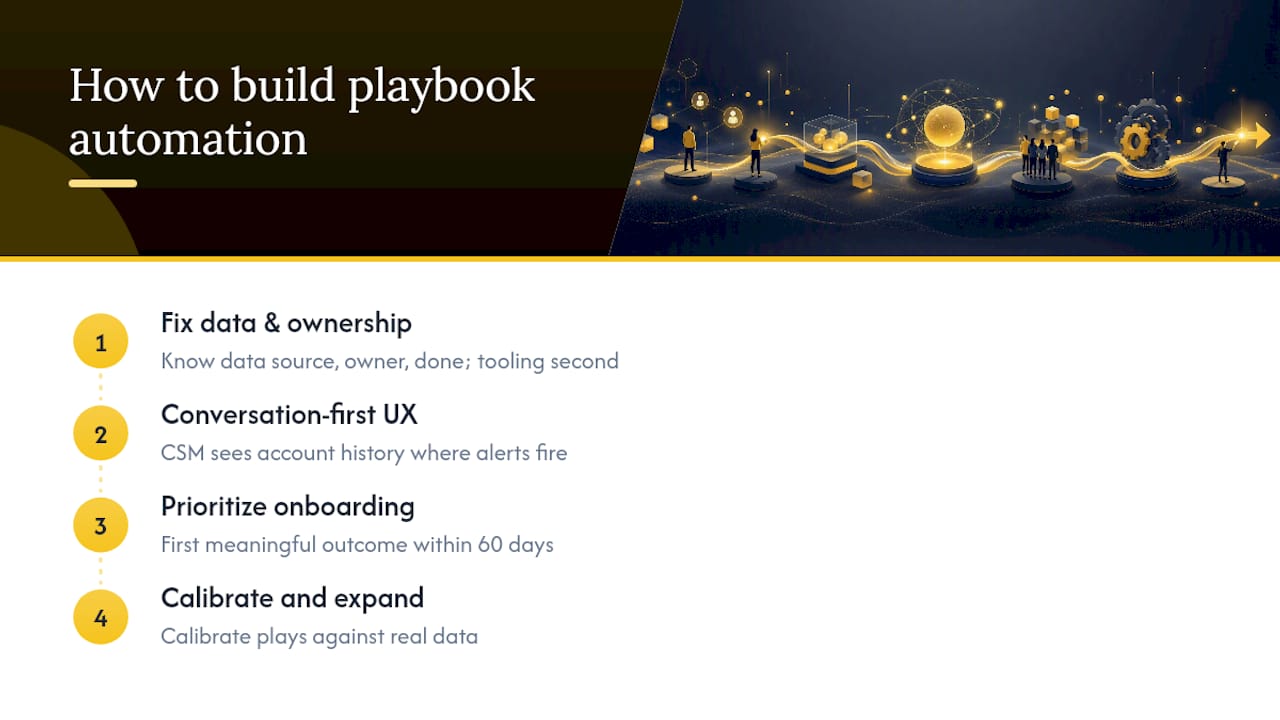
The teams that get this right treat it as a data-quality and ownership problem first, a tooling problem second. Before any trigger goes live, they know exactly which data source feeds it, who owns the task it creates, and what "done" looks like. That sounds obvious. It is almost never done.
The conversation-first principle matters more than most vendors admit. When a CSM cannot see the full account history in the same place they receive a playbook alert, they will context-switch to find it, and that friction is where execution breaks down. The architecture question to ask every vendor is not "what integrations do you have?" but "where does the CSM actually work when a play fires?"
One more thing worth saying plainly: the 90-day onboarding window is not a best practice, it is the leverage point. Accounts that hit their first meaningful outcome in the first 60 days renew at materially higher rates than those that do not. Every other playbook, including at-risk and expansion, is downstream of whether onboarding worked. Build that one first, calibrate it against real data, and the rest of the system becomes much easier to design.
Customerscore gives you the infrastructure to run these plays
Most CS platforms give you a health score and a task list. Customerscore is built around the full execution stack: churn prediction that surfaces at-risk accounts before the CSM notices, an explainable health score your team can actually interpret and act on, and playbook templates with real-time triggers connected to Chargebee, PostHog, HubSpot, Salesforce, Intercom, and Slack.
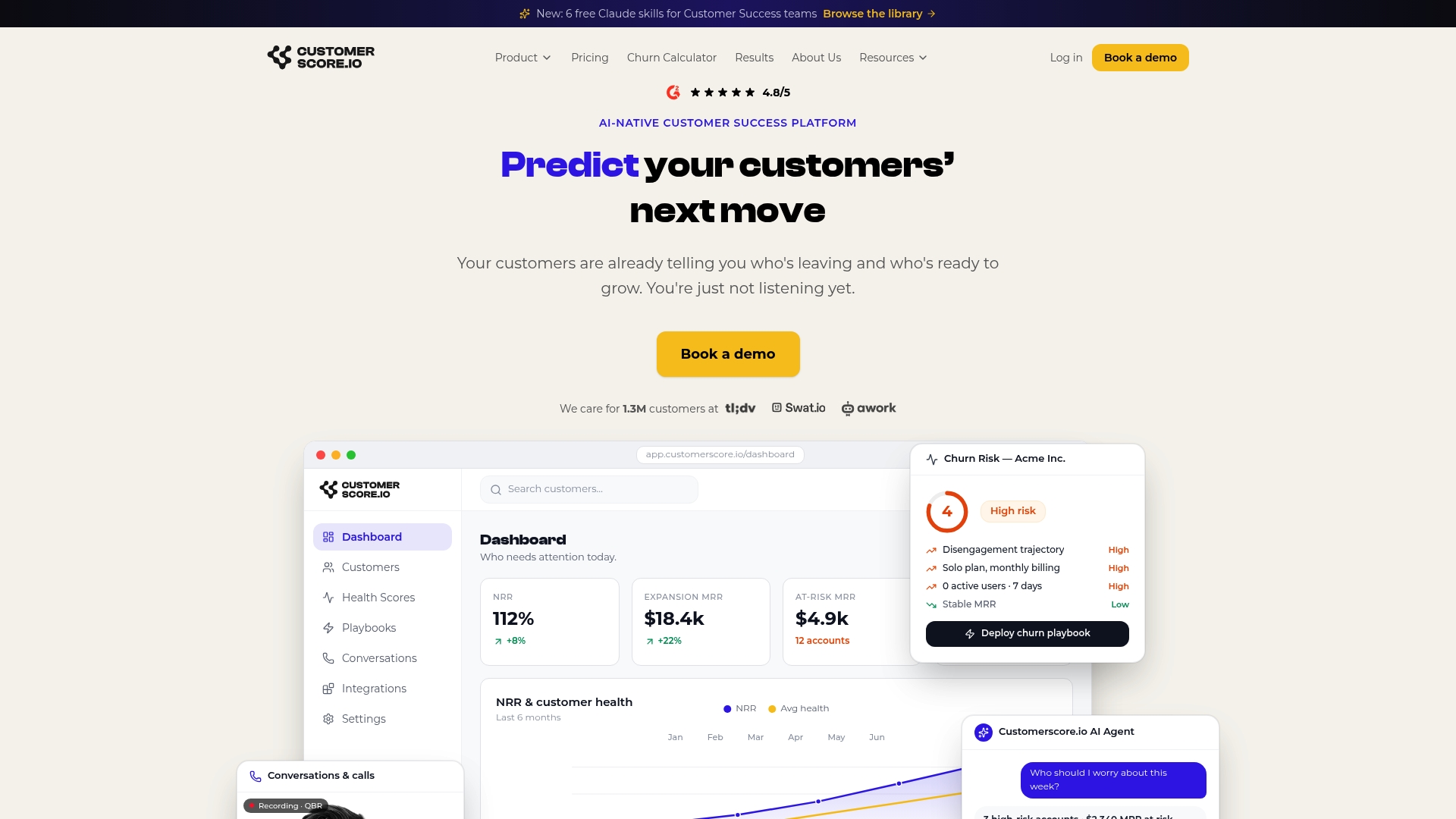
The conversation-first workspace keeps every signal, message, and task in one account timeline, so no CSM has to hunt for context when a play fires. Pilot design is straightforward: pick one segment, connect your billing and usage data, and run the 90-day onboarding playbook against a cohort of 10–20 accounts. Book a demo to walk through the pilot setup with the team and define your success gates before you commit to anything.
Sources
- Customer Success Playbook: A Step-by-Step Guide for Technology Companies | TSIA
- Customer success playbooks: How to build one + free templates
- Customer success playbook and templates for B2B teams
- Customer Success AI Playbook (2026) | Treetop
- How to Build a B2B Customer Success Playbook
Recommended
Related articles
Cut CSM Intervention 18%: Predictive Playbooks for CS & RevOps
Cut CSM Intervention 18%: Predictive Playbooks for CS & RevOps ! Predictive playbook geometric title card Predictive playbooks link a churn prediction to a specific, repeatable action so customer
BlogPinpoint B2B SaaS Adoption Gaps and the Fix That Lifts Renewal
Pinpoint B2B SaaS Adoption Gaps and the Fix That Lifts Renewal ! Analysts reviewing SaaS adoption gaps Adoption gap analysis identifies the funnel stage where eligible users or accounts fail to reach
BlogAnalysts: 6–12 Month Cohort Forecasts for Net Dollar Retention
Analysts: 6–12 Month Cohort Forecasts for Net Dollar Retention ! Analyst reviewing cohort retention forecast The most reliable way to forecast net dollar retention is cohort-based modeling that
BlogStop Surprise Churn: 5 Phase Data Mapping for RevOps and CS
Stop Surprise Churn: 5 Phase Data Mapping for RevOps and CS ! Analyst mapping customer data fields Data mapping for CS means connecting product usage, billing, CRM, and support data to the fields your