
Salesforce Customer Success Integration: A B2B SaaS Playbook


The fastest path to lower churn and higher net revenue retention is a tightly scoped Salesforce customer success integration that syncs Accounts, Contacts, Opportunities, Cases, product usage, and billing into explainable health scores and automated playbooks. For most B2B SaaS teams, the right default architecture is a native connector or lightweight iPaaS middleware, not a custom API build. Three platforms anchor this stack: Salesforce as the system of record, a dedicated customer success platform like Customerscore for health scoring and churn prediction, and HubSpot when your team runs marketing or sales motions alongside CS.
Here is what a working integration covers:
- Sync Salesforce objects: Accounts, Contacts, Opportunities, Cases
- Pull external signals: product usage events, billing/invoice status, NPS/CSAT scores, support ticket volume
- Feed those signals into explainable health scores and churn risk models
- Trigger playbooks automatically: onboarding sequences, risk alerts, renewal cadences, expansion discovery
Key Takeaways
A tightly scoped Salesforce customer success integration, anchored in explainable health scoring and automated playbooks, is the most direct lever B2B SaaS teams have for reducing churn and growing NRR.
| Point | Details |
|---|---|
| Start with canonical keys | Assign customer_id and subscription_id as join keys across every data source before syncing anything. |
| Pilot in 4–8 weeks | Scope the first cohort to a moderate-sized group of accounts; validate health scores against known churned accounts before going live. |
| Track NRR and churn rate first | A modest churn rate reduction on at-risk ARR translates into meaningful retained revenue annually. |
| Automate four core playbooks | Onboarding, churn risk alert, renewal orchestration, and expansion discovery cover the full customer lifecycle. |
| Customerscore accelerates the build | Pre-built Salesforce mapping, explainable health scoring, and multi-source ingestion reduce pilot time to under four weeks. |
Table of Contents
- How should you architect a Salesforce customer success integration?
- Which data should you sync, and how do you model it in Salesforce?
- What CS playbooks and automations should you run in Salesforce?
- Implementation checklist and realistic pilot timeline
- Which KPIs and dashboards should you track to measure ROI?
- Security, privacy, and governance for syncing customer data
- Common pitfalls and how to avoid them
- What Customerscore sees working fastest for B2B SaaS teams
- Customerscore's Salesforce integration for B2B SaaS CS teams
- Useful sources and further reading
How should you architect a Salesforce customer success integration?
The CRM integration architecture you choose determines your maintenance burden for years. Three patterns cover nearly every B2B SaaS scenario.
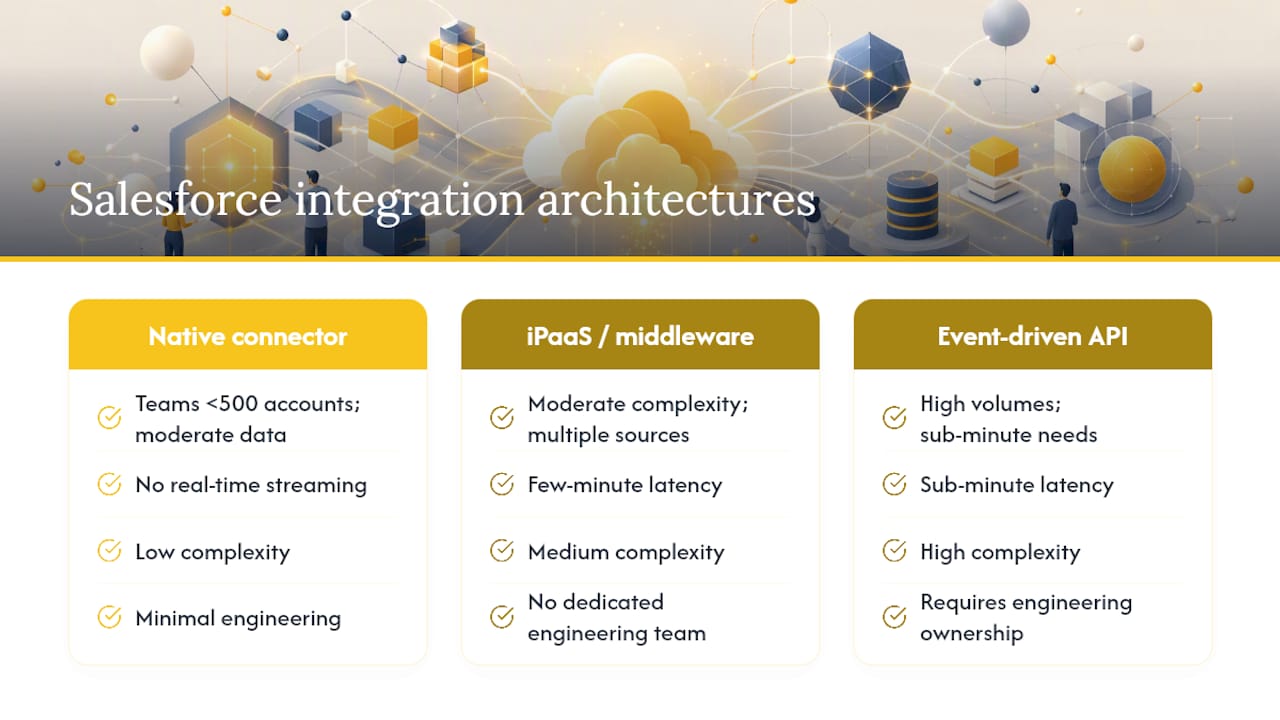
Native connector is the right starting point for teams under 500 accounts with moderate data volumes. Setup takes days, not months, and most CS platforms ship pre-built Salesforce connectors. The trade-off: limited transformation logic and no real-time event streaming.
iPaaS/middleware (tools like MuleSoft, Workato, or Zapier for lighter loads) fits teams with moderate complexity: multiple data sources, some field transformation, and a need for error logging without a dedicated engineering team. Latency runs within a few minutes, which is acceptable for most CS workflows.
Event-driven API is the choice when you need sub-minute latency, high account volumes, or complex enrichment logic. It requires engineering ownership and solid observability tooling, but it is the only pattern that handles real-time churn signals at scale.
When your team runs both HubSpot and Salesforce, treat Salesforce as the system of record for account and opportunity data. Use HubSpot customer success sync for marketing engagement signals, then route everything into your CS platform for unified health scoring. Customerscore connects to both CRMs as integration endpoints, so you avoid building a custom bridge between them.
Pro Tip: Map every data source to a single owner before you write a line of integration code. If two systems both claim to be the source of truth for MRR, your health scores will contradict each other within weeks.
Which data should you sync, and how do you model it in Salesforce?
Start with what actually moves health scores. The table below maps common external sources to Salesforce objects and the custom fields or objects you will need.
| External Source | Salesforce Object | Key Fields |
|---|---|---|
| Product analytics (Mixpanel, PostHog, Segment) | Custom: usage_event | monthly_active_users, feature_adoption_rate, last_activity_date |
| Billing system (Stripe, Chargebee) | Custom: billing_record | MRR, invoice_status, subscription_id |
| Support platform (Intercom, Zendesk) | Case (standard) | total_support_tickets, avg_resolution_time, sentiment_score |
| NPS/CSAT survey tool | Custom: health_score | nps_score, csat_score, survey_date |
| CRM (HubSpot, Salesforce native) | Account, Contact, Opportunity | contract_value, renewal_date, owner_id |
Explainable health scoring depends on joining these records with a canonical key. Use customer_id and subscription_id as the primary join keys across every source. Without them, deduplication becomes a manual fire drill every quarter.
A few field-level specifics worth noting:
last_activity_dateis the single most predictive leading indicator of churn risk in most SaaS productsfeature_adoption_rateshould be scoped to your core value features, not total feature countinvoice_statuswith a "past due" flag should trigger an immediate risk alert, not wait for the next health score refresh- Backfill a sufficient amount of historical usage before running your first health score calculation
What CS playbooks and automations should you run in Salesforce?
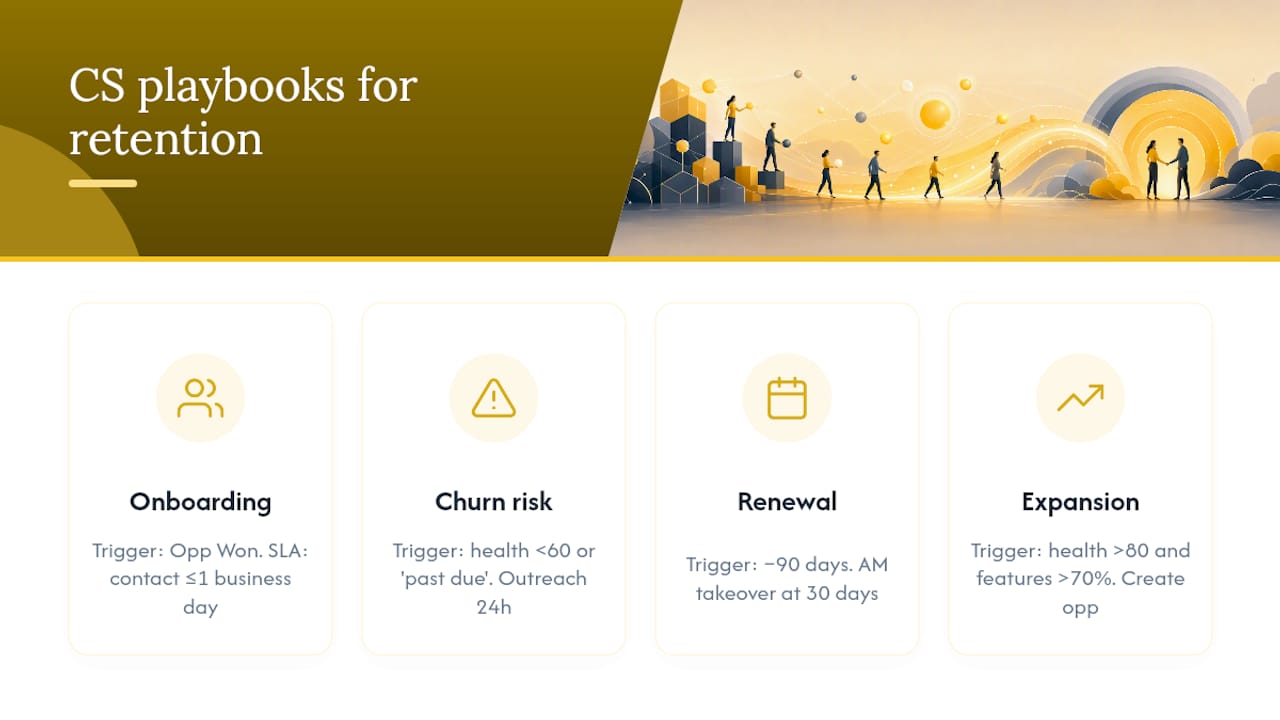
Salesforce becomes genuinely useful for CS when it stops being a data warehouse and starts firing workflows. Four playbooks deliver the fastest retention wins.
Onboarding sequence. Trigger: new Opportunity closes to "Won." Owner: CSM. Actions: create onboarding task checklist, schedule kickoff call within 48 hours, set 30/60/90-day milestone checkpoints. SLA: first contact within one business day. Scalable one-to-many playbooks work well here for lower-touch segments.
Churn risk alert. Trigger: health score drops below threshold (e.g., below 60/100) OR last_activity_date exceeds 14 days OR invoice_status = "past due." Owner: CSM + RevOps notification. Actions: create account triage task, log risk reason, launch personalized outreach sequence within 24 hours.
Renewal orchestration. Trigger: renewal_date minus 90 days. Owner: CSM hands off to Account Manager at 30 days. Actions: 90-day check-in call, 60-day business review, 30-day contract send. Each stage updates a playbook state field in Salesforce so leadership sees pipeline health in real time. Sales and CS alignment at the handoff point is where most renewal losses actually happen.
Expansion discovery. Trigger: health score above 80/100 AND feature_adoption_rate above 70% for core features. Owner: Account Manager. Actions: flag account for upsell review, generate expansion opportunity in Salesforce, notify AM via Slack.
Pro Tip: Do not automate the outreach message itself until you have manually run the playbook at least 20 times. The trigger logic is usually right; the message copy almost never is on the first pass.
Implementation checklist and realistic pilot timeline
Plan 4–8 weeks for a scoped pilot; 8–16 weeks for full production rollout depending on data complexity. The practical pilot guide from Customerscore covers sampling and UAT in detail.
- Define goals and KPIs before touching any system. Agree on which metrics the integration must move (churn rate, NRR, time-to-first-value).
- Inventory data sources and assign a canonical key (
customer_id,subscription_id) to every source. - Audit privacy constraints. Confirm data processing agreements cover each source, especially for PII fields.
- Prep a Salesforce sandbox and configure custom objects (
usage_event,billing_record,health_score) before touching production. - Run a data sample pilot on 50–100 accounts. Map fields, calculate health scores, validate against known churned accounts.
- Conduct UAT with at least two CSMs and one RevOps stakeholder. Document every discrepancy.
- Set up synthetic test records to verify playbook triggers fire correctly before go-live.
- Define a rollback plan. Know exactly which integration jobs to disable and how to restore the previous state if something breaks post-launch.
- Monitor reconciliation daily for the first 30 days. Compare record counts between source systems and Salesforce every morning.
Pro Tip: Run your first health score calculation against a cohort of already-churned accounts. If the model would not have flagged them as at-risk, your signal mix needs adjustment before you go live.
Which KPIs and dashboards should you track to measure ROI?
Track these canonical customer success metrics from day one: churn rate, net revenue retention (NRR), MRR expansion rate, time-to-first-value, CSAT/NPS, and number of at-risk accounts triaged per month.
A straightforward ROI estimate: multiply your expected churn rate reduction (in percentage points) by your ARR exposure in the at-risk segment. A 2-point churn reduction on $5M of at-risk ARR equals $100K in retained revenue annually.
Build two Salesforce reports from the start: an at-risk account list (health score below threshold, updated daily) and a renewal pipeline view (accounts by playbook state and renewal date). Layer a BI tool like Tableau or Looker on top for cohort analysis and seasonality-adjusted NRR trends.
Measure in 90-day cohort windows. Shorter windows pick up noise; longer ones delay the feedback loop. Attribution is always imperfect, so track both the metric and the playbook activity rate together.
Security, privacy, and governance for syncing customer data
Treat Salesforce as sensitive customer data storage from the first day of the integration, not after an incident.
- Enforce role-based access: CSMs see their accounts; RevOps sees aggregates; only admins touch integration credentials
- Apply field-level encryption or masking for PII fields (
email,phone,billing_address) at rest - Confirm data processing agreements cover every external source before syncing (especially usage analytics tools)
- Set retention policies: define how long
usage_eventandbilling_recordcustom objects retain data - Enable Salesforce audit logging and review it monthly
- For U.S. teams: check state-level privacy obligations (CCPA for California-based customers is the most common trigger) and confirm your DPA with Salesforce covers your data residency requirements
- Run a vendor security assessment on any iPaaS middleware sitting between your product database and Salesforce
Common pitfalls and how to avoid them
The most common integration failure is ambiguous ownership combined with mismatched canonical keys. Fix both before writing any sync logic.
- Do assign a named owner for every data domain (usage data, billing data, CRM records) before the project starts
- Do version-control your field mapping logic in Git, not in a shared spreadsheet
- Do monitor reconciliation counts daily, especially in the first month
- Don't duplicate master records across systems. One source of truth per data type, always
- Don't over-automate without a human triage step. Automated risk alerts that fire without CSM review create alert fatigue fast
Pro Tip: When a sync fails silently (no error, but records stop updating), the cause is almost always a changed field API name in the source system. Build a daily record-count reconciliation check that alerts your team when counts diverge by more than 5%.
Pro Tip: Keep your health score model version-controlled. When you adjust weights, tag the version in Salesforce so you can compare score distributions before and after the change.
Pro Tip: Schedule a quarterly mapping review. Source systems change their schemas; your integration will drift if no one owns the update cycle.
Common sync failures and fixes: authentication token expiration (set calendar reminders 30 days before OAuth tokens expire), field type mismatches (validate data types in staging before production), and duplicate account records (run a deduplication job before the first full sync, not after).
What Customerscore sees working fastest for B2B SaaS teams
The teams that see retention gains fastest share one pattern: they combine usage signals with billing events and act on them within 24 hours. Health scores that update weekly are too slow to catch a customer who stopped logging in on Monday and cancels by Friday.
Two other observations stand out. First, change management matters more than the integration architecture. CSMs who understand why the health score flagged an account take better actions than those who just see a red number. Explainability in the scoring model is not a nice feature; it is what drives adoption. Second, the teams that align CS and Sales on renewal handoffs early, with clear ownership rules in Salesforce, consistently outperform those that treat it as a process detail to sort out later.
Customerscore's Salesforce integration for B2B SaaS CS teams
If you have read this far, you are past the "should we do this" stage. The question is execution speed. Customerscore connects directly to Salesforce and ingests usage data from Mixpanel, PostHog, Segment, billing data from Stripe and Chargebee, and support signals from Intercom, giving your CS team explainable churn prediction and health scores without a six-month data engineering project.
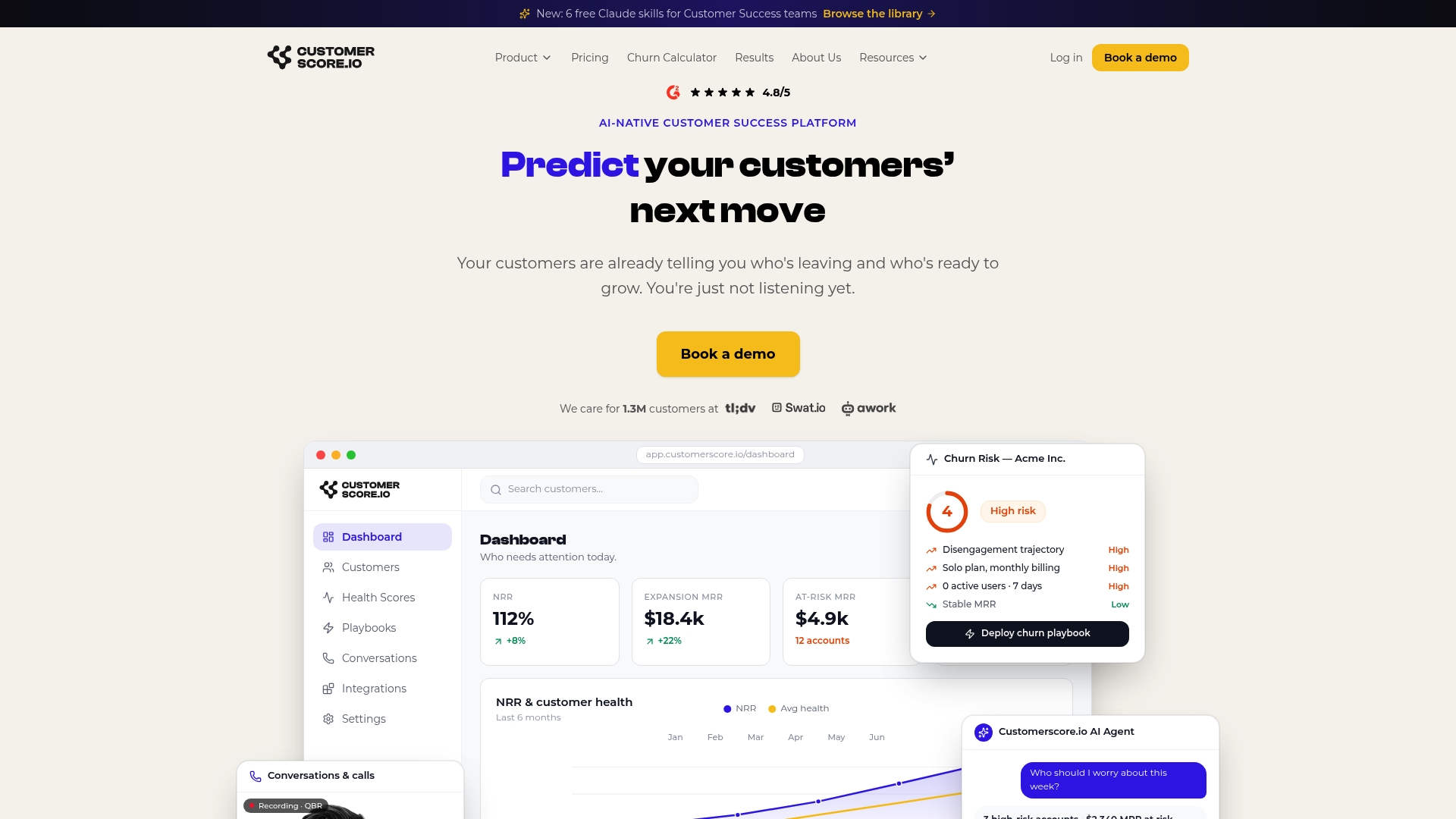
Key integration features: pre-built Salesforce object mapping (Accounts, Contacts, Opportunities), AI health scoring that surfaces the exact signals driving each score, automated playbook triggers for onboarding, risk, renewal, and expansion, and real-time Slack alerts when an account crosses a risk threshold. The setup timeline for a scoped pilot is typically under four weeks.
Book a demo to see the Salesforce integration live and get a pilot scoped to your account base.
Useful sources and further reading
- Customer health score software — explainable scoring model details and playbook mapping
- Customer success metrics reference — canonical KPI definitions and dashboard templates
- Book a demo — start a scoped Customerscore pilot with your Salesforce data
Recommended
Related articles
Benchmarked Save Playbooks: Two Churn Survey Questions for SaaS Teams
Benchmarked Save Playbooks: Two Churn Survey Questions for SaaS Teams ! Customer success manager reviewing churn survey The most effective churn survey for SaaS is a two-question in-flow cancel
Blog90–120 Day Renewal System for CSMs: SaaS Renewal Playbook
90–120 Day Renewal System for CSMs: SaaS Renewal Playbook ! Team planning a structured SaaS renewal Run renewals as a 90 to 120 day managed pipeline, not a calendar reminder.
BlogCut Response Time 60% with This Slack for Customer Success Playbook
Cut Response Time 60% with This Slack for Customer Success Playbook ! Customer success team routing a Slack conversation Slack works best for customer success when it functions as the conversation
BlogProduct Led Customer Success in 90 to 180 Days Without a Data Team
Product Led Customer Success in 90 to 180 Days Without a Data Team ! Customer success operator reviewing product signals Product-led customer success uses product usage data and in-product