
Intercom Customer Success: A Practical B2B SaaS Playbook


Intercom is a practical platform for running customer success at scale. B2B SaaS teams use its in-app messaging, Product Tours, AI automation, and workflow engine to reduce churn, accelerate adoption, and surface expansion opportunities before a renewal conversation ever starts. Intercom's AI agent, Fin, resolved over 81% of Intercom's own support volume and enabled the team to absorb a 300%+ increase in demand without proportional headcount growth. That kind of leverage is exactly what CS leaders need when their book of business grows faster than their team.
This article covers the core Intercom features that matter for customer success, the metrics worth tracking, a repeatable playbook, scaling tactics, real case examples, and a blueprint for combining Intercom with an AI health-scoring layer to turn signals into revenue.
Table of Contents
- How Intercom supports customer success: core features and use cases
- Which customer success metrics should you track from Intercom?
- A step-by-step Intercom customer success playbook
- How to scale customer success with Intercom
- What results do Intercom customers actually see?
- Why combining Intercom with an AI health-scoring layer improves outcomes
- Your 30–90 day implementation checklist for Intercom-based CS
- Key Takeaways
- The trade-off most CS leaders get wrong with Intercom
- Customerscore adds what Intercom leaves open
- Useful sources
How Intercom supports customer success: core features and use cases
Intercom's product suite maps directly to the CS workflow, from first login to renewal. Here is how each feature connects to a real CS task.
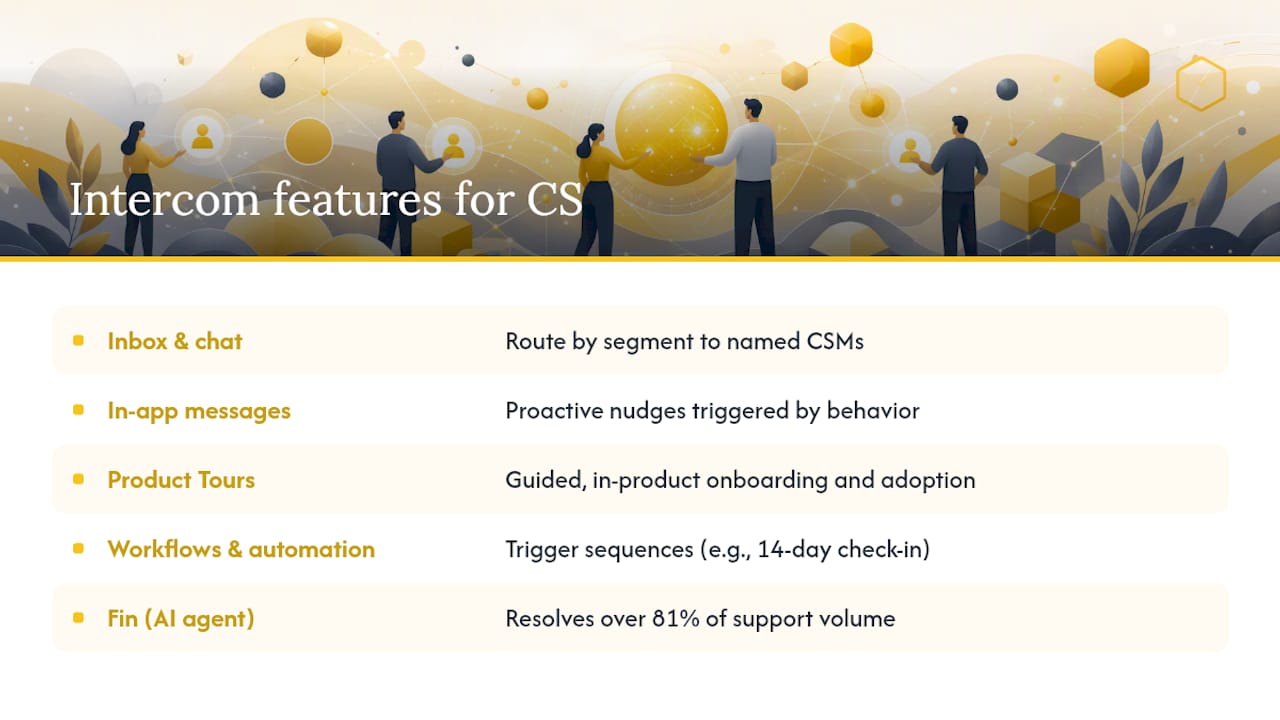
Inbox and live chat handle reactive conversations, but the CS value is in routing. Configure Intercom's Inbox to route messages by customer segment, account tier, or keyword so high-value accounts always reach a named CSM. The outcome: faster response for accounts that matter most, with full conversation history in one place.
In-app messages are the workhorse for proactive CS. Triggered by user behavior (or the absence of it), they let you reach a customer at the exact moment they need a nudge. A user who has not completed a key setup step after 48 hours gets a targeted message. A user who just hit a usage milestone gets a prompt to explore an advanced feature. This is proactive in-product education at scale, without requiring a CSM to manually identify each case.
Product Tours guide users through feature adoption step by step, inside the product. They are particularly effective for onboarding new users to complex workflows and for driving adoption of features that customers have paid for but never used. Intercom positions Product Tours as a core mechanism for adoption and retention in product-led and B2B SaaS contexts.
Help Center and knowledge base reduce inbound volume by surfacing answers before a user opens a ticket. The CS angle: a well-structured Help Center is a living resource that scales your onboarding without scaling your headcount. Keep it updated and segment content by customer type or plan tier.
Workflows and automation let you build trigger-based sequences without code. A customer goes quiet for 14 days? Trigger a check-in message. A support ticket is marked urgent? Escalate to the CSM's queue automatically. These automations are where Intercom shifts CS from reactive to proactive.
Fin, Intercom's AI agent, handles repetitive questions instantly, freeing CSMs for consultative work. Fin now resolves over 81% of support volume for Intercom, serving as the benchmark: the more volume Fin absorbs, the more CSM time goes toward strategic accounts.
Reporting and insights surface conversation trends, resolution rates, and response times. For CS, the most useful reports are those that show which customer segments generate the most support volume, which signals correlate with churn, and where customers drop off in onboarding flows.
Integrations connect Intercom to your CRM (HubSpot, Salesforce), billing system (Stripe, Chargebee), and product analytics (Mixpanel, PostHog, Segment). These connections are what turn Intercom from a messaging tool into a CS signal hub.
Pro Tip: Set up your CRM integration before you build any automated workflows. Without account-level data flowing into Intercom, your segmentation will be based on user behavior alone, and you will miss the account-level risk signals that actually predict churn.
Which customer success metrics should you track from Intercom?
The metrics that matter fall into two categories: leading indicators that predict what is about to happen, and lagging indicators that confirm what already did. Most CS teams over-index on lagging metrics and wonder why churn surprises them.
| Metric | How to measure from Intercom | Leading or lagging | Monitoring cadence |
|---|---|---|---|
| Health score | Combine in-app engagement, support volume, and Help Center usage; feed into a scoring layer | Leading | Weekly |
| Net Revenue Retention (NRR) | Combine billing data with Intercom account records | Lagging | Monthly |
| Gross Revenue Retention (GRR) | Billing data cross-referenced with churned accounts in Intercom | Lagging | Monthly |
| Churn rate | Track account closures against active accounts | Lagging | Monthly |
| Expansion rate | Upsell/cross-sell events from billing + Intercom conversation tags | Lagging | Monthly |
| Time-to-value (TTV) | Time from first login to first key action, tracked via Intercom events | Leading | Per cohort |
| Feature activation rate | % of users completing a defined activation milestone, tracked via Intercom events | Leading | Weekly |
| NPS / CSAT / CES | Intercom survey responses | Leading/lagging | Per trigger or quarterly |
| Support volume per account | Intercom Inbox reports by account | Leading | Weekly |
The metrics that most reliably predict churn are declining feature activation, rising support volume per account, and low Help Center engagement. When all three move in the wrong direction simultaneously, a CSM intervention within 48 hours consistently outperforms a scheduled check-in two weeks later.
For a deeper breakdown of how to construct health score components from these signals, the architecture matters as much as the individual metrics.
A step-by-step Intercom customer success playbook
A practical CS playbook maps the customer journey, defines outcomes, and operationalizes proactive engagement before problems surface. Here is a sequence CS teams can deploy using Intercom.
Step 1: Segment your customer base. Divide accounts by ARR, product tier, and complexity. High-ARR accounts get a named CSM and a high-touch cadence. Mid-tier accounts get a hybrid model. Low-touch accounts get automated Intercom sequences. This segmentation drives every downstream decision.
Step 2: Build your onboarding flow. Create a Product Tour for first-time users that covers the three actions required to reach your activation milestone. Pair it with a triggered in-app message sequence that fires based on what users do (or skip) in their first 14 days.
Step 3: Define your activation milestone. Pick one event that predicts long-term retention. For most B2B SaaS products, it is the moment a user completes a core workflow for the first time. Track it as an Intercom event and build your onboarding metrics around it.
Step 4: Set up health score triggers. Configure Intercom workflows to flag accounts when leading indicators drop below threshold. A 30% decline in weekly active usage, three support tickets in seven days, or a failed payment event should each trigger a CSM alert.
Step 5: Automate low-touch check-ins. For mid-tier accounts, use Intercom's automated messages to run check-ins at 30, 60, and 90 days post-onboarding. Ask one specific question per message. Keep it short. The goal is a response, not a survey.
Step 6: Escalate to human CSMs on signal. Effective playbooks define clear escalation procedures so CSMs know exactly when to step in. Automate the detection; keep the intervention human.
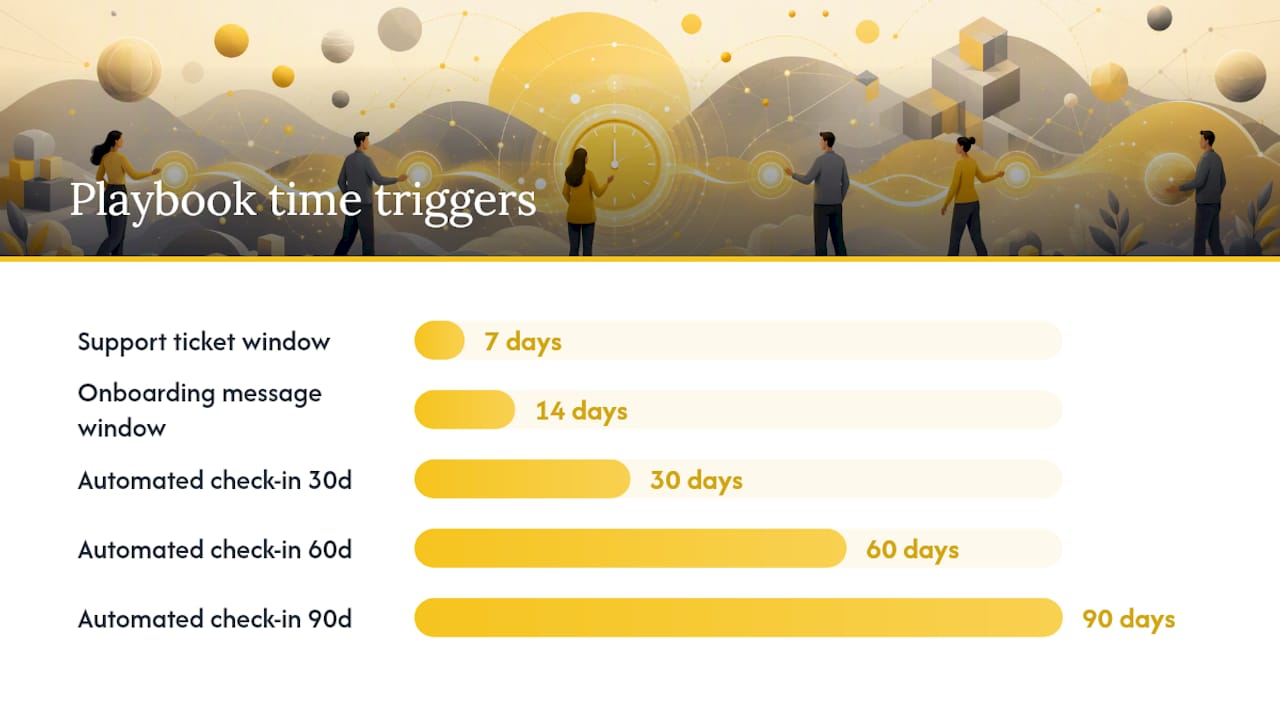
Step 7: Run renewal and expansion motions. At 90 days before renewal, trigger a CSM task in your CRM from an Intercom workflow. At 60 days, send an in-app message highlighting features the account has not yet used. At 30 days, the CSM owns the conversation.
Playbook checklist:
- Segmentation rules documented and synced to Intercom
- Activation milestone defined and tracked as an Intercom event
- Product Tour live for onboarding flow
- Health score thresholds set with CSM alert triggers
- Automated check-in messages scheduled at 30/60/90 days
- Escalation criteria documented and tested
- Renewal workflow linked to CRM tasks
How to scale customer success with Intercom
Scaling CS is not about hiring more CSMs. It is about deciding where human attention creates irreplaceable value and automating everything else.
Capacity planning by segment:
- High-ARR accounts (top 20% by revenue): named CSM, quarterly business reviews, direct Slack or Intercom channel
- Mid-tier accounts: shared CSM pool, automated check-ins, monthly group webinars
- Low-touch accounts: fully automated Intercom sequences, self-serve Help Center, community forum access
Intercom used Product Tours, Help Center improvements, Intercom Academy, and targeted newsletters to scale CS for smaller segments without expanding headcount proportionally. The principle: build content once, deploy it to thousands.
Automation and content investments that pay off:
- Product Tours for every major feature release, not just onboarding
- A Help Center organized by customer job-to-be-done, not by product menu
- An in-app education sequence triggered by feature discovery events
- Fin handling tier-one support questions so CSMs focus on tier-two and above
- Community forums where power users answer common questions
The one-to-many customer success model works when your content is specific enough to feel personal. Generic "check-in" messages get ignored. A message triggered by a specific user action, referencing what they just did, gets a response.
Pro Tip: When your CS team reaches five or more people, create a dedicated knowledge manager role. This person owns the Help Center, the Product Tour library, and the Intercom message templates. Without ownership, these assets go stale within six months and your automation starts doing more harm than good.
What results do Intercom customers actually see?
Real outcomes from Intercom customer stories give CS leaders a benchmark for what is achievable.
- Support volume reduction: — Teams using Fin and automated workflows report reclaiming significant CSM hours per week. Intercom estimates that deploying Fin for tier-one resolution saved between $7.5M–$9M annually in avoided headcount, while reclaiming dozens of CSM hours weekly.
The honest benchmark: results vary by product complexity, customer segment, and how well the Intercom configuration matches the customer journey. Use these numbers as directional targets, then validate against your own baseline in the first 90 days.
Why combining Intercom with an AI health-scoring layer improves outcomes
Intercom generates rich engagement signals. What it does not do natively is synthesize those signals into a predictive, explainable health score that tells a CSM which account is most likely to churn next week and why. That gap is where an AI health-scoring layer adds real value.
The architecture:
- Feed product usage events, support ticket volume, billing events (failed payments, downgrades), and NPS/CSAT responses into a health-scoring engine
- Compute a composite score with explainable components so CSMs understand why an account is flagged, not just that it is flagged
- Push alerts and score changes back into Intercom workflows and CSM task queues
- Sync account health data to your CRM so sales and CS share the same risk picture
Integrating product usage, support trends, billing events, and sentiment into a health score improves early risk detection and better prioritizes CSM time. The key word is "early." By the time a customer tells you they are leaving, the decision is usually already made.
Data hygiene checklist before you build:
- Confirm product usage events are firing correctly in your analytics tool
- Verify billing events are accessible via API or integration
- Standardize account identifiers across CRM, billing, and Intercom
- Define what "healthy" looks like for each customer segment before scoring
Common connectors: HubSpot, Salesforce, Stripe, Chargebee, Mixpanel, PostHog, Segment, and Intercom itself. Most health-scoring implementations use three to five of these sources. More signals improve accuracy, but only if the underlying data is clean.
For teams evaluating their options, a comparison of health score software shows how the architectures differ across platforms.
Your 30–90 day implementation checklist for Intercom-based CS
Getting Intercom configured for CS is a 90-day project, not a 90-minute setup. Here is a realistic timeline.
Days 0–30: Foundation
- Connect your CRM (HubSpot or Salesforce) and sync account and contact data
- Set up Inbox routing rules by customer segment and account tier
- Install the Intercom JavaScript snippet and configure product usage events
- Build your first Product Tour for the onboarding activation milestone
- Create your Help Center structure with at least 20 articles covering the top support questions
- Define your activation milestone and confirm it is tracked as an Intercom event
Days 30–60: Automation and content
- Build automated in-app message sequences for days 1, 7, 14, and 30 post-signup
- Configure health score trigger workflows (usage decline, support volume spike, billing event)
- Set up CSM alert notifications in Slack or email from Intercom workflow triggers
- Launch Fin for tier-one support resolution and monitor resolution rate weekly
- Build renewal workflow: 90/60/30-day triggers linked to CRM tasks
Days 60–90: Measurement and iteration
- Pull your first 90-day cohort report: activation rate, TTV, and early retention signal
- Review Product Tour completion rates and identify drop-off steps
- Audit Fin resolution rate and identify the top five questions it is not resolving
- Set three metric goals for the next quarter: target activation %, TTV reduction, and 90-day retention rate
- Document your playbook and escalation criteria for the full CS team
Common setup pitfalls:
- Skipping CRM sync before building workflows (your segmentation will be wrong)
- Building Product Tours before defining the activation milestone (you will tour the wrong features)
- Launching Fin without a fallback routing rule (unresolved conversations go dark)
- Tracking too many metrics in month one (pick three and measure them consistently)
For PLG-specific teams, the PLG SaaS customer success playbook covers additional configuration priorities for product-led motions.
Key Takeaways
Intercom's value for customer success depends entirely on how well its signals, automation, and content are configured to match your customer journey and CS playbook.
| Point | Details |
|---|---|
| Start with CRM sync | Connect HubSpot or Salesforce before building any workflows to get accurate account-level segmentation. |
| Product Tours drive adoption | Use Intercom's Product Tours for onboarding and feature releases, not just first-login walkthroughs. |
| Leading metrics predict churn | Track activation rate, support volume per account, and feature usage weekly to catch risk before it becomes churn. |
| Fin frees CSM capacity | Deploying Fin for tier-one resolution reclaims CSM hours for consultative, revenue-generating work. |
| Customerscore adds predictive health scoring | Combining Intercom signals with Customerscore's explainable health scores surfaces churn risk and expansion signals before renewal conversations. |
The trade-off most CS leaders get wrong with Intercom
The conventional wisdom says: automate everything you can, then let CSMs handle the rest. That framing is backwards.
The better question is: which conversations create revenue, and which ones just create activity? Intercom is excellent at eliminating the activity. A well-configured Fin deployment, a solid Help Center, and triggered in-app messages handle the volume that was never worth a CSM's time in the first place. That is the easy part.
The hard part is using the time you recover to do something that actually moves NRR. Most CS teams automate the low-touch work and then fill the recovered hours with more check-in calls. The teams that win are the ones who use that capacity for AI-assisted customer success work: reviewing health score trends, identifying expansion signals in product usage data, and having fewer, sharper conversations that change a customer's trajectory.
Intercom's own CS evolution moved the team closer to sales and built codified playbooks precisely because the strategic work, the work that drives expansion revenue, requires alignment with the revenue team, not just the support queue. The metric that tells you whether your CS org is working is NRR, not CSAT. Optimize for the one that compounds.
Customerscore adds what Intercom leaves open
Intercom gives you the engagement layer. What most B2B SaaS CS teams still lack is a predictive, explainable health score that tells them which account to call today and why it is at risk. That is exactly what Customerscore is built to deliver.
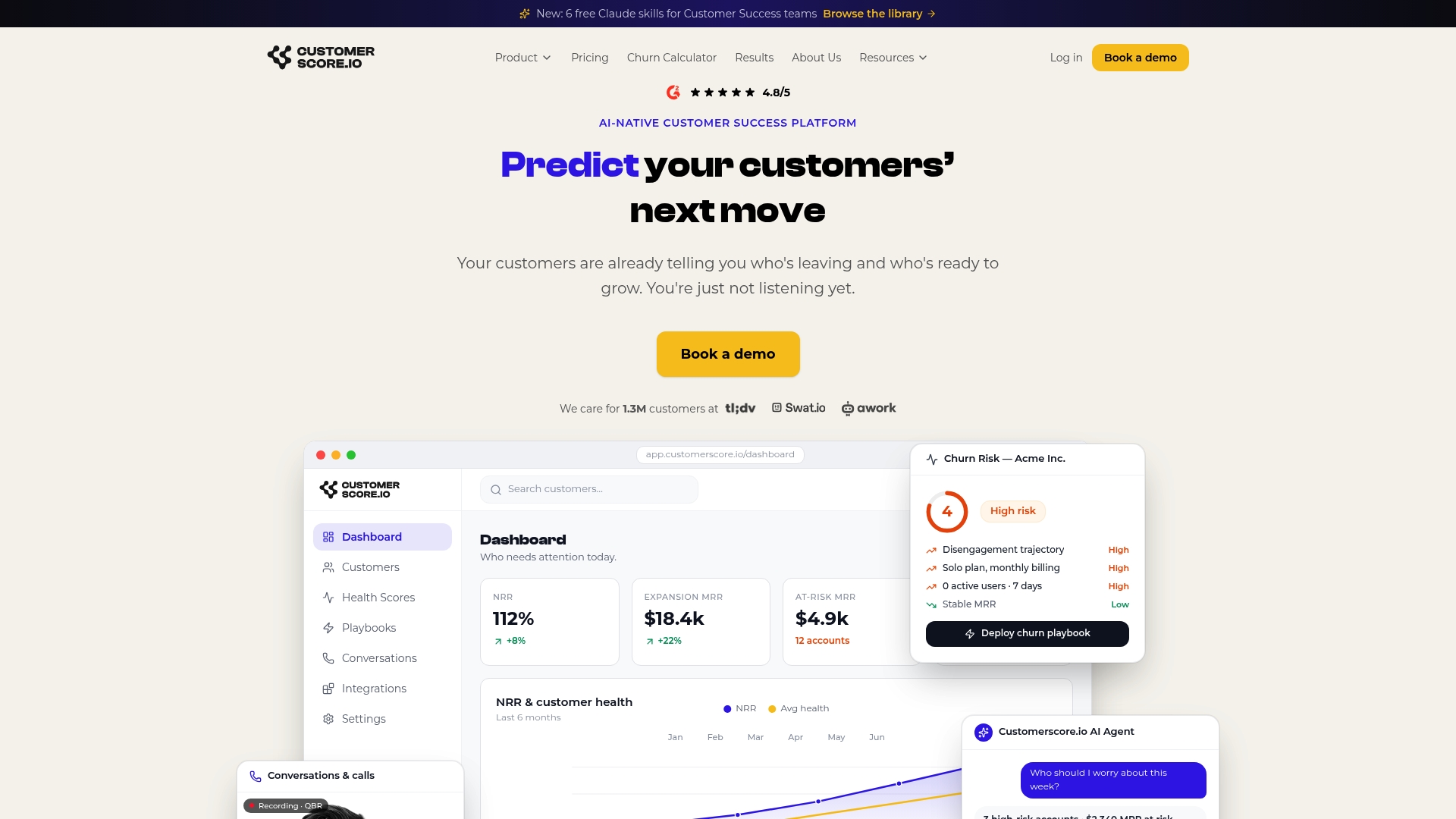
Customerscore connects to Intercom, your CRM (HubSpot or Salesforce), billing (Stripe or Chargebee), and product analytics (Mixpanel, PostHog, Segment) to compute a composite health score with explainable components. CSMs see not just a red/amber/green status but the specific signals driving it: a drop in feature activation, a spike in support tickets, a failed payment. Those signals feed directly into Intercom workflows and CSM task queues, so the right intervention happens at the right moment.
The result: faster churn detection, cleaner renewal pipelines, and expansion signals surfaced before your sales team has to ask for them. Teams using Customerscore's health scoring alongside Intercom get a CS operation that is both proactive and measurable from day one.
Book a demo to see how Customerscore fits your Intercom setup and what your first 90 days would look like.
Useful sources
- Transformation in action: What it takes to automate 81% of your customer service while improving CX - The Intercom Blog
- Customer Success Strategy: Framework for Revenue Leaders - Fullcast
- The 3 Pillars of a High-Performing Customer Success Team
- Customer Success Playbook: Step-by-step guide - TSIA
- How to implement your customer success strategy: a step-by-step guide - Typeform
- Offering customer success at scale with Intercom - Customer Success Collective
- Customer Success vs. Customer Support - Intercom Learning Center
- Intercom — customer stories and case studies
Recommended
Related articles
Product Led Customer Success in 90 to 180 Days Without a Data Team
Product Led Customer Success in 90 to 180 Days Without a Data Team ! Customer success operator reviewing product signals Product-led customer success uses product usage data and in-product
BlogBenchmarked Save Playbooks: Two Churn Survey Questions for SaaS Teams
Benchmarked Save Playbooks: Two Churn Survey Questions for SaaS Teams ! Customer success manager reviewing churn survey The most effective churn survey for SaaS is a two-question in-flow cancel
Blog90–120 Day Renewal System for CSMs: SaaS Renewal Playbook
90–120 Day Renewal System for CSMs: SaaS Renewal Playbook ! Team planning a structured SaaS renewal Run renewals as a 90 to 120 day managed pipeline, not a calendar reminder.
BlogCut Response Time 60% with This Slack for Customer Success Playbook
Cut Response Time 60% with This Slack for Customer Success Playbook ! Customer success team routing a Slack conversation Slack works best for customer success when it functions as the conversation